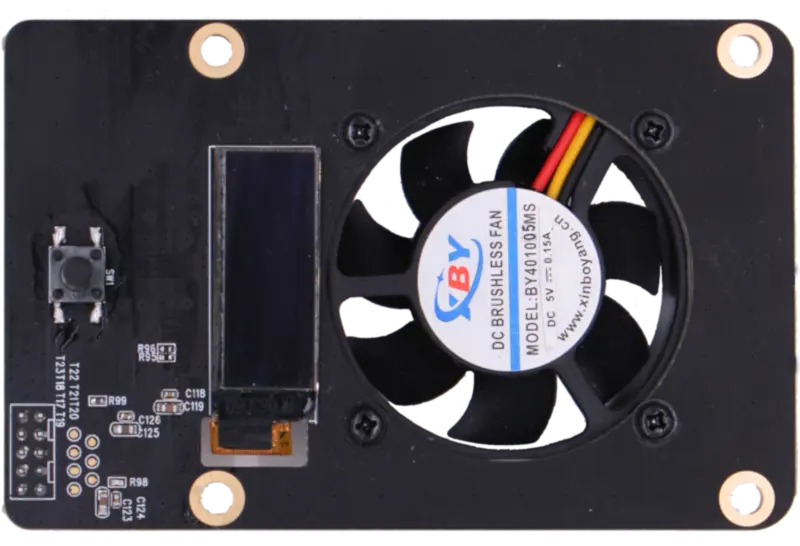
瑞莎 Penta SATA HAT TOP 板
Radxa Penta SATA HAT 有一个 2x5 的座子,座子的信号如下:
| Pin | Signal | Pin | Signal |
|---|---|---|---|
| 1 | I2C_SDA | 2 | VCC3V3_SYS |
| 3 | I2C_SCL | 4 | VCC5V0_SYS |
| 5 | GPIO4_D2 | 6 | GPIO4_C2 |
| 7 | GND | 8 | PWM_33 |
| 9 | GND | 10 | NC |
技术规格:
- 连接器类型: 2x5 针座子
- 针距 (Pitch): 2.0mm
- 兼容连接器: 标准 2.0mm 间距 2x5 针排针 (2x5 pin header, 2.0mm pitch)
这个座子可以用来连接顶板,顶板上有一个 0.91 寸的 OLED 显示屏和一个 4010 风扇,显示屏可以显示 IP 地址和存储信息等,风扇用于散热。
软件支持
为了让顶板的 OLED 显示屏和风扇正常工作,我们提供了 rockpi-penta 软件包,可以通过下面的命令安装。
sudo apt update
sudo apt install wget
wget https://github.com/radxa/rockpi-penta/releases/download/v0.2.2/rockpi-penta-0.2.2.deb
sudo apt install -y ./rockpi-penta-0.2.2.deb
软件配置
最新 Raspberry Pi OS (Debian trixie) 用户注意
rockpi-penta 软件包在全新安装的 Raspberry Pi OS (Debian trixie / Debian 13) 上可能无法正常安装;从 Debian 12 升级到 trixie 的系统通常可以正常安装,但 trixie 全新安装可能会失败。在 trixie 上安装或运行后,您还可能遇到以下问题:
- OLED 显示屏只显示静态消息 "RADXA SATA HAT Loading..."
- 风扇固定在 100% 功率
- 服务启动报错
FileNotFoundError: No such file or directory
可能需要应用额外的修复。请参考 GitHub issue #1792 和 #1540 中用户报告的解决方案:https://github.com/HabiRabbu/rockpi-penta-pi5-fix
安装软件包后,如果需要修改配置,可以编辑配置文件 /etc/rockpi-penta.conf,下面是配置文件的默认值。
[fan]
# When the temperature is above lv0 (35'C), the fan at 25% power,
# and lv1 at 50% power, lv2 at 75% power, and lv3 at 100% power.
# When the temperature is below lv0, the fan is turned off.
# You can change these values if necessary.
lv0 = 35
lv1 = 40
lv2 = 45
lv3 = 50

[key]
# You can customize the function of the key, currently available functions are
# slider: oled display next page
# switch: fan turn on/off switch
# reboot, poweroff
# If you have any good suggestions for key functions,
# please add an issue on https://rock.sh/rockpi-sata
click = slider
twice = switch
press = none

[time]
# twice: maximum time between double clicking (seconds)
# press: long press time (seconds)
twice = 0.7
press = 1.8

[slider]
# Whether the oled auto display next page and the time interval (seconds)
auto = true
time = 10

[oled]
# Whether rotate the text of oled 180 degrees, whether use Fahrenheit
rotate = false
f-temp = false
修改配置后,执行 sudo systemctl restart rockpi-penta.service 命令,重启服务使配置生效。
常见问题
顶板 OLED 一直显示 "ROCKPI SATA HAT loading...",或风扇不转 / 一直满速?
不同产品型号的顶板 I2C 总线不同(见下表),在较新的 Radxa OS (Debian Bookworm) 镜像上,部分型号对应的 I2C overlay 默认未启用。安装 rockpi-penta 后如果出现以下现象,说明对应的 I2C overlay 未启用(以下以 ROCK 4 系列为例):
- OLED 一直显示 "ROCKPI SATA HAT loading..."
- 风扇不转,或一直满速运行
- 服务日志报错:
FileNotFoundError: /sys/class/pwm/pwmchip1/pwm0/period或Device or resource busy
启用方法:
sudo rsetup
在 Overlays 菜单中勾选顶板对应的 I2C overlay(以 ROCK 4 系列为例:勾选 I2C7;若风扇仍异常,同时勾选 PWM1),保存后重启。
| 产品型号 | 顶板使用的 I2C | 需要启用的 overlay |
|---|---|---|
| ROCK 4 系列(含 ROCK Pi 4) | I2C7 | I2C7(风扇:PWM1) |
| ROCK 5A | I2C8 (M4) | I2C8 |
| ROCK 3A | I2C3 (M0) | I2C3 |
| ROCK 3C | GPIO 软件 I2C(GPIO1_A0/A1) | 无需 overlay |
| Raspberry Pi 4 / 5 | I2C1(GPIO 引脚 3/5) | 系统默认启用,无需额外配置 |
注意:上表为 rockpi-penta 软件包中各型号的默认配置。实际总线编号请以
sudo i2cdetect -l输出为准,不要假设固定编号。
如何检查 Penta SATA HAT 顶板挂载在哪条 I2C 总线?
顶板 OLED (SSD1306) 的 I2C 地址为 0x3c,可用以下命令确认顶板是否被识别、以及挂载在哪条总线上:
# 列出系统所有 I2C 总线
sudo i2cdetect -l

# 依次扫描各总线,出现 0x3c 的那条即为顶板所在总线
sudo i2cdetect -y <bus_number>
以 ROCK 4 系列为例,启用 I2C7 overlay 后,扫描对应总线可以看到 OLED 设备:
# 以 ROCK 4 系列为例,启用 I2C7 overlay 后通常对应 i2c-7
sudo i2cdetect -y 7
注意:不同产品型号的总线编号不同(例如 ROCK 5A 通常为 i2c-8、ROCK 3A 通常为 i2c-3),请以
sudo i2cdetect -l输出为准,示例中的编号仅供参考。
输出中出现 3c 即表示顶板 OLED 已被识别。