使用 EDL 工具
介绍 Windows 和 Ubuntu 系统下安装高通设备驱动、设置 EDL 工具环境变量和使用 EDL 工具的方法。
安装驱动
- Windows
- Linux
- 下载驱动
在 Windows 平台,您需要访问 资源汇总下载 页面下载驱动文件。
- 安装驱动
解压下载好的驱动文件,以管理员身份运行 Install.bat 文件安装驱动。

- 设备识别
在 Windows 系统中,可以进入系统的 设备管理器 查看设备是否被正常识别。
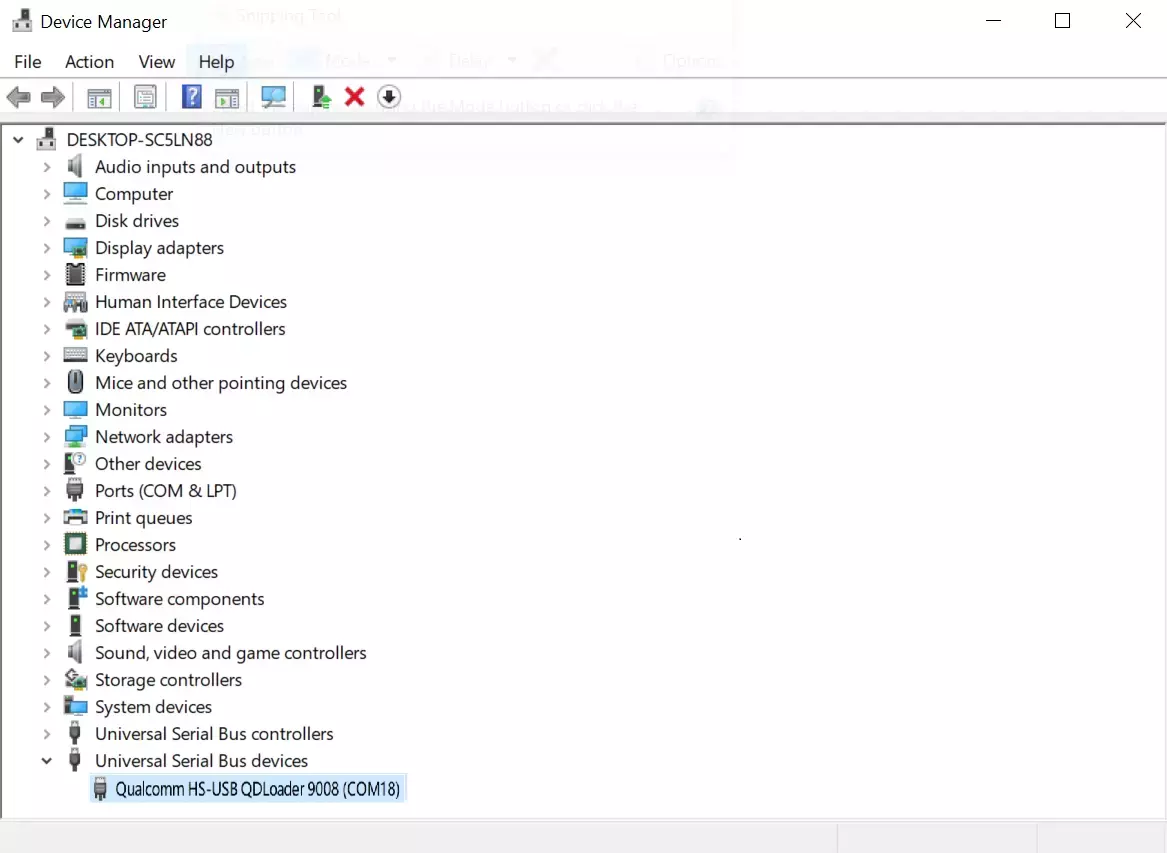
在 Linux 系统中,不需要安装额外的驱动,可以使用 lsusb 命令查看设备是否进入 EDL 模式。
Linux$
lsusb
设备进入 EDL 模式后,会显示类似下面的信息:
Bus 001 Device 012: ID 05c6:9008 Qualcomm, Inc. Gobi Wireless Modem (QDL mode)
使用 EDL 工具
下载 EDL 工具
您需要访问 资源汇总下载 页面下载 EDL 工具。
设置环境变量
设置环境变量,可以简化后续的烧录操作,简化命令。
- Windows
- Ubuntu
- 使用
Win + R打开运行对话框,输入sysdm.cpl,点击确定。
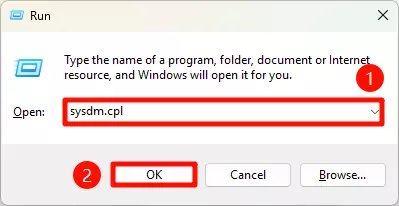
- 在
System Properties选项窗口中,点击Advanced选项卡,点击Environment Variable ...按钮。
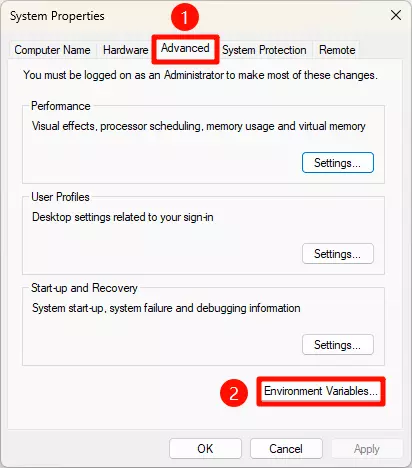
- 在
Environment Variables选项窗口中,双击System variables下的Path变量。
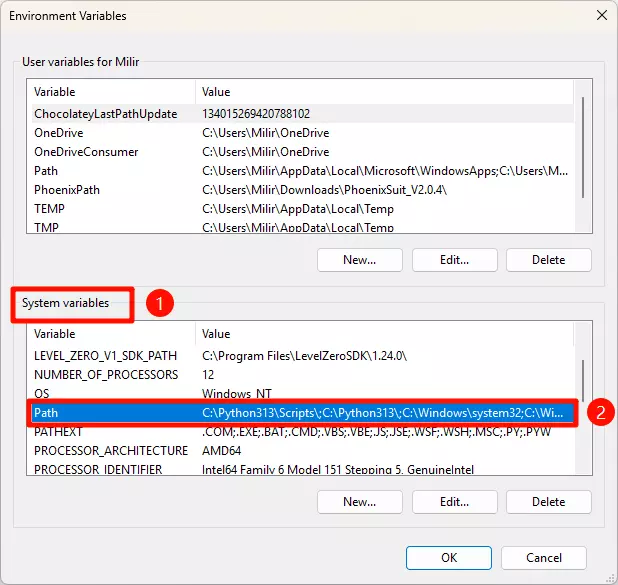
- 在
Edit Environment Variable选项窗口中,点击New按钮,然后输入自己平台的 EDL 工具路径,点击OK按钮。
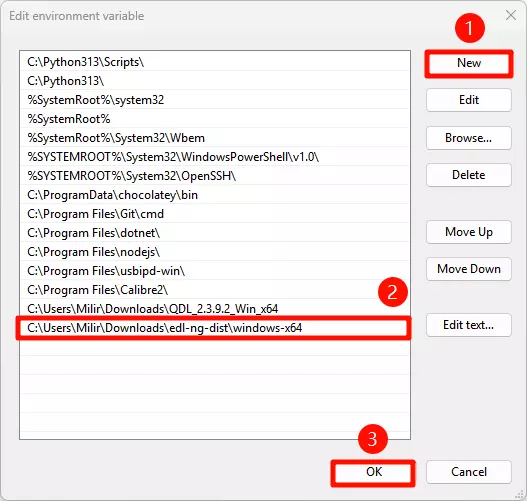
- 完成以上操作,重新打开终端,如果输入
edl-ng命令可以查看到版本信息,说明设置成功。
Windows$
edl-ng
终端输出示例:
Description:
  edl-ng - Qualcomm Emergency Download CLI

Usage:
  edl-ng [command] [options]

Options:
  -l, --loader <loader>                        Path to the Firehose programmer (e.g., prog_firehose_*.elf).
  --vid <vid>                                  Specify USB Vendor ID (hex).
  --pid <pid>                                  Specify USB Product ID (hex).
  --memory <NAND|NVME|SDCC|SPINOR|UFS>         Set memory type for Firehose operations (e.g., SDCC, SPINOR, UFS, NAND, NVME). Defaults typically to UFS.
  --loglevel <Debug|Error|Info|Trace|Warning>  Set the logging level. [default: Info]
  --maxpayload <maxpayload>                    Set max payload size in bytes for Firehose configure command.
  -s, --slot <slot>                            Specify the slot for operations (0 or 1). Defaults to 0.
                                               This is useful when memory is sdcc. Slot 0 is typically eMMC, and slot 1 is typically sdcard. [default: 0]
  --version                                    Show version information
  -?, -h, --help                               Show help and usage information

Commands:
  upload-loader                                    Connects in Sahara mode and uploads the specified Firehose loader (--loader). Does not proceed to Firehose
                                                   operations.
  reset                                            Resets or powers off the device using Firehose.
  printgpt                                         Reads and prints the GPT (GUID Partition Table) from the device.
  read-part <partition_name> <filename>            Reads a partition by name from the device, saving to a file.
  read-sector <start_sector> <sectors> <filename>  Reads a specified number of sectors from a given LUN and start LBA, saving to a file.
  write-part <partition_name> <filename>           Writes data from a file to a partition by name.
  write-sector <start_sector> <filename>           Writes data from a file to a specified number of sectors from a given LUN and start LBA.
  erase-part <partition_name>                      Erases a partition by name from the device.
  erase-sector <start_sector> <sectors>            Erases a specified number of sectors from a given LUN and start LBA.
  provision <xmlfile>                              Performs UFS provisioning using an XML file.
  rawprogram <xmlfile_patterns>                    Processes rawprogramN.xml and patchN.xml files for flashing.
- 查看路径
根据自己使用的系统平台,进入 EDL 工具的目录,使用 realpath 命令查看 EDL 工具的路径。
Ubuntu$
realpath edl-ng
终端输出示例:
/home/milir/download/edl-ng-dist/linux-x64/edl-ng
- 可执行权限
使用 chmod 命令为 EDL 工具添加可执行权限。
Ubuntu$
sudo chmod 777 edl-ng
- 创建软链接
你需要将 /home/milir/download/edl-ng-dist/linux-x64/edl-ng 替换成实际的 EDL 工具路径。
Ubuntu$
sudo ln -s /home/milir/download/edl-ng-dist/linux-x64/edl-ng /usr/local/bin/edl-ng
- 验证
在任意位置打开终端,如果可以使用 edl-ng 命令查看到版本信息,说明设置成功。
Ubuntu$
edl-ng
终端输出示例:
Description:
  edl-ng - Qualcomm Emergency Download CLI

Usage:
  edl-ng [command] [options]

Options:
  -l, --loader <loader>                        Path to the Firehose programmer (e.g., prog_firehose_*.elf).
  --vid <vid>                                  Specify USB Vendor ID (hex).
  --pid <pid>                                  Specify USB Product ID (hex).
  --memory <NAND|NVME|SDCC|SPINOR|UFS>         Set memory type for Firehose operations (e.g., SDCC, SPINOR, UFS, NAND,
                                               NVME). Defaults typically to UFS.
  --loglevel <Debug|Error|Info|Trace|Warning>  Set the logging level. [default: Info]
  --maxpayload <maxpayload>                    Set max payload size in bytes for Firehose configure command.
  -s, --slot <slot>                            Specify the slot for operations (0 or 1). Defaults to 0.
                                               This is useful when memory is sdcc. Slot 0 is typically eMMC, and slot 1
                                               is typically sdcard. [default: 0]
  --version                                    Show version information
  -?, -h, --help                               Show help and usage information

Commands:
  upload-loader                                    Connects in Sahara mode and uploads the specified Firehose loader
                                                   (--loader). Does not proceed to Firehose operations.
  reset                                            Resets or powers off the device using Firehose.
  printgpt                                         Reads and prints the GPT (GUID Partition Table) from the device.
  read-part <partition_name> <filename>            Reads a partition by name from the device, saving to a file.
  read-sector <start_sector> <sectors> <filename>  Reads a specified number of sectors from a given LUN and start LBA,
                                                   saving to a file.
  write-part <partition_name> <filename>           Writes data from a file to a partition by name.
  write-sector <start_sector> <filename>           Writes data from a file to a specified number of sectors from a
                                                   given LUN and start LBA.
  erase-part <partition_name>                      Erases a partition by name from the device.
  erase-sector <start_sector> <sectors>            Erases a specified number of sectors from a given LUN and start LBA.
  provision <xmlfile>                              Performs UFS provisioning using an XML file.
  rawprogram <xmlfile_patterns>                    Processes rawprogramN.xml and patchN.xml files for flashing.