40 Pin GPIO 接口
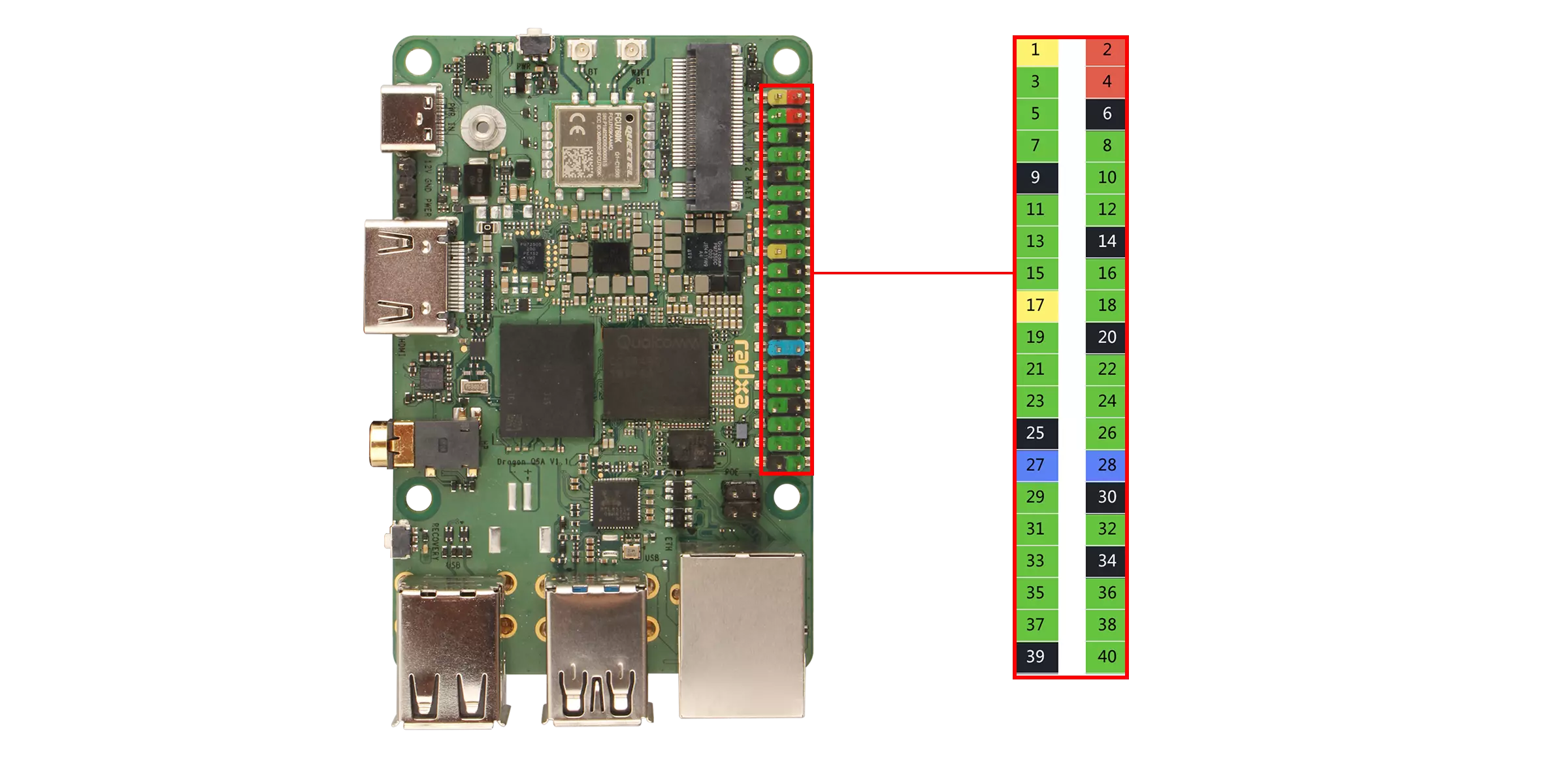
瑞莎 Dragon Q6A 板载 40-Pin GPIO(通用输入输出)接口,为硬件扩展提供了高度灵活的接口支持。
用户可以通过 40-Pin GPIO 接口连接各类传感器、执行器、通信模块、显示屏以及其他嵌入式外设,从而快速实现物联网(IoT)、机器人控制、工业自动化等领域的原型开发与功能验证。
危险
使用 40-Pin GPIO 接口时,请注意引脚和外设的接线,请确保引脚连接正确,不当操作可能导致设备硬件损坏。
GPIO 功能
Dragon Q6A 支持给板载的 GPIO 引脚外接外部设备,支持 UART、SPI、I2C、I3C、I2S 等。
| Function4 | Function3 | Function2 | Function1 | Function0 | Pin# | Pin# | Function0 | Function1 | Function2 | Function3 | Function4 |
|---|---|---|---|---|---|---|---|---|---|---|---|
| 3V3 | 1 | 2 | 5V | ||||||||
| SPI6_MISO | I2C6_SDA | UART6_CTS | GPIO_24 | 3 | 4 | 5V | |||||
| SPI6_MOSI | I2C6_SCL | UART6_RFR | GPIO_25 | 5 | 6 | GND | |||||
| PRI_MI2S_MCLK | GPIO_96 | 7 | 8 | GPIO_22 | UART5_TX | SPI5_SCLK | |||||
| GND | 9 | 10 | GPIO_23 | UART5_RX | SPI5_CS_0 | ||||||
| SPI7_MOSI | I2C7_SCL | UART7_RFR | GPIO_29 | 11 | 12 | GPIO_97 | MI2S0_SCK | ||||
| I3C0_SDA | SPI0_MISO | I2C0_SDA | UART0_CTS | GPIO_0 | 13 | 14 | GND | ||||
| I3C0_SCL | SPI0_MOSI | I2C0_SCL | UART0_RFR | GPIO_1 | 15 | 16 | GPIO_26 | UART6_TX | SPI6_SCLK | ||
| 3V3 | 17 | 18 | GPIO_27 | UART6_RX | SPI6_CS_0 | ||||||
| SPI12_MOSI | I2C12_SCL | UART12_RFR | GPIO_49 | 19 | 20 | GND | |||||
| SPI12_MISO | I2C12_SDA | UART12_CTS | GPIO_48 | 21 | 22 | GPIO_57 | UART14_RFR | I2C14_SCL | SPI14_MOSI | ||
| SPI14_CS_3 | SPI12_SCLK | UART12_TX | GPIO_50 | 23 | 24 | GPIO_51 | UART12_RX | SPI12_CS_0 | |||
| GND | 25 | 26 | GPIO_55 | UART13_RX | SPI13_CS_0 | SPI12_CS_1 | |||||
| SPI2_MISO | I2C2_SDA | UART2_CTS | GPIO_8 | 27 | 28 | GPIO_9 | UART2_RFR | I2C2_SCL | SPI2_MOSI | ||
| SPI7_CS_0 | UART7_RX | GPIO_31 | 29 | 30 | GND | ||||||
| SPI7_MISO | I2C7_SDA | UART7_CTS | GPIO_28 | 31 | 32 | GPIO_30 | UART7_TX | SPI7_SCLK | |||
| SPI14_MISO | I2C14_SDA | UART14_CTS | GPIO_56 | 33 | 34 | GND | |||||
| MI2S0_WS | GPIO_100 | 35 | 36 | GPIO_59 | UART14_RX | SPI14_CS_0 | |||||
| SPI14_SCLK | UART14_TX | GPIO_58 | 37 | 38 | GPIO_98 | MI2S0_DATA0 | |||||
| GND | 39 | 40 | GPIO_99 | MI2S0_DATA1 |
GPIO 使用
通过板载的 40-Pin GPIO 接口,演示常见的 GPIO 使用方法。
安装 Python 库
使用 python-periphery 库控制 GPIO 引脚。
radxa@dragon-q6a$
sudo apt update
sudo apt install -y python3-periphery -y
GPIO 输出/输入
硬件准备
- 主板
- 杜邦线
软件准备
- python-periphery 库
测试代码
以下代码是使用 python-periphery 库来控制 GPIO_25 引脚输出高低电平,然后通过 GPIO_96 引脚读取 GPIO_25 引脚的高低电平。
gpio_output_input.py
from periphery import GPIO
import time

def gpio_output_with_feedback():
    # GPIO Configuration (modify pin numbers based on your hardware)
    # GPIO_25 (output) → maps to pin 25 of /dev/gpiochip4
    # GPIO_96 (input)  → maps to pin 96 of /dev/gpiochip4
    OUTPUT_PIN_CHIP = "/dev/gpiochip4"
    OUTPUT_PIN_NUMBER = 25  # GPIO_25 (output pin, controlled by the script)
    INPUT_PIN_NUMBER = 96   # GPIO_96 (input pin, reads GPIO_25's output state)

    # Initialize GPIO objects as None first (for safe release later)
    gpio_out = None
    gpio_in = None

    try:
        # Initialize GPIO_25 as OUTPUT mode
        gpio_out = GPIO(OUTPUT_PIN_CHIP, OUTPUT_PIN_NUMBER, "out")
        # Initialize GPIO_96 as INPUT mode
        gpio_in = GPIO(OUTPUT_PIN_CHIP, INPUT_PIN_NUMBER, "in")

        # Print test initialization info
        print("=== GPIO Output-Input Feedback Test Started ===")
        print(f"Controlled Pin (GPIO_25): {OUTPUT_PIN_CHIP} - Pin {OUTPUT_PIN_NUMBER} (OUTPUT)")
        print(f"Monitoring Pin (GPIO_96): {OUTPUT_PIN_CHIP} - Pin {INPUT_PIN_NUMBER} (INPUT)")
        print("Test Behavior: GPIO_25 toggles HIGH/LOW every 1s; GPIO_96 verifies GPIO_25's state")
        print("Press Ctrl+C to stop the test\n")

        # Main loop: Toggle GPIO_25 and read GPIO_96 feedback
        while True:
            # 1. Set GPIO_25 to HIGH level
            gpio_out.write(True)
            time.sleep(0.1)  # Short delay for signal stabilization (avoid read lag)
            gpio96_reading = gpio_in.read()
            print(f"GPIO_25 Output: HIGH (True) | GPIO_96 Reading: {gpio96_reading}")

            # Keep GPIO_25 HIGH for 1 second
            time.sleep(1)

            # 2. Set GPIO_25 to LOW level
            gpio_out.write(False)
            time.sleep(0.1)  # Short delay for signal stabilization
            gpio96_reading = gpio_in.read()
            print(f"GPIO_25 Output: LOW (False) | GPIO_96 Reading: {gpio96_reading}")

            # Keep GPIO_25 LOW for 1 second
            time.sleep(1)

    # Handle user-initiated exit (Ctrl+C)
    except KeyboardInterrupt:
        print("\n\nTest stopped by user (Ctrl+C)")
    # Handle other unexpected errors (e.g., GPIO access failure)
    except Exception as e:
        print(f"\nError during test: {str(e)}")
    # Ensure GPIO resources are released even if an error occurs
    finally:
        print("\nReleasing GPIO resources...")
        # Safely close GPIO_25 (set to LOW first to avoid residual high level)
        if gpio_out:
            try:
                gpio_out.write(False)
                gpio_out.close()
                print(f"Successfully closed GPIO_25 (Pin {OUTPUT_PIN_NUMBER})")
            except Exception as close_err:
                print(f"Failed to close GPIO_25 (Pin {OUTPUT_PIN_NUMBER}): {str(close_err)}")
        # Safely close GPIO_96
        if gpio_in:
            try:
                gpio_in.close()
                print(f"Successfully closed GPIO_96 (Pin {INPUT_PIN_NUMBER})")
            except Exception as close_err:
                print(f"Failed to close GPIO_96 (Pin {INPUT_PIN_NUMBER}): {str(close_err)}")
        print("Resource release complete.")

# Run the test when the script is executed directly
if __name__ == "__main__":
    gpio_output_with_feedback()
测试步骤
-
将 GPIO_25 引脚和 GPIO_96 引脚进行短接
-
将代码保存为
gpio_output_input.py -
使用
sudo python3 gpio_output_input.py命令运行测试代码
实验现象
终端会输出 GPIO_25 输出的电平和 GPIO_96 读取的电平信息。
False 代表低电平,True 代表高电平。