QAI AppBuilder
Quick AI Application Builder (QAI AppBuilder) 可帮助开发者轻松使用基于 Qualcomm® AI Runtime SDK 在搭载 Qualcomm® Hexagon™ Processor (NPU) 的 Qualcomm® SoC 平台上部署 AI 模型和设计 AI 应用。 它将模型部署 API 封装成一组简化的接口,用于将模型加载到 NPU 并执行推理。QAI AppBuilder 大大降低了开发者部署模型的复杂性并且提供多个 demo 让开发者参考设计自己的 AI 应用。
支持 Python API / C++ API
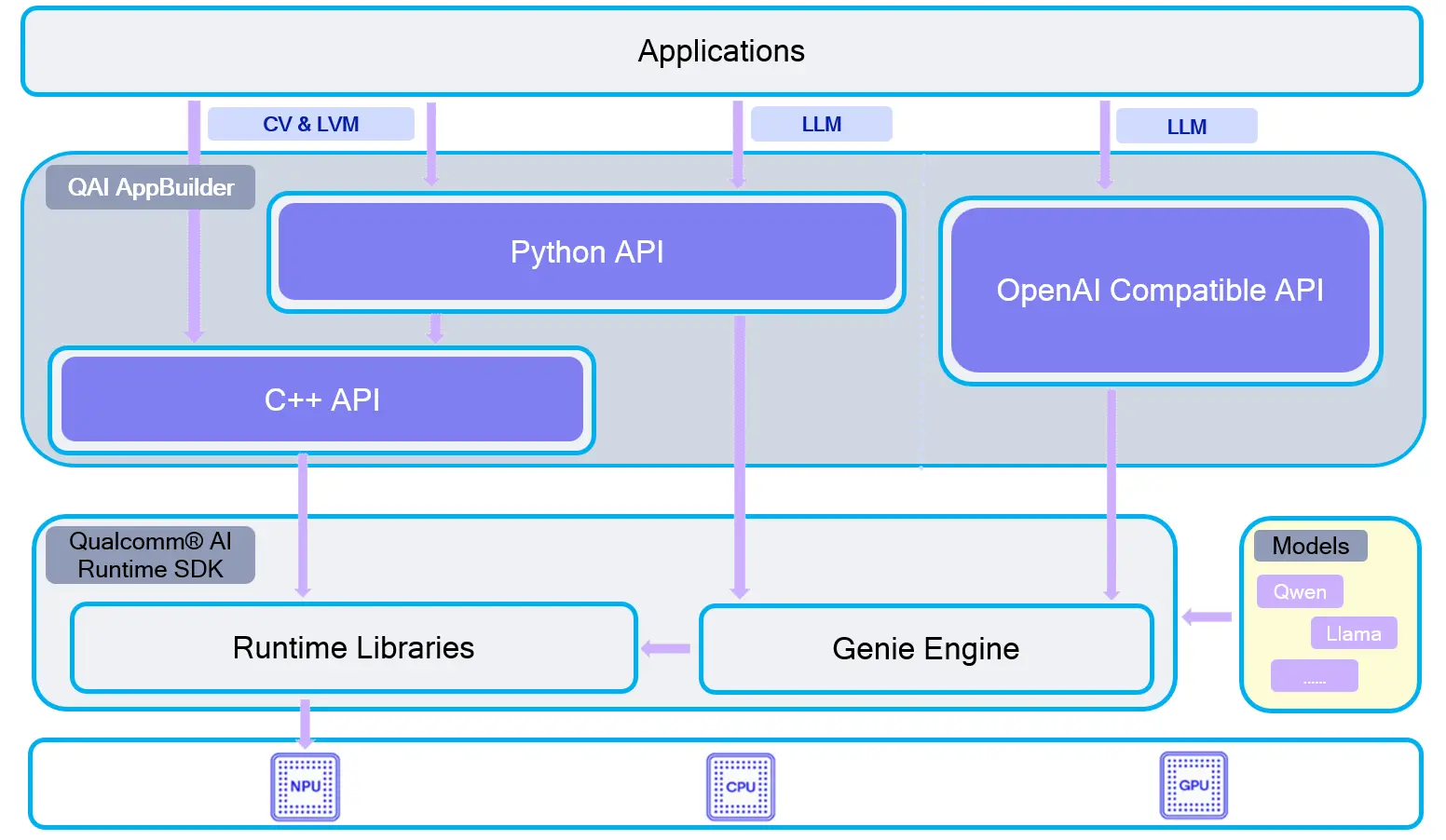
QAI-APPBUILDER 架构
支持设备
| 设备 | SoC |
|---|---|
| Dragon Q6A | QCS6490 |
| Dragon Q8B | SC8280XP |
| Fogwise® AIRbox Q900 | QCS9075 |
安装方法
推荐 使用 wheel 包安装。如需自行编译,可参考 源码编译。
克隆仓库
git clone https://github.com/qualcomm/qai-appbuilder.git && cd qai-appbuilder
使用 wheel 包安装
创建虚拟环境
安装 Python 库前需要创建虚拟环境进行环境隔离。
sudo apt install python3-venv
python3 -m venv .venv
source .venv/bin/activate
安装 qai_appbuilder
从 GitHub Release 下载与 Python 版本匹配的 Linux aarch64 wheel,例如 Python 3.12:
pip3 install https://github.com/qualcomm/qai-appbuilder/releases/download/v2.48.40/qai_appbuilder-2.48.40-cp312-cp312-manylinux_2_39_aarch64.whl
从 v2.0.0 起,Python wheel 已内置运行所需的 Qualcomm® AI Runtime 库(如 libQnnHtp.so、Hexagon skel 等),一般无需再单独安装完整 QAIRT SDK 即可做 Python 推理。
验证安装:
python3 -c "import qai_appbuilder; print(qai_appbuilder.__file__)"
源码编译
如需从源码编译,请先安装构建依赖,并准备 QAIRT SDK。
安装构建依赖
sudo apt update
sudo apt install -y cmake build-essential python3-dev python3-venv
git clone https://github.com/qualcomm/qai-appbuilder.git --recursive
cd qai-appbuilder
python3 -m venv .venv
source .venv/bin/activate
pip3 install wheel==0.45.1 setuptools==80.9.0 pybind11==2.13.6 build==1.4.0
配置 QAIRT 环境变量
请先完成 QAIRT SDK 解压。将 <path_to_qairt> 替换为实际 SDK 路径:
export QNN_SDK_ROOT=<path_to_qairt>
export QAI_TOOLCHAINS=aarch64-oe-linux-gcc11.2
编译并安装 qai_appbuilder wheel
python3 -m build -w
python3 -m pip install dist/qai_appbuilder-*.whl
wheel 版本号会随所链接的 QAIRT SDK 版本变化。官方构建说明见 BUILD.md。
创建 ADSP 环境变量
在 Linux 设备上运行 NPU 推理前,需要设置 ADSP_LIBRARY_PATH,指向包含 Hexagon skel(如 libQnnHtpV68Skel.so / libQnnHtpV73Skel.so)的目录。
使用 wheel 内置库(推荐)
安装 wheel 后,可直接指向包内 libs 目录:
export ADSP_LIBRARY_PATH=$(python3 -c "import os, qai_appbuilder; print(os.path.join(os.path.dirname(qai_appbuilder.__file__), 'libs'))")
使用系统 QAIRT 包
qairt-libs、qairt-dsp-binaries 等系统包来自高通 apt 软件源(ppa:ubuntu-qcom-iot/qcom-ppa)。该软件源默认未配置,需先手动添加后再安装:
sudo apt update && sudo apt install -y software-properties-common
sudo add-apt-repository -y ppa:ubuntu-qcom-iot/qcom-ppa
sudo apt update
sudo apt install -y qairt-libs qairt-dsp-binaries
若系统已安装 qairt-dsp-binaries 等包,也可将 ADSP_LIBRARY_PATH 指向对应平台的 DSP 目录,例如 QCS6490:
export ADSP_LIBRARY_PATH=/usr/share/qcom/qcm6490/Thundercomm/RB3gen2/dsp/cdsp
可在 ~/.bashrc 中写入上述 export,并执行 source ~/.bashrc 使其长期生效。
应用例子
上游示例已按任务类型重新组织目录。Linux 上运行示例脚本时,需要通过 --chipset 指定芯片,以便自动下载对应模型:
- QCS6490 / SC8280XP:
--chipset 6490 - QCS9075:
--chipset 9075
更多示例说明见上游 samples/README.md。也可参考本地 Demos 示例。
安装示例依赖
在已激活的虚拟环境中安装示例常用依赖:
pip3 install requests tqdm qai-hub py3-wget Pillow torch torchvision opencv-python-headless
进入示例目录
cd qai-appbuilder/samples
运行示例
可直接运行示例脚本,也可使用交互式启动器:
python3 run_inference.py --list
python3 run_inference.py --model inception_v3 --args "--chipset 6490"
- QCS6490
- SC8280XP
- QCS9075
-
图像分类
模型 运行方法 googlenet python3 ComputerVision/Image_Classification/googlenet/googlenet.py --chipset 6490inception_v3 python3 ComputerVision/Image_Classification/inception_v3/inception_v3.py --chipset 6490 -
目标检测
模型 运行方法 yolov8_det python3 ComputerVision/Object_Detection/yolov8_det/yolov8_det.py --chipset 6490 -
图像超分辨率
模型 运行方法 quicksrnetmedium python3 ComputerVision/Super_Resolution/quicksrnetmedium/quicksrnetmedium.py --chipset 6490real_esrgan_general_x4v3 python3 ComputerVision/Super_Resolution/real_esrgan_general_x4v3/real_esrgan_general_x4v3.py --chipset 6490real_esrgan_x4plus python3 ComputerVision/Super_Resolution/real_esrgan_x4plus/real_esrgan_x4plus.py --chipset 6490 --bin --no_show
上游 Linux 示例脚本目前通过 --chipset 6490 / --chipset 9075 选择模型包。SC8280XP 与 QCS6490 同为 Hexagon V68,下载模型时使用 --chipset 6490。QCS6490 上 real_esrgan_x4plus 需加 --bin。
-
图像分类
模型 运行方法 googlenet python3 ComputerVision/Image_Classification/googlenet/googlenet.py --chipset 6490inception_v3 python3 ComputerVision/Image_Classification/inception_v3/inception_v3.py --chipset 6490 -
目标检测
模型 运行方法 yolov8_det python3 ComputerVision/Object_Detection/yolov8_det/yolov8_det.py --chipset 6490 -
图像超分辨率
模型 运行方法 quicksrnetmedium python3 ComputerVision/Super_Resolution/quicksrnetmedium/quicksrnetmedium.py --chipset 6490real_esrgan_general_x4v3 python3 ComputerVision/Super_Resolution/real_esrgan_general_x4v3/real_esrgan_general_x4v3.py --chipset 6490real_esrgan_x4plus python3 ComputerVision/Super_Resolution/real_esrgan_x4plus/real_esrgan_x4plus.py --chipset 6490 --bin --no_show
-
图像生成 / 图像修复
模型 运行方法 stable_diffusion_v2_1 python3 GenerativeAI/Image_Generation/stable_diffusion_v2_1/stable_diffusion_v2_1.py --chipset 9075 --prompt "the prompt string ..."stable_diffusion_v1_5 python3 GenerativeAI/Image_Generation/stable_diffusion_v1_5/stable_diffusion_v1_5.py --chipset 9075 --prompt "the prompt string ..."lama_dilated python3 ComputerVision/Image_Editing/lama_dilated/lama_dilated.py --chipset 9075aotgan python3 ComputerVision/Image_Editing/aotgan/aotgan.py --chipset 9075 -
图像超分辨率
模型 运行方法 real_esrgan_x4plus python3 ComputerVision/Super_Resolution/real_esrgan_x4plus/real_esrgan_x4plus.py --chipset 9075real_esrgan_general_x4v3 python3 ComputerVision/Super_Resolution/real_esrgan_general_x4v3/real_esrgan_general_x4v3.py --chipset 9075quicksrnetmedium python3 ComputerVision/Super_Resolution/quicksrnetmedium/quicksrnetmedium.py --chipset 9075 -
图像识别
模型 运行方法 inception_v3 python3 ComputerVision/Image_Classification/inception_v3/inception_v3.py --chipset 9075beit python3 ComputerVision/Image_Classification/beit/beit.py --chipset 9075googlenet python3 ComputerVision/Image_Classification/googlenet/googlenet.py --chipset 9075 -
姿态识别
模型 运行方法 openpose python3 ComputerVision/Pose_Estimation/openpose/openpose.py --chipset 9075mediapipe_hand python3 ComputerVision/Pose_Estimation/mediapipe_hand/mediapipe_hand.py --chipset 9075 -
图像分割 / 深度估计
模型 运行方法 unet_segmentation python3 ComputerVision/Semantic_Segmentation/unet_segmentation/unet_segmentation.py --chipset 9075depth_anything python3 ComputerVision/Depth_Estimation/depth_anything/depth_anything.py --chipset 9075 -
目标检测
模型 运行方法 yolov8_det python3 ComputerVision/Object_Detection/yolov8_det/yolov8_det.py --chipset 9075 -
三维建模
模型 运行方法 facemap_3dmm python3 ComputerVision/Face_Recognition/facemap_3dmm/facemap_3dmm.py --chipset 9075face_attrib_net python3 ComputerVision/Face_Recognition/face_attrib_net/face_attrib_net.py --chipset 9075 -
音频模型
模型 运行方法 yamnet python3 audio/Audio_Classification/yamnet/yamnet.py --chipset 9075whisper_base_en python3 audio/Speech_Recognition/whisper_base_en/whisper_base_en.py --chipset 9075whisper_tiny_en python3 audio/Speech_Recognition/whisper_tiny_en/whisper_tiny_en.py --chipset 9075 -
文本 / 多模态嵌入
模型 运行方法 nomic_embed_text python3 Multimodal/Text_Generation/nomic_embed_text/nomic_embed_text.py --chipset 9075openai_clip python3 Multimodal/Image_Classification/openai_clip/openai_clip.py --chipset 9075 --text "mountain"qwen_vl 需先下载模型包; python3 Multimodal/qwen_vl/qwen_vl.py --model qwen2 --path ./qwen2vl2b(见示例页) -
三维动作识别
模型 运行方法 resnet_3d python3 ComputerVision/Video_Classification/resnet_3d/resnet_3d.py --chipset 9075 -
OCR(文字识别)
模型 运行方法 easy_ocr python3 Multimodal/Image_To_Text/easy_ocr/easy_ocr.py --chipset 9075