Frigate NVR for Axera
Frigate is an NVR project designed specifically for Home Assistant. It can fully utilize local hardware acceleration and use AI models for real-time object detection, recognition, and classification on surveillance video (for example, distinguishing people, vehicles, pets, and more).
Home Assistant is currently the most popular open-source smart home hub in the world.
For more information, see the official documentation or the official Chinese documentation.
This document describes how to deploy Frigate on a Radxa Rock5b+ with a Radxa AX-M1 M.2 accelerator.
Preparation
- Hardware: one Rock5b+ and one AX-M1
- OS: Debian 12 (Radxa official image)
- Drivers: install drivers by following Environment setup
- Tools: set up Docker by following the official Docker documentation
Clone the repository
Clone the repository using the Hugging Face CLI tool.
mkdir frigate && cd frigate
python3 -m venv .venv
source .venv/bin/activate
pip3 install huggingface_hub
hf download AXERA-TECH/frigate-resource --revision v0.16-rk-axcl --local-dir ./
Simulate RTSP streaming
If you don't have an IP camera yet (if you do, you can use it directly), simulating an RTSP stream with FFmpeg + MediaMTX is a good way to validate your setup.
Follow the steps below.
MediaMTX
mkdir mediamtx && cd mediamtx
wget https://github.com/bluenviron/mediamtx/releases/download/v1.16.0/mediamtx_v1.16.0_linux_arm64.tar.gz
tar -xvf mediamtx_v1.16.0_linux_arm64.tar.gz
./mediamtx
This will start an RTSP server in the current terminal and wait for incoming streams.
Then open a new terminal and use FFmpeg to push a stream.
FFmpeg
sudo apt install ffmpeg
Next, you need a video file. Prepare one yourself and rename it to test.mp4.
ffmpeg -re -stream_loop -1 -i test.mp4 -c copy -f rtsp rtsp://localhost:8554/mystream
Parameter explanation:
-re: Read input at its native frame rate. Without this, FFmpeg may push frames as fast as possible and the video will look like fast-forward.-stream_loop -1: Loop the video infinitely. This is useful for testing Frigate so the stream doesn't stop when the video ends.-i test.mp4: Specify the input video file.-c copy: Copy audio/video streams without re-encoding. This uses minimal CPU and simply repackages the original packets into RTSP.-f rtsp: Set the output format to RTSP.rtsp://localhost:8554/mystream: The RTSP push URL.mystreamis the stream ID you choose.
Start Frigate
Update the ports in docker-compose.yml (this change is only needed because MediaMTX uses port 8554 by default for RTSP simulation; if you are using a real camera, you don't need to change it):
services:
  frigate:
    container_name: frigate
    privileged: true
    restart: unless-stopped
    stop_grace_period: 30s
    image: frigate:rk-axcl-d80bb4d
    shm_size: "1024mb"
    volumes:
      - /etc/localtime:/etc/localtime:ro
      - ./config:/config
      - ./storage:/media/frigate
      - type: tmpfs
        target: /tmp/cache
        tmpfs:
          size: 1000000000
    ports:
      - "8971:8971"
      # - "5000:5000" # Unauthenticated internal access. Expose with caution.
      - "8556:8554" # RTSP stream                 <-- change to 8556 to avoid conflicts
      - "8555:8555/tcp" # WebRTC over TCP
      - "8555:8555/udp" # WebRTC over UDP
    environment:
      TZ: "Asia/Shanghai"
Start Frigate:
docker compose up -d
In the web UI, click Settings -> Config Editor, then update the configuration as follows:
mqtt:
  enabled: false

cameras:
  camera: # <--- Replace with your camera name. Only letters, numbers, underscores, and hyphens are supported.
    enabled: true
    ffmpeg:
      inputs:
        - path: rtsp://192.168.2.245:8554/mystream # <--- Replace with your camera RTSP URL
          roles:
            - detect

detectors:
  axengine:
    type: axengine

model:
  path: yolov5s_320
  width: 320
  height: 320
  input_pixel_format: bgr
  labelmap_path: /labelmap/coco-80.txt

detect:
  enabled: true
version: 0.16-0
Restart Frigate:
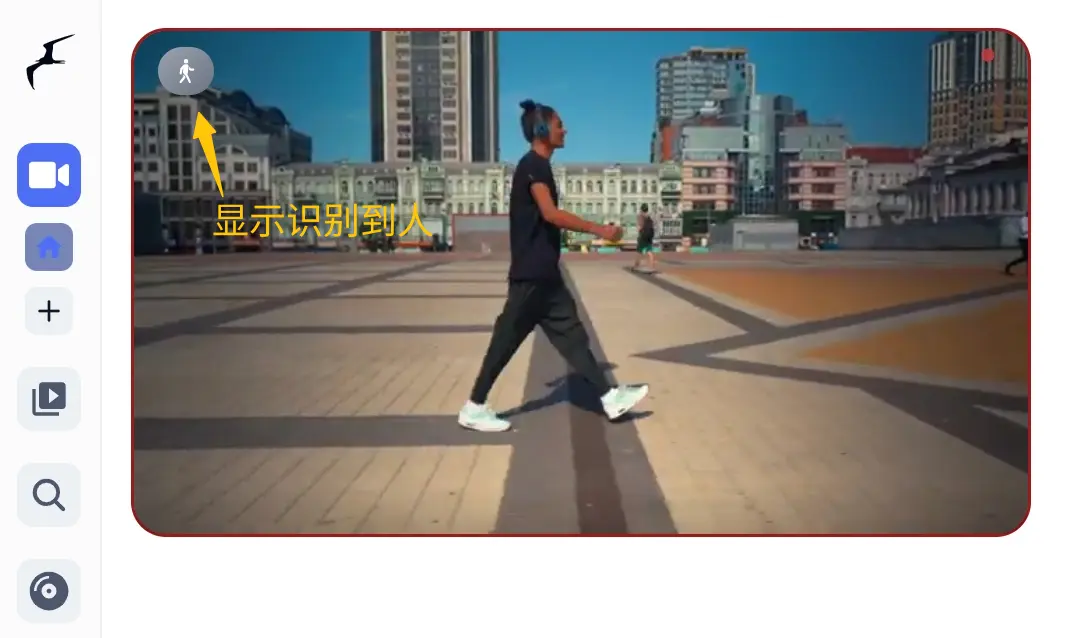
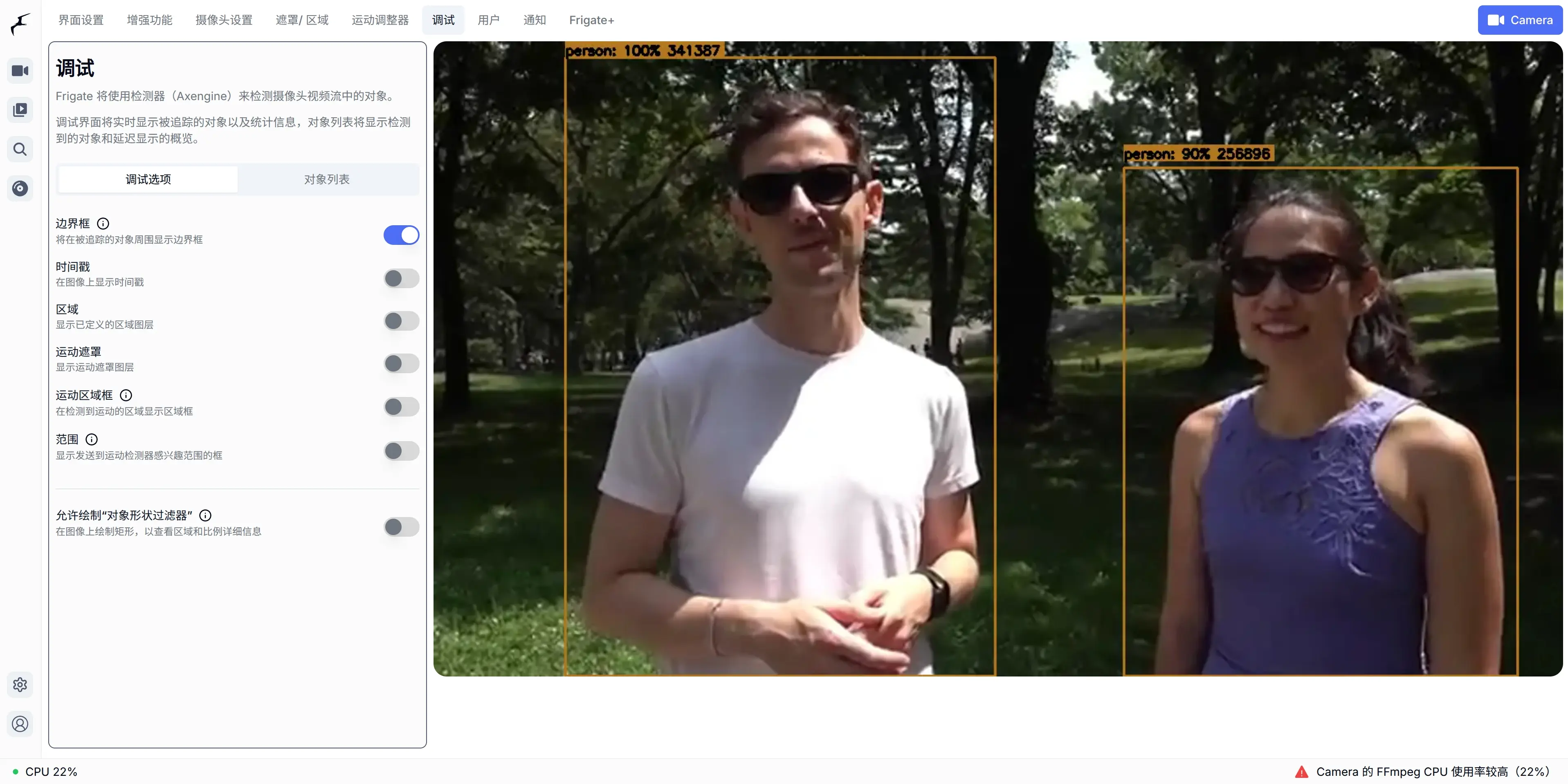
You have now successfully deployed Frigate on Rock5b+ using AX-M1 for inference.