DX-STREAM
DX-STREAM is a custom GStreamer plugin used to integrate real-time streaming data into AI inference applications based on the DEEPX NPU. It provides a modular pipeline framework with configurable pre-processing, inference, and post-processing components, designed for computer vision workloads. DX-STREAM enables developers to build flexible, high-performance applications for scenarios such as video analytics, smart cameras, and edge AI systems.
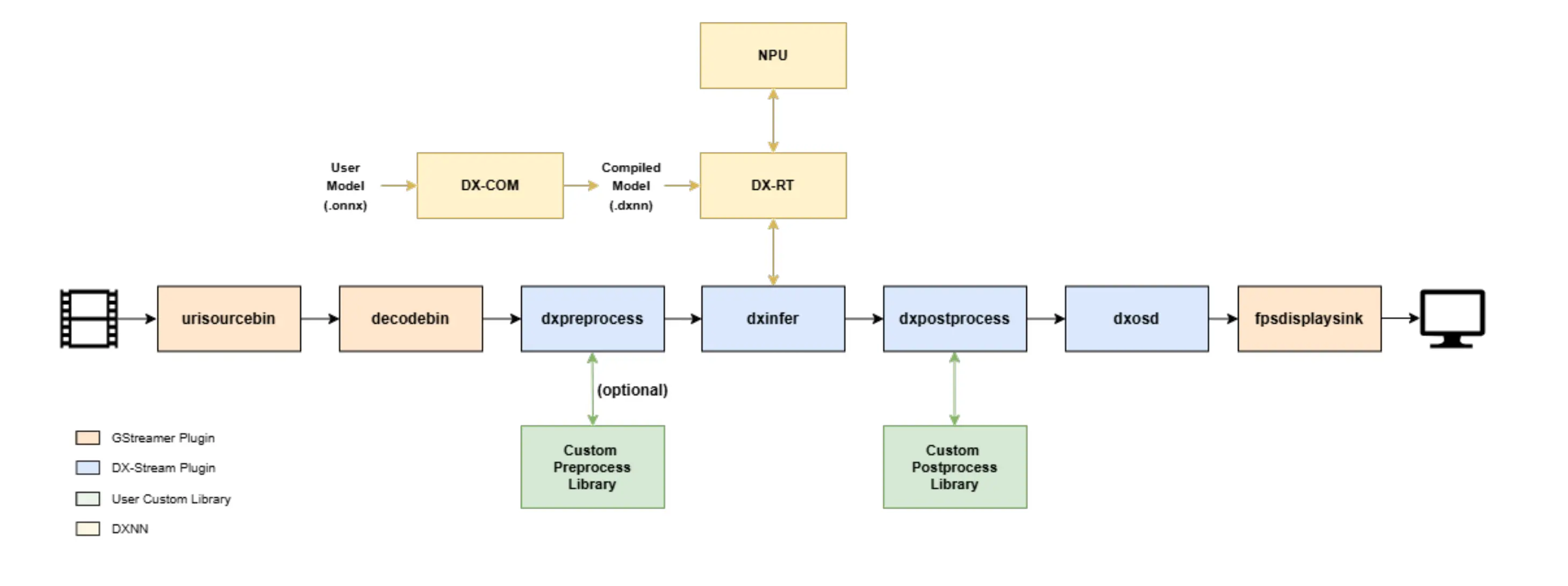
DX-STREAM Architecture
Installation
Clone the DX-ALL-SUITE repository
Follow DX-ALL-SUITE to clone the specified version of the DX-ALL-SUITE repository.
Build DX-STREAM
Enter the dx-all-suite/dx-runtime/dx_stream directory.
cd dx-all-suite/dx-runtime/dx_stream
Install required dependencies
./install.sh
Build dx-stream
./build.sh
Verify dx-stream
gst-inspect-1.0 dxstream
(.venv) rock@rock-5b-plus:~/ssd/deepx/v2.1.0/docs/dx-all-suite/dx-runtime/dx_stream$ gst-inspect-1.0 dxstream
Plugin Details:
  Name                     dxstream
  Description              DX Stream plugin
  Filename                 /lib/aarch64-linux-gnu/gstreamer-1.0/libgstdxstream.so
  Version                  2.1.0
  License                  LGPL
  Source module            gst-dxstream
  Binary package           GStreamer DEEPX DX-Stream Plugins
  Origin URL               https://github.com/DEEPX-AI/dx_stream

  dxgather: DxGather
  dxinfer: DXInfer
  dxinputselector: DXInputSelector
  dxmsgbroker: DXMsgBroker
  dxmsgconv: DXMsgConv
  dxosd: DXOsd
  dxoutputselector: DXOutputSelector
  dxpostprocess: DXPostprocess
  dxpreprocess: DXPreprocess
  dxrate: DXRate
  dxtracker: DXTracker

  11 features:
  +-- 11 elements
Uninstall dx-stream
./build.sh --uninstall
Examples
Download sample models and videos
./setup.sh
Run the demo
./run_demo.sh
After running run_demo.sh, select the demo from the list of options.
(.venv) rock@rock-5b-plus:~/ssd/deepx/v2.1.0/docs/dx-all-suite/dx-runtime/dx_stream$ ./run_demo.sh
/mnt/ssd/deepx/v2.1.0/docs/dx-all-suite/dx-runtime/dx_stream ~/ssd/deepx/v2.1.0/docs/dx-all-suite/dx-runtime/dx_stream
[INFO] DX_STREAM_PATH: /mnt/ssd/deepx/v2.1.0/docs/dx-all-suite/dx-runtime/dx_stream
[INFO] Models and Videos directory already exists. Skipping download.
0: Object Detection (YOLOv5s)
1: Object Detection (YOLOv5s with PPU)
2: Face Detection (YOLOV5S_Face)
3: Face Detection (SCRFD500M with PPU)
4: Pose Estimation (YOLOV5Pose)
5: Pose Estimation (YOLOV5Pose with PPU)
6: Multi-Object Tracking
7: Semantic Segmentation
8: Multi-Channel Object Detection
9: Multi-Channel RTSP
-: secondary mode
which AI demo do you want to run:(timeout:10s, default:0)
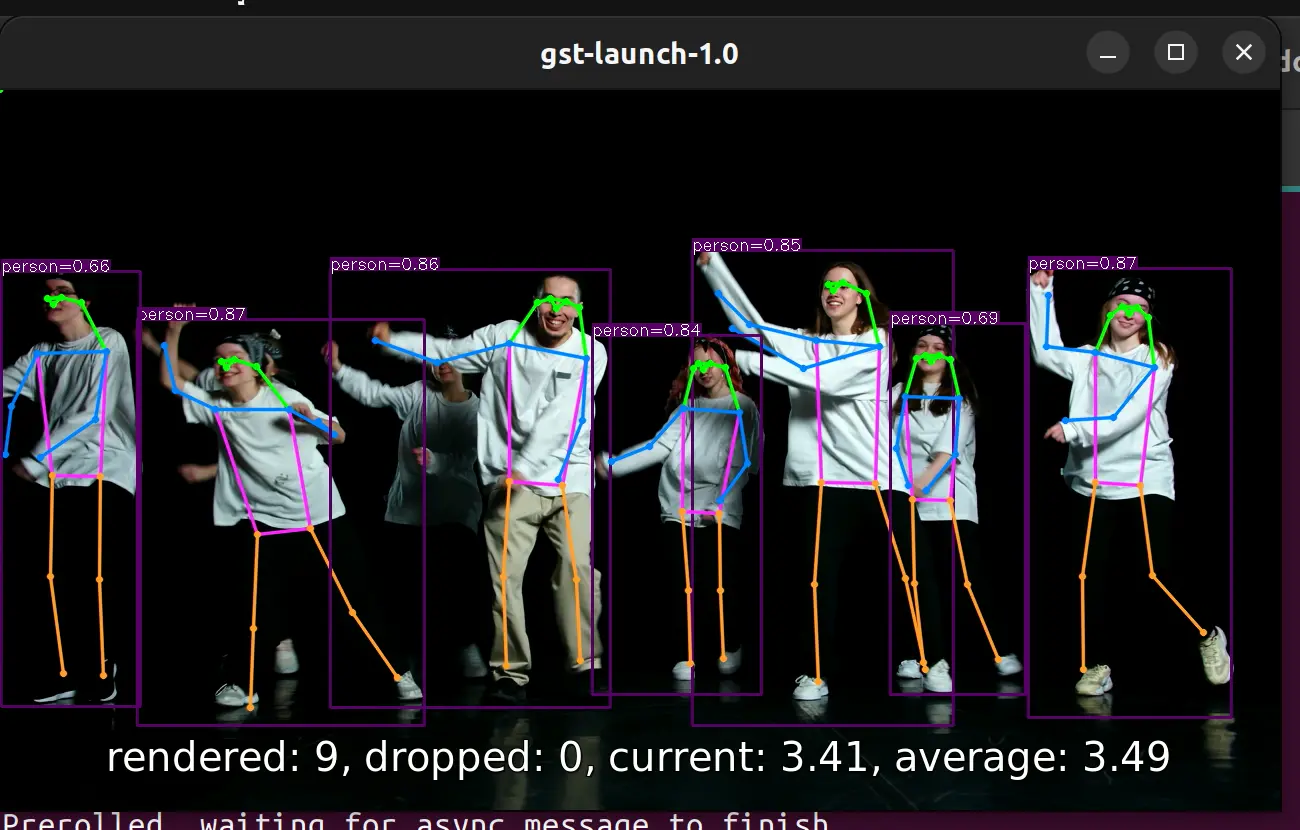
DX-STREAM Demo
Build DX-STREAM documentation
For more details on how to use DX-STREAM, build the full documentation and refer to it.
Install MkDocs
pip install mkdocs mkdocs-material mkdocs-video pymdown-extensions mkdocs-with-pdf markdown-grid-tables
Build the docs
cd docs
mkdocs build
After the build finishes, DEEPX_DX-STREAM_UM_v2.1.0.pdf will be generated in the current directory.
Serve the docs
You can access the documentation website in a browser.
mkdocs serve