HDMI Interface
The Radxa Cubie A5E features one onboard HDMI port that supports video output up to 4K@60fps.
For the exact location of the HDMI interface, please refer to the interface description section in the Hardware Interface tutorial!
Usage Guide
Connect a display to the Cubie A5E's HDMI port to test the video output functionality.
Some displays may have compatibility issues. If you encounter problems, try using a different display for testing.
Display Configuration
This section explains how to modify display resolution settings through both graphical interface and command line.
- Graphical Interface
- Command Line
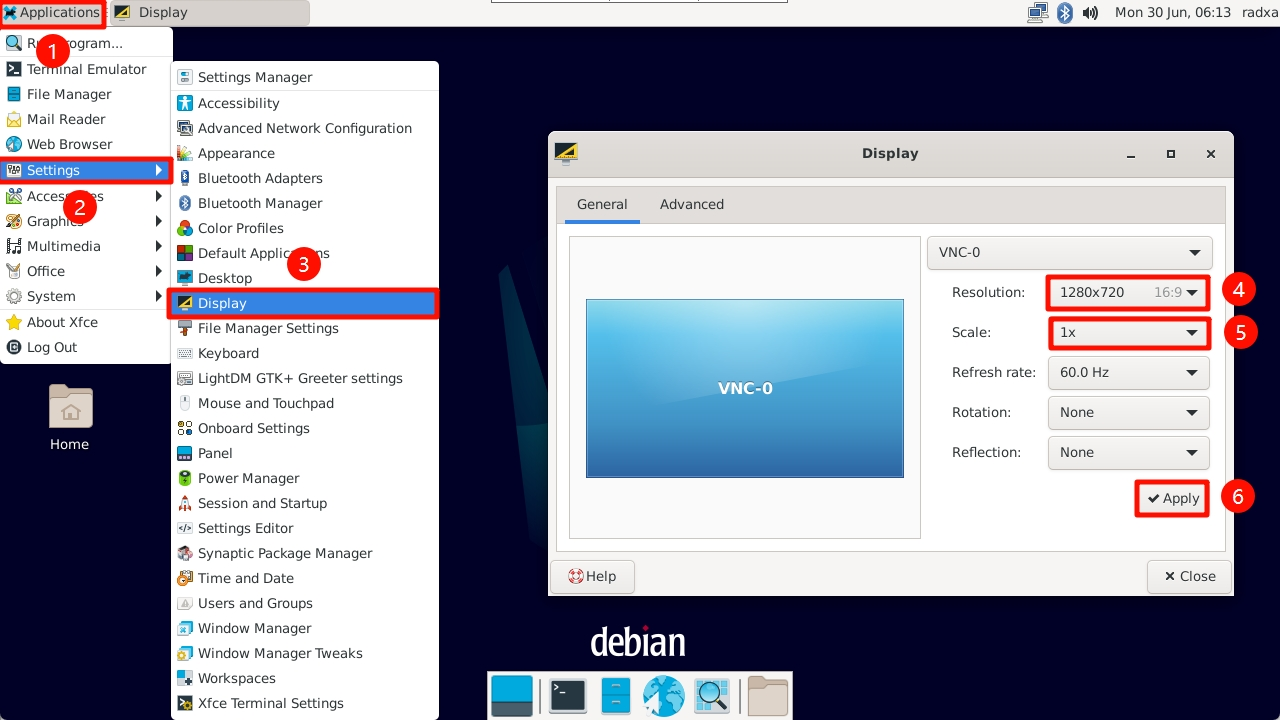
You can adjust the display resolution using the system's built-in display settings:
①. Click on Applications to open the system applications menu
②. Select Settings to access system settings
③. Choose Display to open the display settings interface
④. Select Resolution to change the display resolution
⑤. Adjust the Scale to modify the display scaling
⑥. Click Apply to save your display settings
You can also modify the display resolution using the command line interface.
- xrandr Tool
xrandr is a command-line utility in Linux systems used to configure display settings, including screen resolution, refresh rate, rotation, and multi-monitor layouts.
- View Current Display Configuration
Running xrandr (without parameters) will list all connected display devices (such as HDMI-1, DP-1, etc.) along with their supported resolutions and refresh rates.
xrandr
Terminal output example:
Screen 0: minimum 320 x 200, current 3840 x 2160, maximum 16384 x 16384
HDMI-1 connected primary 3840x2160+0+0 (normal left inverted right x axis y axis) 597mm x 336mm
   3840x2160     60.00*+  60.00    50.00    59.94    30.00    25.00    24.00    29.97    23.98
   1920x2160     60.00
   2560x1440     59.95
   2048x1152     60.00
   1920x1200     59.95
   1920x1080     60.00    60.00    50.00    59.94
   1920x1080i    60.00    59.94
   1680x1050     59.88
   1600x900      60.00
   1440x900      59.90
   1280x800      59.91
   1280x720      60.00    50.00    59.94
   1024x768      60.00
   800x600       60.32
   720x576       50.00
   720x480       60.00    59.94
   640x480       60.00    59.94
- Set Display Resolution and Refresh Rate
Set HDMI-1 resolution to 1920x1080 with a refresh rate of 60Hz:
xrandr --output HDMI-1 --mode 1920x1080 --rate 60
Interface Specifications
For complete technical specifications and pin definitions, please refer to the Hardware Design: Schematics document in the download section.