Headphone Jack
Radxa Cubie A7A features an onboard 3.5mm 4-pole headphone jack, supporting both audio input and output.
For the exact location of the headphone jack, please refer to the interface description section in the Hardware Interfaces guide!
Usage Guide
Connect a 3.5mm headphone cable to the headphone jack of the Cubie A7A and your headphones, then play audio on the Cubie A7A to test if there is sound.
If you cannot play audio, try unplugging and replugging the headphone cable or check if the audio output device is set correctly.
The latest production batches of Cubie A7A use the AC101B audio codec and can play audio normally when using the latest system image.
If you are using an earlier version with the AC101 audio codec, you need to enable the AC101 audio codec via the Rsetup tool.
- Distinguish the audio codec
You can check the silkscreen on the back of the board to determine the audio codec model.
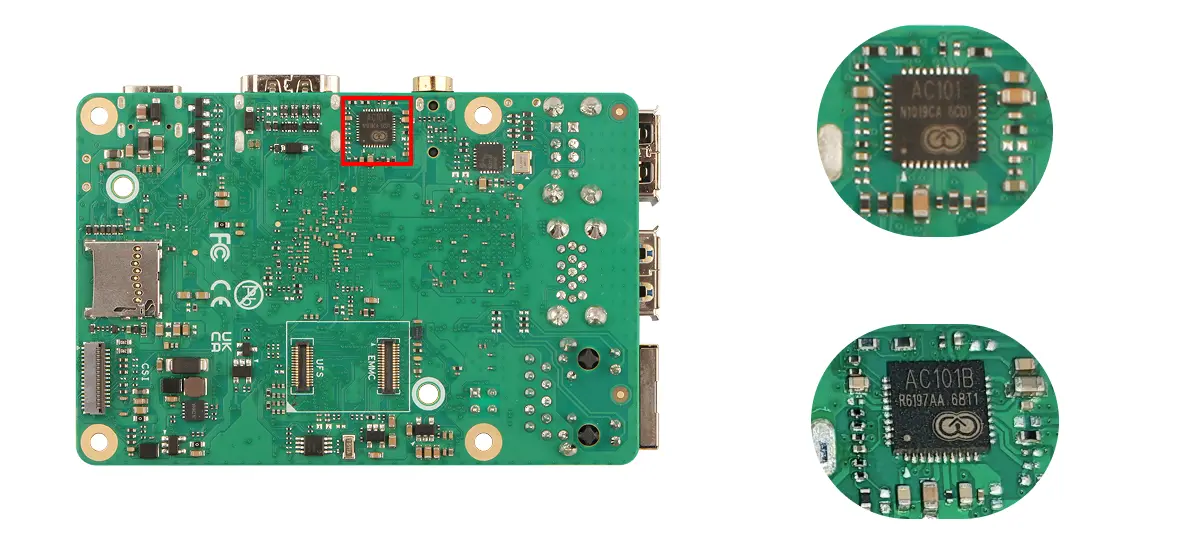
- Enable in software
Use the Rsetup tool provided by the Radxa system to enable the AC101 audio codec.
Run the rsetup command in the terminal to start the Rsetup tool:
rsetup
In Rsetup, go to Overlays -> Manage overlays.
- Use the arrow keys to find the [ ] Enable Allwinner AC101 Codec option.
- Press
Spaceso it changes to [*] Enable Allwinner AC101 Codec, indicating that the feature is enabled. - Press
Enterto confirm and save the settings. - Reboot the system to make the configuration take effect.
Check Audio Devices
Use the aplay -l command to view audio playback devices (speakers), and use the arecord -l command to view audio recording devices (microphones).
- View audio playback devices
aplay -l
Sample terminal output: card 0: sndi2s0 is the onboard AC101B audio codec, usually used for input (microphone) and output (audio playback) of the 3.5mm headphone jack.
**** List of PLAYBACK Hardware Devices ****
card 0: sndi2s0 [sndi2s0], device 0: sunxi-snd-plat-i2s-ac101-codec sunxi-ac101.15-001a-0 []
  Subdevices: 1/1
  Subdevice #0: subdevice #0
card 1: sndhdmi [sndhdmi], device 0: sunxi-snd-plat-i2s-sunxi-snd-codec-hdmi soc@3000000:hdmi_codec- []
  Subdevices: 1/1
  Subdevice #0: subdevice #0
- View audio recording devices
arecord -l
Sample output: card 0: sndi2s0 is the onboard AC101B audio codec, usually used for input (microphone) and output (audio playback) of the 3.5mm headphone jack.
**** List of CAPTURE Hardware Devices ****
card 0: sndi2s0 [sndi2s0], device 0: sunxi-snd-plat-i2s-ac101-codec sunxi-ac101.15-001a-0 []
  Subdevices: 1/1
  Subdevice #0: subdevice #0
card 1: sndhdmi [sndhdmi], device 0: sunxi-snd-plat-i2s-sunxi-snd-codec-hdmi soc@3000000:hdmi_codec- []
  Subdevices: 1/1
  Subdevice #0: subdevice #0
Record Audio
This function requires the headset to support a microphone. Use the arecord command to record audio.
sudo arecord -Dhw:0,0 -d 20 -f cd -r 44100 -c 2 -t wav /tmp/tmp.wav
- Dhw:0,0: Use
card 0: sndi2s0anddevice 0 - d 20: Record for 20 seconds
- f cd: Use CD audio format
- r 44100: Use 44.1kHz sampling rate
- c 2: Use stereo
- t wav: Use WAV format
- /tmp/tmp.wav: Output file path
Play Audio
Use the aplay command to play audio.
sudo aplay -Dhw:0,0 /tmp/tmp.wav
- Dhw:0,0: Use
card 0: sndi2s0anddevice 0 - /tmp/tmp.wav: Input file path
Port Specifications
For complete technical specifications and pin definitions, please refer to the Hardware Design: Schematic document in the download section.