UBOOT Key
Radxa Cubie A7A features an onboard UBOOT key, used to enter FEL mode.
For the exact location of the UBOOT key, please refer to the interface description section in the Hardware Interfaces guide!
Usage Guide
FEL is a low-level boot and flashing mode in Allwinner chips, mainly used for system recovery or debugging when the device cannot boot from regular storage media.
Entering FEL Mode
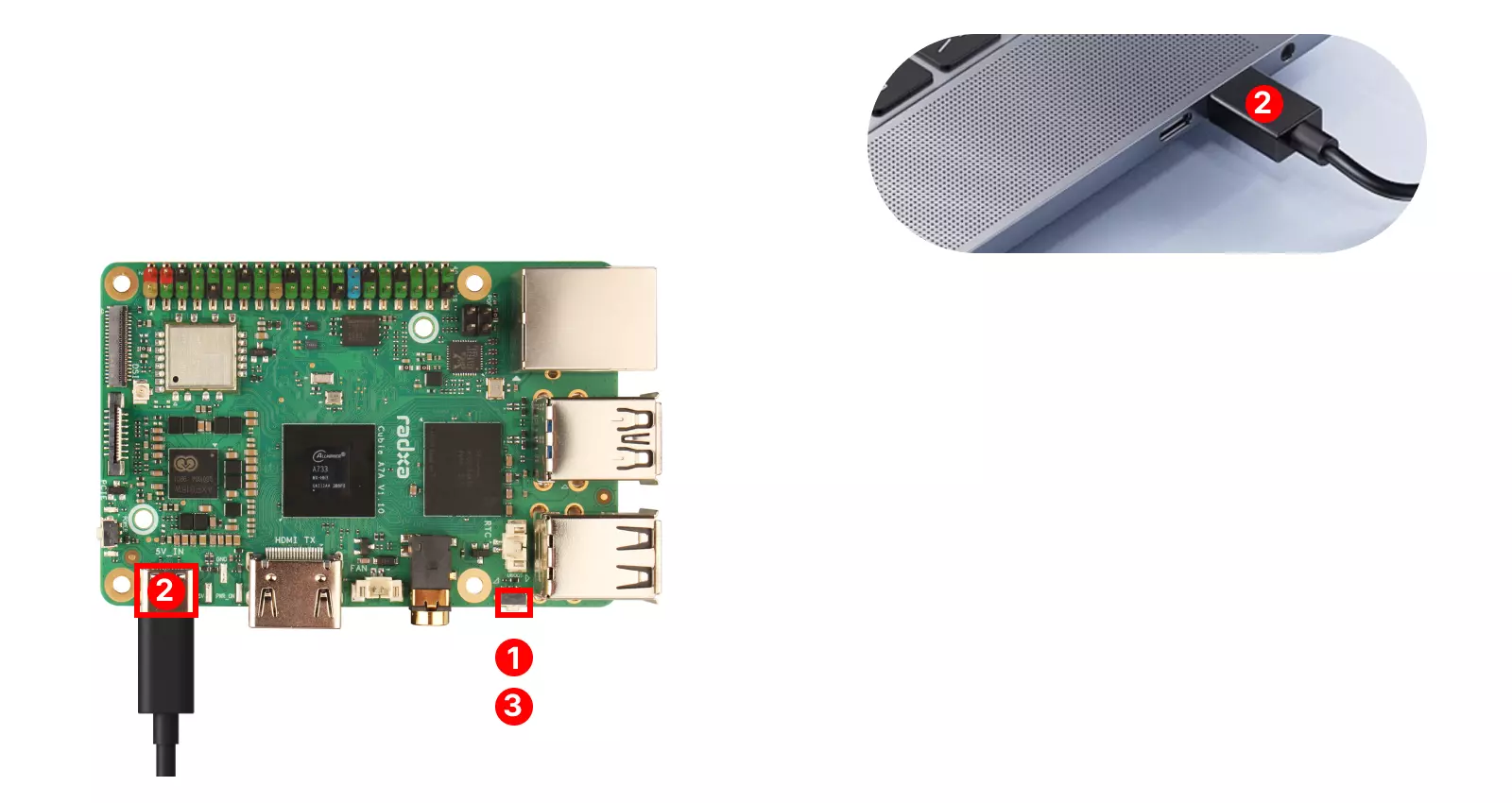
Before powering on the board, press and hold the UBOOT key on the Cubie A7A. After powering on, release the UBOOT key to enter FEL mode.
① : Press and hold the UBOOT key on the Cubie A7A
② : Use a USB Type-A to Type-C data cable to connect the Cubie A7A's USB Type-C port to the PC's USB Type-A port
③ : Release the UBOOT key on the Cubie A7A
Installing System Image
After Cubie A7A enters FEL mode, you can install a system image to the eMMC / UFS module in this mode.
Port Specifications
For complete technical specifications and pin definitions, please refer to the Hardware Design: Schematic document in the download section.