ACUITY Toolkit Usage Example
This guide uses a MobileNetV2 object detection model in Keras format as an example. We will use the Acuity Toolkit to parse, quantize, and compile the model, generate project code, perform simulation with Vivante IDE, and finally run inference on the VIP9000 series NPU.
NPU Version Comparison Table
| Product | TOPS | Platform | NPU Version | NPU Software Version |
|---|---|---|---|---|
| Radxa A5E | 2 Tops | T527 | v2 | v1.13 |
| Radxa A7A | 3 Tops | A733 | v3 | v2.0 |
| Radxa A7Z | 3 Tops | A733 | v3 | v2.0 |
| Radxa A7S | 3 Tops | A733 | v3 | v2.0 |
Download Example Repository
In the ACUITY Docker container, download the example repository.
Download the repository:
git clone https://github.com/ZIFENG278/ai-sdk.git
Configure the model compilation script:
- A733
- T527
cd ai-sdk/models
source env.sh v3 # NPU_VERSION
cp ../scripts/* .
cd ai-sdk/models
source env.sh v2 # NPU_VERSION
cp ../scripts/* .
Specify NPU_VERSION: Use v3 for A733 and v2 for T527. Refer to the NPU Version Comparison Table for details.
Model Parsing
Navigate to the ai-sdk/models/MobileNetV2_Imagenet example directory in the Docker container.
cd ai-sdk/models/MobileNetV2_Imagenet
This directory contains the following files:
MobilNetV2_Imagenet.h5: The original model file (required).channel_mean_value.txt: File containing mean and scale values for model input.dataset.txt: Calibration dataset file for model quantization.space_shuttle_224x224.jpg: Test input image and calibration image included in the dataset.inputs_outputs.txt: File containing model input and output nodes (set output nodes if necessary to avoid quantization failure).
.
|-- MobileNetV2_Imagenet.h5
|-- channel_mean_value.txt
|-- dataset.txt
|-- inputs_outputs.txt
`-- space_shuttle_224x224.jpg

0 directories, 5 files
Importing the Model
The pegasus_import.sh script can parse model structures and weights from various AI frameworks and output the parsed files:
- Model architecture will be saved in MODEL_DIR.json
- Model weights will be saved in MODEL_DIR.data
- Automatically generates model input file template MODEL_DIR_inputmeta.yml
- Automatically generates model post-processing file template MODEL_DIR_postprocess_file.yml
# pegasus_import.sh MODEL_DIR
./pegasus_import.sh MobileNetV2_Imagenet/
Parameters:
- MODEL_DIR: Folder containing the source model files
Manually Modify Model Input File
You need to manually set the mean and scale values in MobileNetV2_Imagenet_inputmeta.yml according to the model's input preprocessing requirements.
Using MobileNetV2_ImageNet as an example, since the MobileNet output is (1,224,224,3) RGB three-channel, the model preprocessing formula is:
x1 = (x - mean) / std
x1 = (x - mean) * scale
scale = 1 / std
Since the training dataset is ImageNet, the normalization mean for the ImageNet training set is [0.485, 0.456, 0.406] and std is [0.229, 0.224, 0.225]. We need to perform denormalization calculations. Normalization data reference: PyTorch Documentation
# mean
0.485 * 255 = 123.675
0.456 * 255 = 116.28
0.406 * 255 = 103.53
# scale
1 / (0.229 * 255) = 0.01712
1 / (0.224 * 255) = 0.01751
1 / (0.225 * 255) = 0.01743
Based on the calculations above, modify the mean and scale values in MobileNetV2_Imagenet_inputmeta.yml as follows:
mean:
- 123.675
- 116.28
- 103.53
scale:
- 0.01712
- 0.01751
- 0.01743
Model Quantization
Before model conversion, different types of quantization can be applied to the model. ACUITY supports various quantization methods including uint8/int16/bf16/pcq (int8 per-channel quantized). Using float means no quantization will be applied.
The pegasus_quantize.sh script can be used to quantize the model with specified type.
If the source model is already quantized, no additional quantization is needed here, otherwise it will cause an error.
# pegasus_quantize.sh MODEL_DIR QUANTIZED ITERATION
pegasus_quantize.sh MobileNetV2_Imagenet int16 10
The quantization process will generate a quantized file MODEL_DIR_QUANTIZED.quantize corresponding to the quantization method used.
| QUANTIZED | TYPE | QUANTIZER |
|---|---|---|
| uint8 | uint8 | asymmetric_affine |
| int16 | int16 | dynamic_fixed_point |
| pcq | int8 | perchannel_symmetric_affine |
| bf16 | bf16 | qbfloat16 |
Inference on Quantized Models
After quantization, the model's performance will improve to varying degrees, but the accuracy may slightly decrease. The quantized model can be inferred using pegasus_inference.sh to verify if the accuracy meets requirements after quantization.
The input for test inference is the first image in dataset.txt.
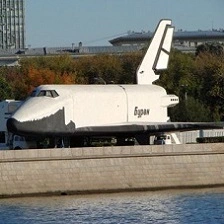
Inference on Float Model
Inference on the non-quantized float model to get reference results for comparison with quantized models
# pegasus_inference.sh MODEL_DIR QUANTIZED ITERATION
pegasus_inference.sh MobileNetV2_Imagenet/ float
The inference output is:
I 07:01:06 Iter(0), top(5), tensor(@attach_Logits/Softmax/out0_0:out0) :
I 07:01:06 812: 0.9990391731262207
I 07:01:06 814: 0.0001562383840791881
I 07:01:06 627: 8.89502334757708e-05
I 07:01:06 864: 6.59249781165272e-05
I 07:01:06 536: 2.808812860166654e-05
The top5 confidence score is highest for class 812, which corresponds to the label space shuttle. This matches the actual input image type, indicating that the mean and scale settings for the model input preprocessing are correct.
The inference tensors are saved in the MODEL_DIR/inf/MODEL_DIR_QUANTIZED directory:
- iter_0_input_1_158_out0_1_224_224_3.qnt.tensor: The original image tensor
- iter_0_input_1_158_out0_1_224_224_3.tensor: The preprocessed model input tensor
- iter_0_attach_Logits_Softmax_out0_0_out0_1_1000.tensor: The model's output tensor
.
|-- iter_0_attach_Logits_Softmax_out0_0_out0_1_1000.tensor
|-- iter_0_input_1_158_out0_1_224_224_3.qnt.tensor
`-- iter_0_input_1_158_out0_1_224_224_3.tensor

0 directories, 3 files
Inference on uint8 Quantized Model
# pegasus_inference.sh MODEL_DIR QUANTIZED ITERATION
pegasus_inference.sh MobileNetV2_Imagenet/ uint8
The inference output is:
I 07:02:20 Iter(0), top(5), tensor(@attach_Logits/Softmax/out0_0:out0) :
I 07:02:20 904: 0.8729746341705322
I 07:02:20 530: 0.012925799004733562
I 07:02:20 905: 0.01022859662771225
I 07:02:20 468: 0.006405209191143513
I 07:02:20 466: 0.005068646278232336
The top5 confidence score is highest for class 904, which corresponds to the label wig. This does not match the input image result and is inconsistent with the float model's inference result. This indicates precision loss after uint8 quantization. In this case, you can apply higher precision quantization models such as pcq or int16. For methods to improve model accuracy, please refer to Mixed Quantization.
Inference on PCQ Quantized Model
# pegasus_inference.sh MODEL_DIR QUANTIZED ITERATION
pegasus_inference.sh MobileNetV2_Imagenet/ pcq
The inference results are:
I 03:36:41 Iter(0), top(5), tensor(@attach_Logits/Softmax/out0_0:out0) :
I 03:36:41 812: 0.9973124265670776
I 03:36:41 814: 0.00034916045842692256
I 03:36:41 627: 0.00010834729619091377
I 03:36:41 833: 9.26952125155367e-05
I 03:36:41 576: 6.784773722756654e-05
The highest confidence score in the top5 results is 812, corresponding to the label space shuttle, which matches the actual input image type and is consistent with the float type inference results. This indicates that the accuracy is correct with pcq quantization.
Inference on int16 Quantized Model
# pegasus_inference.sh MODEL_DIR QUANTIZED ITERATION
pegasus_inference.sh MobileNetV2_Imagenet/ int16
The inference results are:
I 06:54:23 Iter(0), top(5), tensor(@attach_Logits/Softmax/out0_0:out0) :
I 06:54:23 812: 0.9989829659461975
I 06:54:23 814: 0.0001675251842243597
I 06:54:23 627: 9.466391202295199e-05
I 06:54:23 864: 6.788487371522933e-05
I 06:54:23 536: 3.0241633794503286e-05
The highest confidence score in the top5 results is 812, corresponding to the label space shuttle, which matches the actual input image type and is consistent with the float type inference results. This indicates that the accuracy is correct with int16 quantization.
Model Compilation and Export
pegasus_export_ovx.sh can export the model files and project code required for NPU inference.
Here we use the INT16 quantized model as an example:
# pegasus_export_ovx.sh MODEL_DIR QUANTIZED
pegasus_export_ovx.sh MobileNetV2_Imagenet int16
Generates OpenVX and NBG project paths:
MODEL_DIR/wksp/MODEL_DIR_QUANTIZED: Cross-platform OpenVX project, requires hardware just-in-time (JIT) compilation for model initialization.MODEL_DIR/wksp/MODEL_DIR_QUANTIZED_nbg_unify: NBG format, pre-compiled machine code format, low overhead, fast initialization.
(.venv) root@focal-v4l2:~/work/Acuity/acuity_examples/models/MobileNetV2_Imagenet/wksp$ ls
MobileNetV2_Imagenet_int16  MobileNetV2_Imagenet_int16_nbg_unify
In the NBG project, you can obtain the network_binary.nb model file. The compiled model can be copied to the board for on-device inference using vpm_run or awnn API.
Simulating Inference with Vivante IDE
Vivante IDE can be used to verify the generated target model and OpenVX project in the ACUITY Docker on an X86 PC.
Import Required Environment Variables for Vivante IDE
export USE_IDE_LIB=1
export VIVANTE_SDK_DIR=~/Vivante_IDE/VivanteIDE5.11.0/cmdtools/vsimulator
export LD_LIBRARY_PATH=$LD_LIBRARY_PATH:~/Vivante_IDE/VivanteIDE5.11.0/cmdtools/common/lib:~/Vivante_IDE/VivanteIDE5.11.0/cmdtools/vsimulator/lib
unset VSI_USE_IMAGE_PROCESS
Simulating Cross-platform OpenVX Project
Compile the Executable
cd MobileNetV2_Imagenet/wksp/MobileNetV2_Imagenet_int16
make -f makefile.linux
The generated target file is a binary executable of MODEL_DIR_QUANTIZED.
Run the Executable
# Usage: ./mobilenetv2imagenetint16 data_file inputs...
./mobilenetv2imagenetint16 MobileNetV2_Imagenet_int16.export.data ../../space_shuttle_224x224.jpg
Execution Result:
Create Neural Network: 11ms or 11426us
Verify...
Verify Graph: 2430ms or 2430049us
Start run graph [1] times...
Run the 1 time: 229309.52ms or 229309520.00us
vxProcessGraph execution time:
Total   229309.53ms or 229309536.00us
Average 229309.53ms or 229309536.00us
 --- Top5 ---
812: 0.999023
814: 0.000146
627: 0.000084
864: 0.000067
  0: 0.000000
Simulate Running NBG Project
Running NBG projects in Vivante IDE will increase the execution time.
Compile the Executable
cd MobileNetV2_Imagenet/wksp/MobileNetV2_Imagenet_int16_nbg_unify
make -f makefile.linux
The generated target file is a binary executable of MODEL_DIR_QUANTIZED.
Run the Executable
# Usage: ./mobilenetv2imagenetint16 data_file inputs...
./mobilenetv2imagenetint16 network_binary.nb ../../space_shuttle_224x224.jpg
Execution Result:
Create Neural Network: 4ms or 4368us
Verify...
Verify Graph: 2ms or 2482us
Start run graph [1] times...
Run the 1 time: 229388.50ms or 229388496.00us
vxProcessGraph execution time:
Total   229388.52ms or 229388512.00us
Average 229388.52ms or 229388512.00us
 --- Top5 ---
812: 0.999023
814: 0.000146
627: 0.000084
864: 0.000067
  0: 0.000000
On-board NPU Inference
For on-board NPU inference of NBG format models, you can use the vpm_run tool for inference testing.
For vpm_run installation and usage, please refer to vpm_run Model Testing Tool