Use EDL Tool
This document explains how to install Qualcomm device drivers, set up EDL tool environment variables, and use EDL tools on Windows and Ubuntu systems.
Install Drivers
- Windows
- Linux
- Download Drivers
On Windows, you need to visit the Downloads page to download the driver files.
- Install Drivers
Extract the downloaded driver files and run the Install.bat file as administrator to install the drivers.
- Device Recognition
In Windows, you can check if the device is properly recognized by opening the Device Manager.
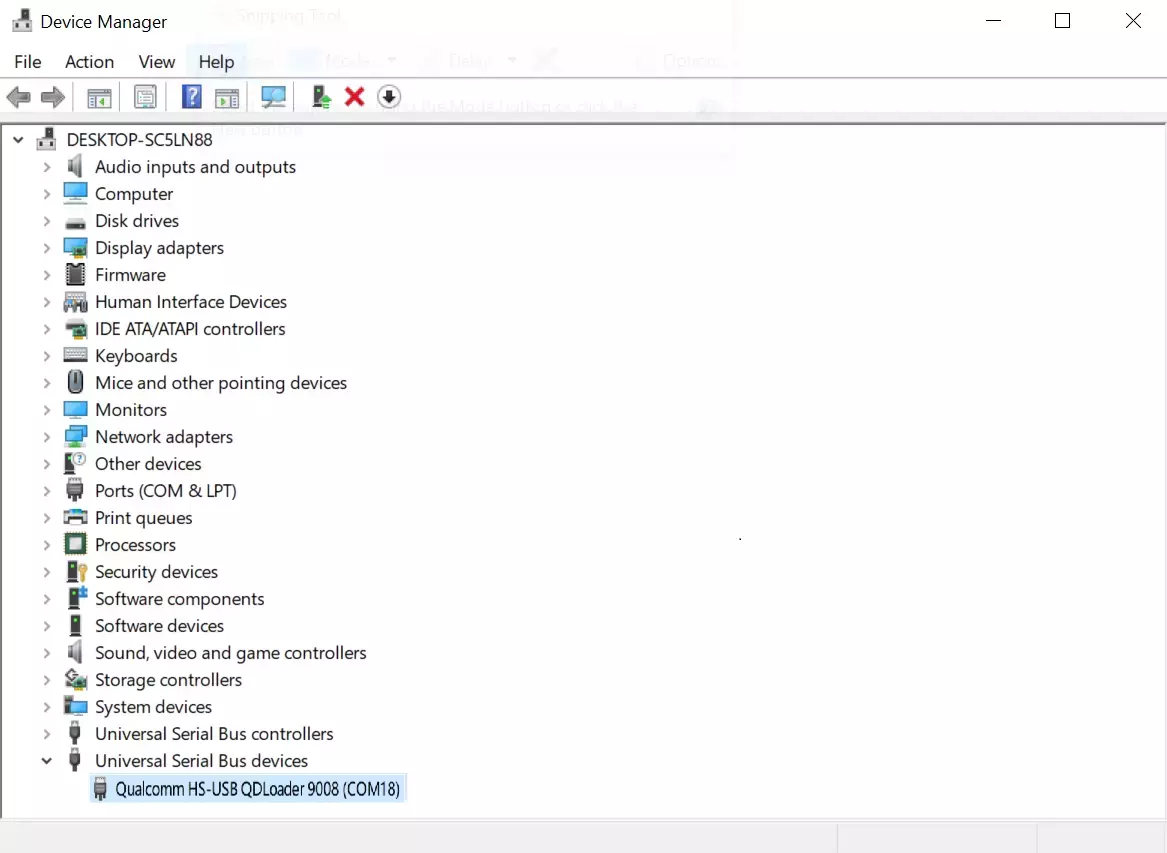
On Linux systems, no additional drivers are needed. You can use the lsusb command to check if the device is in EDL mode.
lsusb
When the device enters EDL mode, you will see output similar to the following:
Bus 001 Device 012: ID 05c6:9008 Qualcomm, Inc. Gobi Wireless Modem (QDL mode)
Using EDL Tools
Download EDL Tools
You need to visit the Downloads page to download the EDL tools.
Set Up Environment Variables
Setting up environment variables can simplify subsequent flashing operations and commands.
- Windows
- Ubuntu
- Press
Win + Rto open the Run dialog, typesysdm.cpl, and clickOK.
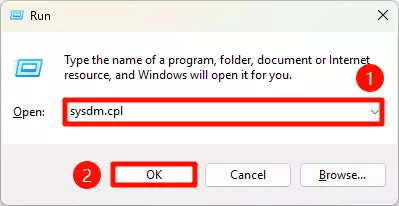
- In the
System Propertieswindow, click theAdvancedtab, then click theEnvironment Variables...button.
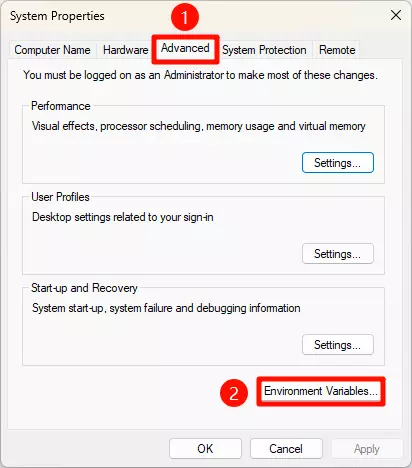
- In the
Environment Variableswindow, double-click thePathvariable underSystem variables.
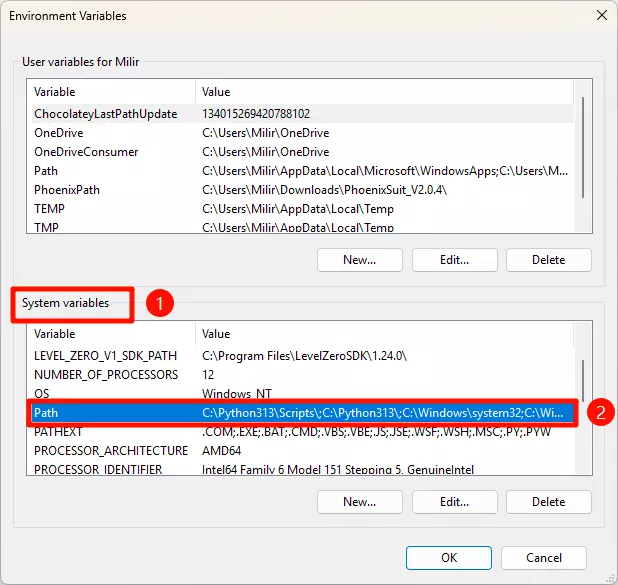
- In the
Edit Environment Variablewindow, click theNewbutton, then enter the path to your platform's EDL tools, and clickOK.
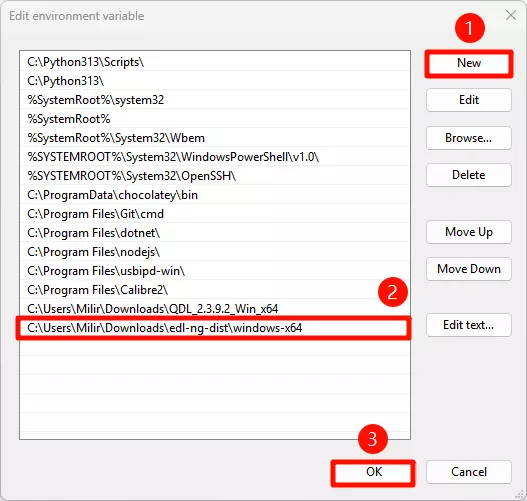
- After completing the above steps, reopen the terminal. If you can see the version information by running the
edl-ngcommand, the setup is successful.
edl-ng
Terminal output example:
Description:
  edl-ng - Qualcomm Emergency Download CLI

Usage:
  edl-ng [command] [options]

Options:
  -l, --loader <loader>                        Path to the Firehose programmer (e.g., prog_firehose_*.elf).
  --vid <vid>                                  Specify USB Vendor ID (hex).
  --pid <pid>                                  Specify USB Product ID (hex).
  --memory <NAND|NVME|SDCC|SPINOR|UFS>         Set memory type for Firehose operations (e.g., SDCC, SPINOR, UFS, NAND, NVME). Defaults typically to UFS.
  --loglevel <Debug|Error|Info|Trace|Warning>  Set the logging level. [default: Info]
  --maxpayload <maxpayload>                    Set max payload size in bytes for Firehose configure command.
  -s, --slot <slot>                            Specify the slot for operations (0 or 1). Defaults to 0.
                                               This is useful when memory is sdcc. Slot 0 is typically eMMC, and slot 1 is typically sdcard. [default: 0]
  --version                                    Show version information
  -?, -h, --help                               Show help and usage information

Commands:
  upload-loader                                    Connects in Sahara mode and uploads the specified Firehose loader (--loader). Does not proceed to Firehose
                                                   operations.
  reset                                            Resets or powers off the device using Firehose.
  printgpt                                         Reads and prints the GPT (GUID Partition Table) from the device.
  read-part <partition_name> <filename>            Reads a partition by name from the device, saving to a file.
  read-sector <start_sector> <sectors> <filename>  Reads a specified number of sectors from a given LUN and start LBA, saving to a file.
  write-part <partition_name> <filename>           Writes data from a file to a partition by name.
  write-sector <start_sector> <filename>           Writes data from a file to a specified number of sectors from a given LUN and start LBA.
  erase-part <partition_name>                      Erases a partition by name from the device.
  erase-sector <start_sector> <sectors>            Erases a specified number of sectors from a given LUN and start LBA.
  provision <xmlfile>                              Performs UFS provisioning using an XML file.
  rawprogram <xmlfile_patterns>                    Processes rawprogramN.xml and patchN.xml files for flashing.
- Check the Path
Navigate to the EDL tool's directory based on your system platform and use the realpath command to view the EDL tool's path.
realpath edl-ng
Terminal output example:
/home/milir/download/edl-ng-dist/linux-x64/edl-ng
- Make Executable
Use the chmod command to add execute permissions to the EDL tool.
sudo chmod 777 edl-ng
- Create a Symbolic Link
You need to replace /home/milir/download/edl-ng-dist/linux-x64/edl-ng with the actual EDL tool path.
sudo ln -s /home/milir/download/edl-ng-dist/linux-x64/edl-ng /usr/local/bin/edl-ng
- Verify
Open a terminal in any location and verify that you can use the edl-ng command to see the version information. If you can, the setup is successful.
edl-ng
Terminal output example:
Description:
  edl-ng - Qualcomm Emergency Download CLI

Usage:
  edl-ng [command] [options]

Options:
  -l, --loader <loader>                        Path to the Firehose programmer (e.g., prog_firehose_*.elf).
  --vid <vid>                                  Specify USB Vendor ID (hex).
  --pid <pid>                                  Specify USB Product ID (hex).
  --memory <NAND|NVME|SDCC|SPINOR|UFS>         Set memory type for Firehose operations (e.g., SDCC, SPINOR, UFS, NAND,
                                               NVME). Defaults typically to UFS.
  --loglevel <Debug|Error|Info|Trace|Warning>  Set the logging level. [default: Info]
  --maxpayload <maxpayload>                    Set max payload size in bytes for Firehose configure command.
  -s, --slot <slot>                            Specify the slot for operations (0 or 1). Defaults to 0.
                                               This is useful when memory is sdcc. Slot 0 is typically eMMC, and slot 1
                                               is typically sdcard. [default: 0]
  --version                                    Show version information
  -?, -h, --help                               Show help and usage information

Commands:
  upload-loader                                    Connects in Sahara mode and uploads the specified Firehose loader
                                                   (--loader). Does not proceed to Firehose operations.
  reset                                            Resets or powers off the device using Firehose.
  printgpt                                         Reads and prints the GPT (GUID Partition Table) from the device.
  read-part <partition_name> <filename>            Reads a partition by name from the device, saving to a file.
  read-sector <start_sector> <sectors> <filename>  Reads a specified number of sectors from a given LUN and start LBA,
                                                   saving to a file.
  write-part <partition_name> <filename>           Writes data from a file to a partition by name.
  write-sector <start_sector> <filename>           Writes data from a file to a specified number of sectors from a
                                                   given LUN and start LBA.
  erase-part <partition_name>                      Erases a partition by name from the device.
  erase-sector <start_sector> <sectors>            Erases a specified number of sectors from a given LUN and start LBA.
  provision <xmlfile>                              Performs UFS provisioning using an XML file.
  rawprogram <xmlfile_patterns>                    Processes rawprogramN.xml and patchN.xml files for flashing.