EDL Button
The Radxa Dragon Q6A motherboard features an onboard EDL button, which is used to enter EDL mode. EDL mode is an emergency download mode in Qualcomm processor devices, primarily used for emergency repairs, firmware flashing, or device unlocking.
Usage Guide
During the power-on process of the motherboard, if the EDL button is detected as being pressed, the motherboard will enter EDL mode.
Detailed steps:
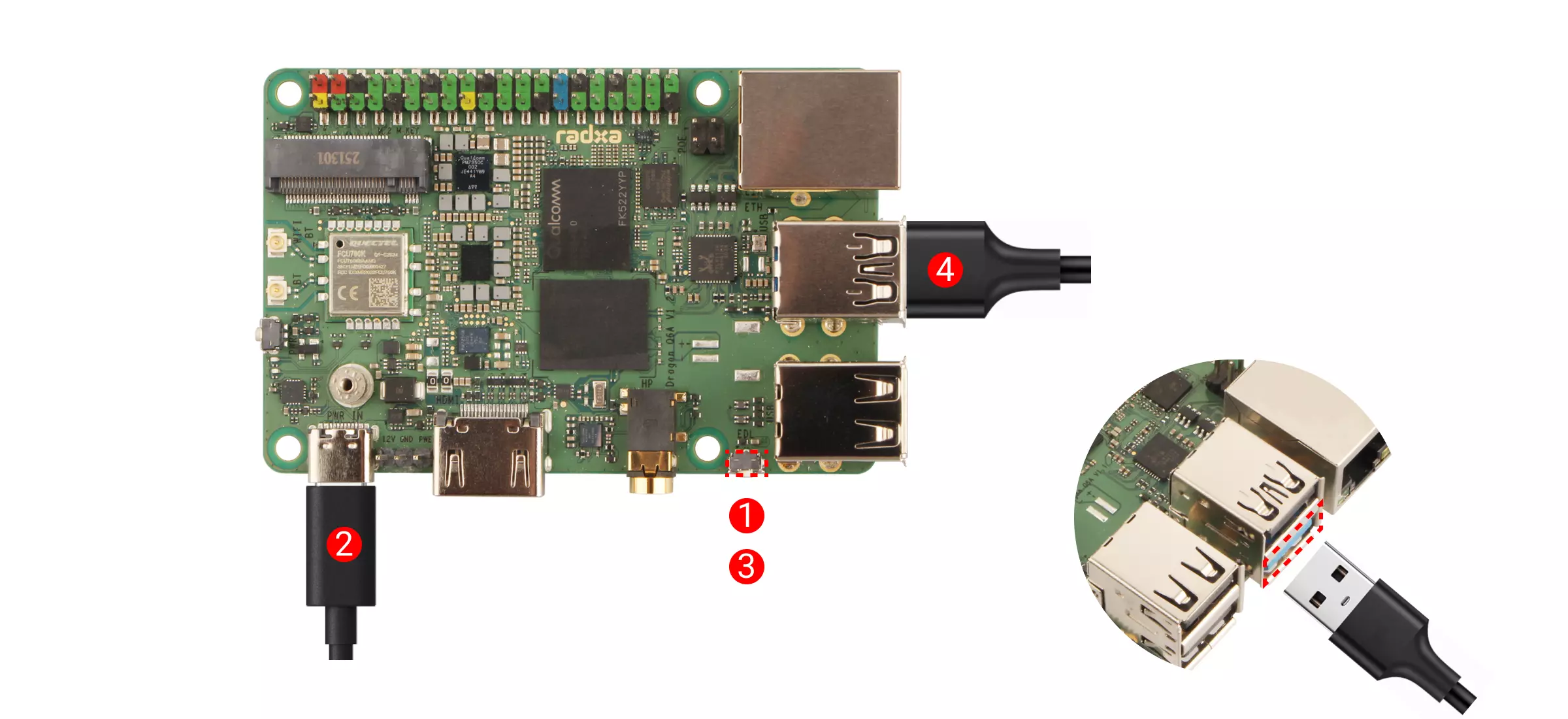
① : Hold down the EDL button
② : Connect a 12V Type-C power adapter (compatible with PD protocol)
③ : Release the EDL button
④ : Use a dual-head USB Type-A data cable to connect the USB 3.1 Type-A port of the Dragon Q6A to a USB Type-A port on the computer
Under normal circumstances, the motherboard will enter EDL mode.
Interface Pin Definition
Refer to the hardware schematic diagram on the Resource Summary Download page.