40-Pin GPIO Interface
The Radxa Dragon Q6A features an onboard 40-pin GPIO (General-Purpose Input/Output) interface, providing highly flexible interface support for hardware expansion.
Users can connect various sensors, actuators, communication modules, displays, and other embedded peripherals via the 40-pin GPIO interface, enabling rapid prototyping and functional verification in fields such as the Internet of Things (IoT), robotics control, and industrial automation.
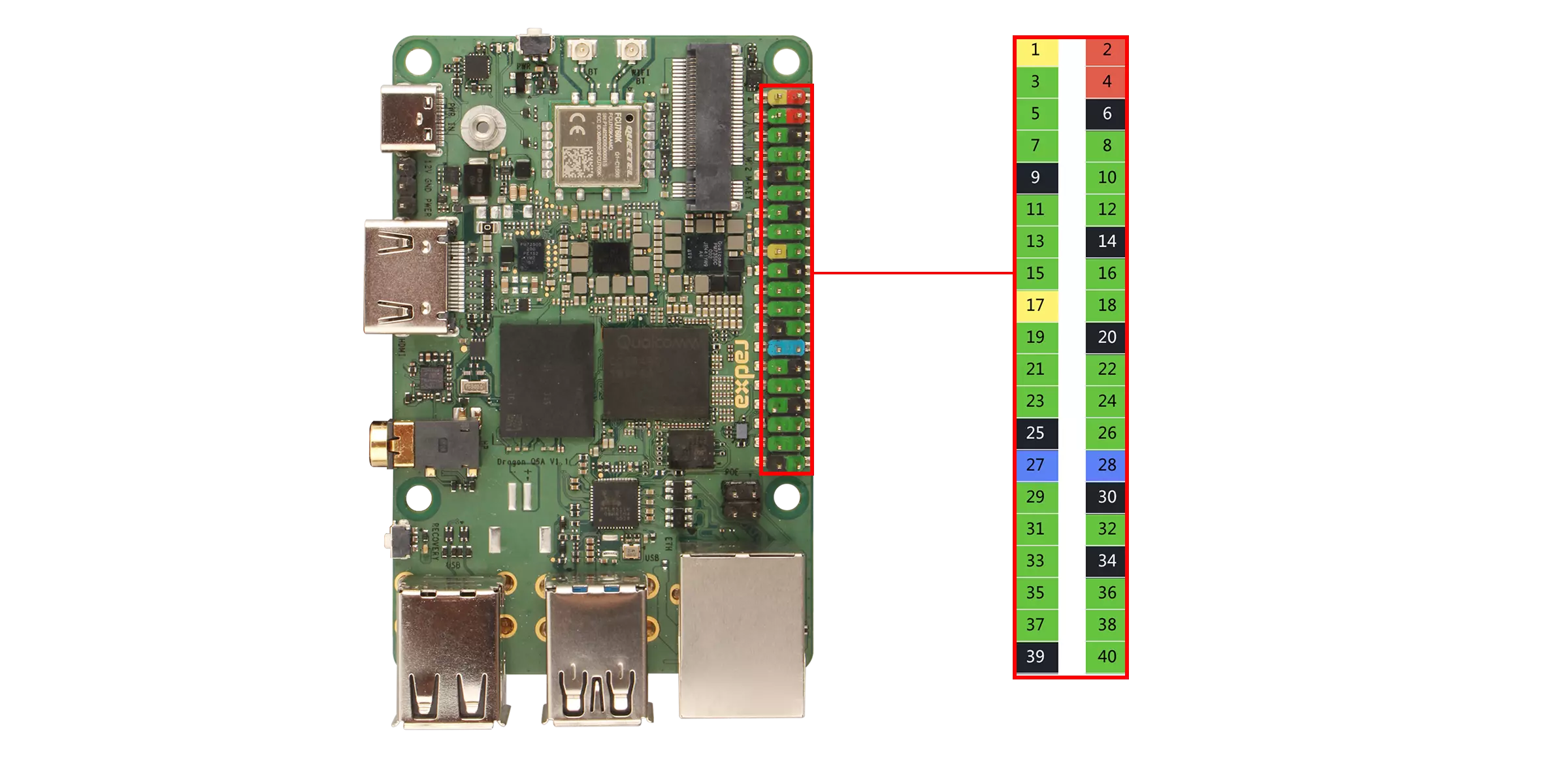
When using the 40-pin GPIO interface, pay attention to the wiring of the pins and peripherals, and ensure that the pins are connected correctly. Improper operation may result in damage to the device hardware.
GPIO Functions
Dragon Q6A supports connecting external devices to the onboard GPIO pins, including UART, SPI, I2C, I3C, I2S and more.
| Function4 | Function3 | Function2 | Function1 | Function0 | Pin# | Pin# | Function0 | Function1 | Function2 | Function3 | Function4 |
|---|---|---|---|---|---|---|---|---|---|---|---|
| 3V3 | 1 | 2 | 5V | ||||||||
| SPI6_MISO | I2C6_SDA | UART6_CTS | GPIO_24 | 3 | 4 | 5V | |||||
| SPI6_MOSI | I2C6_SCL | UART6_RFR | GPIO_25 | 5 | 6 | GND | |||||
| PRI_MI2S_MCLK | GPIO_96 | 7 | 8 | GPIO_22 | UART5_TX | SPI5_SCLK | |||||
| GND | 9 | 10 | GPIO_23 | UART5_RX | SPI5_CS_0 | ||||||
| SPI7_MOSI | I2C7_SCL | UART7_RFR | GPIO_29 | 11 | 12 | GPIO_97 | MI2S0_SCK | ||||
| I3C0_SDA | SPI0_MISO | I2C0_SDA | UART0_CTS | GPIO_0 | 13 | 14 | GND | ||||
| I3C0_SCL | SPI0_MOSI | I2C0_SCL | UART0_RFR | GPIO_1 | 15 | 16 | GPIO_26 | UART6_TX | SPI6_SCLK | ||
| 3V3 | 17 | 18 | GPIO_27 | UART6_RX | SPI6_CS_0 | ||||||
| SPI12_MOSI | I2C12_SCL | UART12_RFR | GPIO_49 | 19 | 20 | GND | |||||
| SPI12_MISO | I2C12_SDA | UART12_CTS | GPIO_48 | 21 | 22 | GPIO_57 | UART14_RFR | I2C14_SCL | SPI14_MOSI | ||
| SPI14_CS_3 | SPI12_SCLK | UART12_TX | GPIO_50 | 23 | 24 | GPIO_51 | UART12_RX | SPI12_CS_0 | |||
| GND | 25 | 26 | GPIO_55 | UART13_RX | SPI13_CS_0 | SPI12_CS_1 | |||||
| SPI2_MISO | I2C2_SDA | UART2_CTS | GPIO_8 | 27 | 28 | GPIO_9 | UART2_RFR | I2C2_SCL | SPI2_MOSI | ||
| SPI7_CS_0 | UART7_RX | GPIO_31 | 29 | 30 | GND | ||||||
| SPI7_MISO | I2C7_SDA | UART7_CTS | GPIO_28 | 31 | 32 | GPIO_30 | UART7_TX | SPI7_SCLK | |||
| SPI14_MISO | I2C14_SDA | UART14_CTS | GPIO_56 | 33 | 34 | GND | |||||
| MI2S0_WS | GPIO_100 | 35 | 36 | GPIO_59 | UART14_RX | SPI14_CS_0 | |||||
| SPI14_SCLK | UART14_TX | GPIO_58 | 37 | 38 | GPIO_98 | MI2S0_DATA0 | |||||
| GND | 39 | 40 | GPIO_99 | MI2S0_DATA1 |
GPIO Usage
This section demonstrates common GPIO usage through the onboard 40-pin GPIO interface.
Install Python Library
Use the python-periphery library to control GPIO pins.
sudo apt update
sudo apt install -y python3-periphery -y
GPIO Output/Input
Hardware Requirements
- Board
- Dupont wire
Software Requirements
- python-periphery library
Test Code
The following code uses the python-periphery library to control the GPIO_25 pin for outputting high/low levels and reads the GPIO_25 pin's state through the GPIO_96 pin.
gpio_output_input.py
from periphery import GPIO
import time

def gpio_output_with_feedback():
    # GPIO Configuration (modify pin numbers based on your hardware)
    # GPIO_25 (output) → maps to pin 25 of /dev/gpiochip4
    # GPIO_96 (input)  → maps to pin 96 of /dev/gpiochip4
    OUTPUT_PIN_CHIP = "/dev/gpiochip4"
    OUTPUT_PIN_NUMBER = 25  # GPIO_25 (output pin, controlled by the script)
    INPUT_PIN_NUMBER = 96   # GPIO_96 (input pin, reads GPIO_25's output state)

    # Initialize GPIO objects as None first (for safe release later)
    gpio_out = None
    gpio_in = None

    try:
        # Initialize GPIO_25 as OUTPUT mode
        gpio_out = GPIO(OUTPUT_PIN_CHIP, OUTPUT_PIN_NUMBER, "out")
        # Initialize GPIO_96 as INPUT mode
        gpio_in = GPIO(OUTPUT_PIN_CHIP, INPUT_PIN_NUMBER, "in")

        # Print test initialization info
        print("=== GPIO Output-Input Feedback Test Started ===")
        print(f"Controlled Pin (GPIO_25): {OUTPUT_PIN_CHIP} - Pin {OUTPUT_PIN_NUMBER} (OUTPUT)")
        print(f"Monitoring Pin (GPIO_96): {OUTPUT_PIN_CHIP} - Pin {INPUT_PIN_NUMBER} (INPUT)")
        print("Test Behavior: GPIO_25 toggles HIGH/LOW every 1s; GPIO_96 verifies GPIO_25's state")
        print("Press Ctrl+C to stop the test\n")

        # Main loop: Toggle GPIO_25 and read GPIO_96 feedback
        while True:
            # 1. Set GPIO_25 to HIGH level
            gpio_out.write(True)
            time.sleep(0.1)  # Short delay for signal stabilization (avoid read lag)
            gpio96_reading = gpio_in.read()
            print(f"GPIO_25 Output: HIGH (True) | GPIO_96 Reading: {gpio96_reading}")

            # Keep GPIO_25 HIGH for 1 second
            time.sleep(1)

            # 2. Set GPIO_25 to LOW level
            gpio_out.write(False)
            time.sleep(0.1)  # Short delay for signal stabilization
            gpio96_reading = gpio_in.read()
            print(f"GPIO_25 Output: LOW (False) | GPIO_96 Reading: {gpio96_reading}")

            # Keep GPIO_25 LOW for 1 second
            time.sleep(1)

    # Handle user-initiated exit (Ctrl+C)
    except KeyboardInterrupt:
        print("\n\nTest stopped by user (Ctrl+C)")
    # Handle other unexpected errors (e.g., GPIO access failure)
    except Exception as e:
        print(f"\nError during test: {str(e)}")
    # Ensure GPIO resources are released even if an error occurs
    finally:
        print("\nReleasing GPIO resources...")
        # Safely close GPIO_25 (set to LOW first to avoid residual high level)
        if gpio_out:
            try:
                gpio_out.write(False)
                gpio_out.close()
                print(f"Successfully closed GPIO_25 (Pin {OUTPUT_PIN_NUMBER})")
            except Exception as close_err:
                print(f"Failed to close GPIO_25 (Pin {OUTPUT_PIN_NUMBER}): {str(close_err)}")
        # Safely close GPIO_96
        if gpio_in:
            try:
                gpio_in.close()
                print(f"Successfully closed GPIO_96 (Pin {INPUT_PIN_NUMBER})")
            except Exception as close_err:
                print(f"Failed to close GPIO_96 (Pin {INPUT_PIN_NUMBER}): {str(close_err)}")
        print("Resource release complete.")

# Run the test when the script is executed directly
if __name__ == "__main__":
    gpio_output_with_feedback()
Test Steps
-
Short-circuit the GPIO_25 and GPIO_96 pins using a jumper wire
-
Save the code as
gpio_output_input.py -
Run the test code using the command:
sudo python3 gpio_output_input.py
Expected Results
The terminal will display the output level of GPIO_25 and the level read by GPIO_96.
- False represents a LOW level
- True represents a HIGH level