RTC Interface
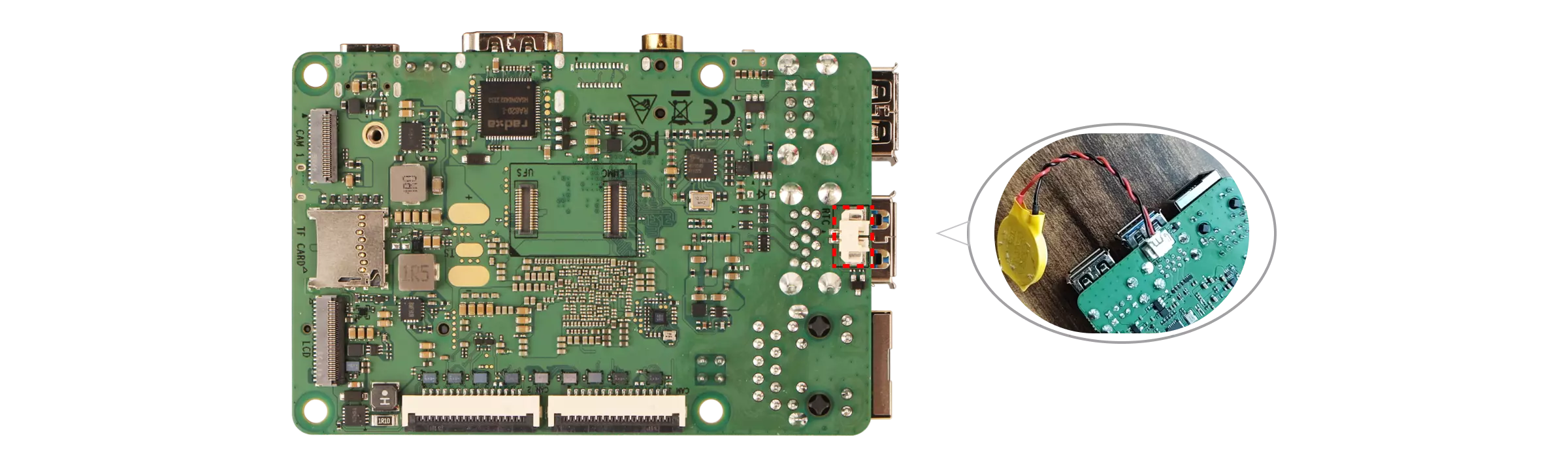
The Dragon Q6A has an onboard RTC interface for installing a coin cell battery.
Hardware Connection
Install the CR2032 button battery into the RTC interface of the Radxa Dragon Q6A. When installing, please pay attention to the positive and negative terminals of the battery.
Interface parameters:
-
Interface type: 2-Pin 1.25mm
-
Battery type: CR2032
-
Working voltage: 3.3V
Configuring the RTC
Confirming the RTC hardware
Use the following command to confirm that the RTC hardware is functioning properly.
sudo dmesg | grep rtc
The terminal outputs information similar to: registered as rtc0, indicating that the RTC battery has been correctly identified.
[    0.368528] msm_dpu ae01000.display-controller: [drm] Cannot find any crtc or sizes
[    0.368720] msm_dpu ae01000.display-controller: [drm] Cannot find any crtc or sizes
[    6.259233] rtc-ds1307 10-0068: registered as rtc0
[    6.260658] rtc-ds1307 10-0068: setting system clock to 2025-08-06T08:39:15 UTC (1754469555)
Reading RTC time
The terminal uses the hwclock command to read the current time from the RTC chip (/dev/rtc0).
sudo apt update
sudo apt install util-linux util-linux-extra -y
sudo hwclock -r -f /dev/rtc0
Display the system time
Use the date command to display the current system time.
date
Setting the RTC time
If the RTC time and system time are inconsistent, you can use the hwclock command to write the current system time to the RTC.
sudo hwclock -w -f /dev/rtc0
Verifying RTC Functionality
Record the current system time, then disconnect the motherboard power supply and network connection, wait for about 10 minutes, then reconnect the power supply and observe whether the system time is counting normally.
Interface Pin Definitions
Refer to the hardware schematic diagram on the Resource Summary Download page.