QAI AppBuilder
Quick AI Application Builder (QAI AppBuilder) helps developers easily use the Qualcomm® AI Runtime SDK to deploy AI models and design AI applications on Qualcomm® SoC platforms equipped with the Qualcomm® Hexagon™ Processor (NPU). It encapsulates model deployment APIs into a set of simplified interfaces for loading models to the NPU and performing inference. QAI AppBuilder significantly reduces the complexity of model deployment for developers and provides multiple demos as references for designing their own AI applications.
Supports Python API / C++ API
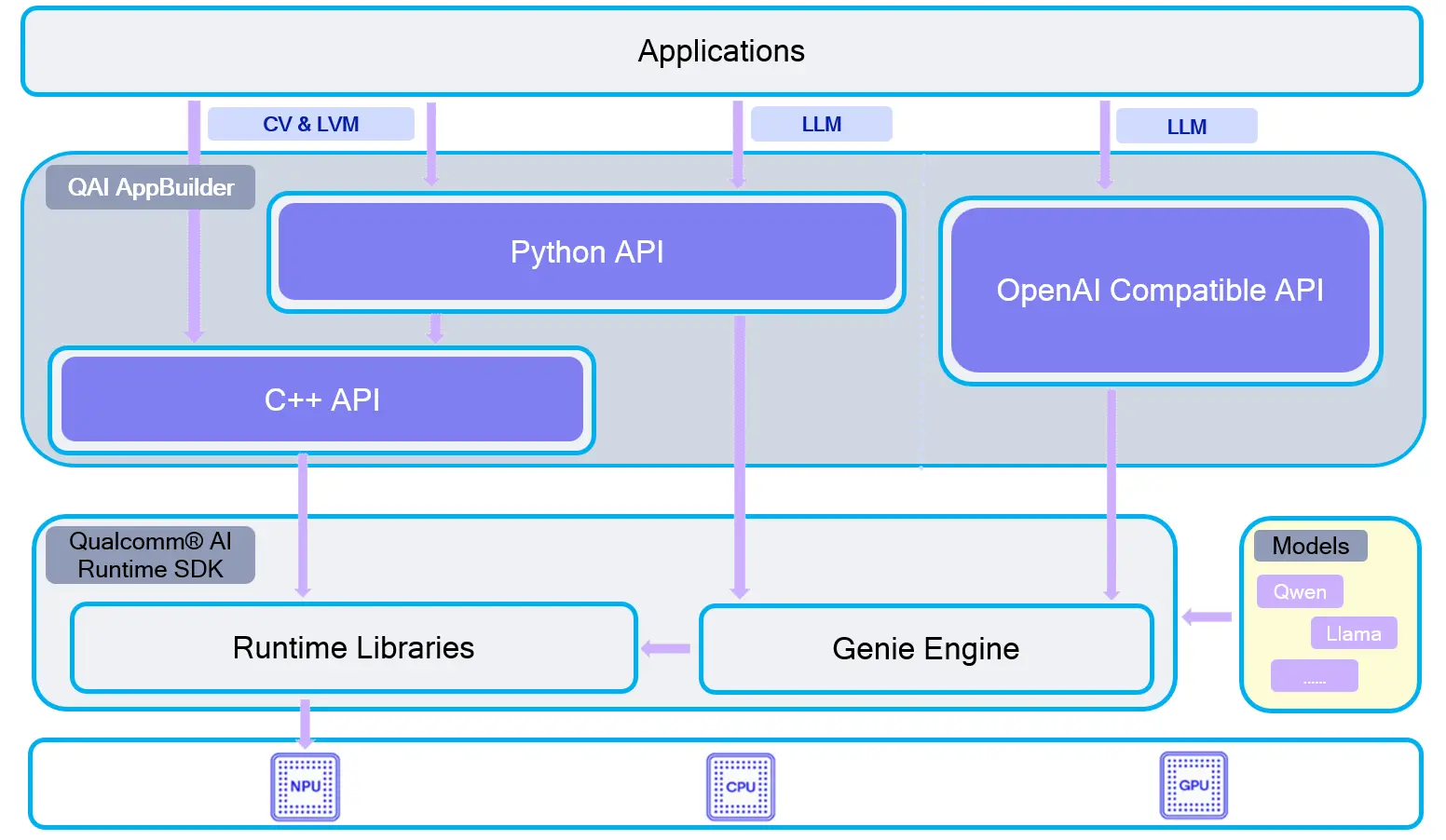
QAI-APPBUILDER architecture
Supported devices
| Device | SoC |
|---|---|
| Dragon Q6A | QCS6490 |
| Dragon Q8B | SC8280XP |
| Fogwise® AIRbox Q900 | QCS9075 |
Installation methods
Install with a wheel package is recommended. To build from source, see Build from source.
Clone the repository
git clone https://github.com/qualcomm/qai-appbuilder.git && cd qai-appbuilder
Install with a wheel package
Create a virtual environment
Create a virtual environment before installing Python packages for isolation.
sudo apt install python3-venv
python3 -m venv .venv
source .venv/bin/activate
Install qai_appbuilder
Download the Linux aarch64 wheel that matches your Python version from GitHub Releases. For Python 3.12, for example:
pip3 install https://github.com/qualcomm/qai-appbuilder/releases/download/v2.48.40/qai_appbuilder-2.48.40-cp312-cp312-manylinux_2_39_aarch64.whl
Starting from v2.0.0, the Python wheel bundles the required Qualcomm® AI Runtime libraries (such as libQnnHtp.so and Hexagon skels). You usually do not need a full QAIRT SDK install for Python inference.
Verify the installation:
python3 -c "import qai_appbuilder; print(qai_appbuilder.__file__)"
Build from source
To build from source, install build dependencies and prepare the QAIRT SDK.
Install build dependencies
sudo apt update
sudo apt install -y cmake build-essential python3-dev python3-venv
git clone https://github.com/qualcomm/qai-appbuilder.git --recursive
cd qai-appbuilder
python3 -m venv .venv
source .venv/bin/activate
pip3 install wheel==0.45.1 setuptools==80.9.0 pybind11==2.13.6 build==1.4.0
Configure QAIRT environment variables
Extract the QAIRT SDK first. Replace <path_to_qairt> with the actual SDK path:
export QNN_SDK_ROOT=<path_to_qairt>
export QAI_TOOLCHAINS=aarch64-oe-linux-gcc11.2
Build and install the qai_appbuilder wheel
python3 -m build -w
python3 -m pip install dist/qai_appbuilder-*.whl
The wheel version follows the linked QAIRT SDK version. See the official BUILD.md for details.
Create ADSP environment variables
Before running NPU inference on Linux, set ADSP_LIBRARY_PATH to a directory that contains the Hexagon skel libraries (for example libQnnHtpV68Skel.so / libQnnHtpV73Skel.so).
Use the bundled wheel libraries (recommended)
After installing the wheel, point to the package libs directory:
export ADSP_LIBRARY_PATH=$(python3 -c "import os, qai_appbuilder; print(os.path.join(os.path.dirname(qai_appbuilder.__file__), 'libs'))")
Use system QAIRT packages
System packages such as qairt-libs and qairt-dsp-binaries come from the Qualcomm apt repository (ppa:ubuntu-qcom-iot/qcom-ppa). This repository is not configured by default — add it manually before installing the packages:
sudo apt update && sudo apt install -y software-properties-common
sudo add-apt-repository -y ppa:ubuntu-qcom-iot/qcom-ppa
sudo apt update
sudo apt install -y qairt-libs qairt-dsp-binaries
If packages such as qairt-dsp-binaries are already installed, you can also point ADSP_LIBRARY_PATH to the platform DSP directory. For QCS6490, for example:
export ADSP_LIBRARY_PATH=/usr/share/qcom/qcm6490/Thundercomm/RB3gen2/dsp/cdsp
You can add the export line to ~/.bashrc and run source ~/.bashrc to make it persistent.
Application examples
Upstream samples are reorganized by task type. On Linux, pass --chipset so the script can download the matching model package:
- QCS6490 / SC8280XP:
--chipset 6490 - QCS9075:
--chipset 9075
For more samples, see the upstream samples/README.md. You can also refer to local Demo examples.
Install sample dependencies
Install common sample dependencies in the activated virtual environment:
pip3 install requests tqdm qai-hub py3-wget Pillow torch torchvision opencv-python-headless
Enter the samples directory
cd qai-appbuilder/samples
Run samples
You can run a sample script directly, or use the interactive launcher:
python3 run_inference.py --list
python3 run_inference.py --model inception_v3 --args "--chipset 6490"
- QCS6490
- SC8280XP
- QCS9075
-
Image classification
Model How to run googlenet python3 ComputerVision/Image_Classification/googlenet/googlenet.py --chipset 6490inception_v3 python3 ComputerVision/Image_Classification/inception_v3/inception_v3.py --chipset 6490 -
Object detection
Model How to run yolov8_det python3 ComputerVision/Object_Detection/yolov8_det/yolov8_det.py --chipset 6490 -
Super resolution
Model How to run quicksrnetmedium python3 ComputerVision/Super_Resolution/quicksrnetmedium/quicksrnetmedium.py --chipset 6490real_esrgan_general_x4v3 python3 ComputerVision/Super_Resolution/real_esrgan_general_x4v3/real_esrgan_general_x4v3.py --chipset 6490real_esrgan_x4plus python3 ComputerVision/Super_Resolution/real_esrgan_x4plus/real_esrgan_x4plus.py --chipset 6490 --bin --no_show
Upstream Linux sample scripts currently select model packages with --chipset 6490 / --chipset 9075. SC8280XP and QCS6490 both use Hexagon V68, so use --chipset 6490 when downloading models.
-
Image classification
Model How to run googlenet python3 ComputerVision/Image_Classification/googlenet/googlenet.py --chipset 6490inception_v3 python3 ComputerVision/Image_Classification/inception_v3/inception_v3.py --chipset 6490 -
Object detection
Model How to run yolov8_det python3 ComputerVision/Object_Detection/yolov8_det/yolov8_det.py --chipset 6490 -
Super resolution
Model How to run quicksrnetmedium python3 ComputerVision/Super_Resolution/quicksrnetmedium/quicksrnetmedium.py --chipset 6490real_esrgan_general_x4v3 python3 ComputerVision/Super_Resolution/real_esrgan_general_x4v3/real_esrgan_general_x4v3.py --chipset 6490real_esrgan_x4plus python3 ComputerVision/Super_Resolution/real_esrgan_x4plus/real_esrgan_x4plus.py --chipset 6490 --bin --no_show
-
Image generation / image editing
Model How to run stable_diffusion_v2_1 python3 GenerativeAI/Image_Generation/stable_diffusion_v2_1/stable_diffusion_v2_1.py --chipset 9075 --prompt "the prompt string ..."stable_diffusion_v1_5 python3 GenerativeAI/Image_Generation/stable_diffusion_v1_5/stable_diffusion_v1_5.py --chipset 9075 --prompt "the prompt string ..."lama_dilated python3 ComputerVision/Image_Editing/lama_dilated/lama_dilated.py --chipset 9075aotgan python3 ComputerVision/Image_Editing/aotgan/aotgan.py --chipset 9075 -
Super resolution
Model How to run real_esrgan_x4plus python3 ComputerVision/Super_Resolution/real_esrgan_x4plus/real_esrgan_x4plus.py --chipset 9075real_esrgan_general_x4v3 python3 ComputerVision/Super_Resolution/real_esrgan_general_x4v3/real_esrgan_general_x4v3.py --chipset 9075quicksrnetmedium python3 ComputerVision/Super_Resolution/quicksrnetmedium/quicksrnetmedium.py --chipset 9075 -
Image recognition
Model How to run inception_v3 python3 ComputerVision/Image_Classification/inception_v3/inception_v3.py --chipset 9075beit python3 ComputerVision/Image_Classification/beit/beit.py --chipset 9075googlenet python3 ComputerVision/Image_Classification/googlenet/googlenet.py --chipset 9075 -
Pose estimation
Model How to run openpose python3 ComputerVision/Pose_Estimation/openpose/openpose.py --chipset 9075mediapipe_hand python3 ComputerVision/Pose_Estimation/mediapipe_hand/mediapipe_hand.py --chipset 9075 -
Segmentation / depth estimation
Model How to run unet_segmentation python3 ComputerVision/Semantic_Segmentation/unet_segmentation/unet_segmentation.py --chipset 9075depth_anything python3 ComputerVision/Depth_Estimation/depth_anything/depth_anything.py --chipset 9075 -
Object detection
Model How to run yolov8_det python3 ComputerVision/Object_Detection/yolov8_det/yolov8_det.py --chipset 9075 -
3D face modeling
Model How to run facemap_3dmm python3 ComputerVision/Face_Recognition/facemap_3dmm/facemap_3dmm.py --chipset 9075face_attrib_net python3 ComputerVision/Face_Recognition/face_attrib_net/face_attrib_net.py --chipset 9075 -
Audio models
Model How to run yamnet python3 audio/Audio_Classification/yamnet/yamnet.py --chipset 9075whisper_base_en python3 audio/Speech_Recognition/whisper_base_en/whisper_base_en.py --chipset 9075whisper_tiny_en python3 audio/Speech_Recognition/whisper_tiny_en/whisper_tiny_en.py --chipset 9075 -
Text / multimodal embedding
Model How to run nomic_embed_text python3 Multimodal/Text_Generation/nomic_embed_text/nomic_embed_text.py --chipset 9075openai_clip python3 Multimodal/Image_Classification/openai_clip/openai_clip.py --chipset 9075 --text "mountain"qwen_vl Download model package first; python3 Multimodal/qwen_vl/qwen_vl.py --model qwen2 --path ./qwen2vl2b(see sample page) -
3D action recognition
Model How to run resnet_3d python3 ComputerVision/Video_Classification/resnet_3d/resnet_3d.py --chipset 9075 -
OCR
Model How to run easy_ocr python3 Multimodal/Image_To_Text/easy_ocr/easy_ocr.py --chipset 9075