QAI Hub Models
Qualcomm® AI Hub Models (QAI-Hub-Models) Leveraging the cloud services provided by QAI-Hub, it supports quantization, compilation, inference, analysis, and downloading of models from the model list on cloud devices via command line.
Usage Guide
Install qai_hub_models
pip3 install qai_hub_models
Configure API Token
First, register and log in to Qualcomm® AI Hub to obtain your API Token
qai-hub configure --api_token API_TOKEN
Usage Examples
QAI HUB MODELS Model Compilation Example
This example demonstrates compiling RealESRGAN_x4plus into a Context-Binary model format with 128x128 input size and w8a8 quantization for NPU inference, providing a simple introduction to using Qualcomm® AI Hub Models for model compilation.
- QCS6490
- SC8280XP
- QCS9075
export PRODUCT_CHIP=qualcomm-qcs6490-proxy
export PRODUCT_CHIP=qualcomm-sc8280xp-proxy
export PRODUCT_CHIP=qualcomm-qcs9075-proxy
python3 -m qai_hub_models.models.real_esrgan_x4plus.export --chipset ${PRODUCT_CHIP} --target-runtime qnn_context_binary --height 128 --width 128 --quantize w8a8 --num-calibration-samples 10
--chipset Specifies the target chipset
--target-runtime Specifies the target runtime
--height Input height for the target model
--width Input width for the target model
--quantize Specifies the quantization method
--num-calibration-samples Specifies the number of calibration images for quantization
For detailed usage of qai_hub_models.models.real_esrgan_x4plus.export, use the --help flag
All model compilation information and logs can be viewed in the JOBS section of Qualcomm® AI Hub
(.venv) (base) radxa@vms-max:/mnt/sda1/qualcomm/qai-hub/ai_hub_model$ python3 -m qai_hub_models.models.real_esrgan_x4plus.export --chipset "qualcomm-qcs6490-proxy" --target-runtime qnn_context_binary  --height 128 --width 128 --quantize w8a8 --num-calibration-samples 10
Quantizing model real_esrgan_x4plus.
Uploading tmplaenxfnu.pt
100%|██████████████████████████████████████████████████████████████████████████████████████████████████| 64.8M/64.8M [00:06<00:00, 11.1MB/s]
Scheduled compile job (jgon7zqkp) successfully. To see the status and results:
    https://app.aihub.qualcomm.com/jobs/jgon7zqkp/

Loading 10 calibration samples.
Waiting for compile job (jgon7zqkp) completion. Type Ctrl+C to stop waiting at any time.
    ✅ SUCCESS
Uploading dataset: 700kB [00:01, 522kB/s]
Scheduled quantize job (jpew0o3vp) successfully. To see the status and results:
    https://app.aihub.qualcomm.com/jobs/jpew0o3vp/

Waiting for quantize job (jpew0o3vp) completion. Type Ctrl+C to stop waiting at any time.
    ✅ SUCCESS
Optimizing model real_esrgan_x4plus to run on-device
Scheduled compile job (jgdqynlz5) successfully. To see the status and results:
    https://app.aihub.qualcomm.com/jobs/jgdqynlz5/

Profiling model real_esrgan_x4plus on a hosted device.
Waiting for compile job (jgdqynlz5) completion. Type Ctrl+C to stop waiting at any time.
    ✅ SUCCESS
Scheduled profile job (jp4d6n01p) successfully. To see the status and results:
    https://app.aihub.qualcomm.com/jobs/jp4d6n01p/

Running inference for real_esrgan_x4plus on a hosted device with example inputs.
Downloading data at https://qaihub-public-assets.s3.us-west-2.amazonaws.com/qai-hub-models/models/super_resolution/v2/super_resolution_input.jpg to /home/zifeng/.qaihm/models/super_resolution/v2/super_resolution_input.jpg
100%|██████████████████████████████████████████████████████████████████████████████████████████████████| 16.5k/16.5k [00:00<00:00, 92.2MB/s]
Done
Uploading dataset: 104kB [00:01, 100kB/s]
Scheduled inference job (jpx6892lp) successfully. To see the status and results:
    https://app.aihub.qualcomm.com/jobs/jpx6892lp/

real_esrgan_x4plus.bin: 100%|██████████████████████████████████████████████████████████████████████████| 21.5M/21.5M [00:02<00:00, 7.97MB/s]
Downloaded model to /mnt/sda1/qualcomm/qai-hub/ai_hub_model/build/real_esrgan_x4plus/real_esrgan_x4plus.bin
Waiting for profile job (jp4d6n01p) completion. Type Ctrl+C to stop waiting at any time.
    ✅ SUCCESS

------------------------------------------------------------
Performance results on-device for Real_Esrgan_X4Plus.
------------------------------------------------------------
Device                          : QCS6490 (Proxy) (ANDROID 12)
Runtime                         : QNN_CONTEXT_BINARY
Estimated inference time (ms)   : 171.8
Estimated peak memory usage (MB): [0, 13]
Total # Ops                     : 1027
Compute Unit(s)                 : npu (1027 ops) gpu (0 ops) cpu (0 ops)
------------------------------------------------------------
More details: https://app.aihub.qualcomm.com/jobs/jp4d6n01p/

tmpz9r34tur.h5: 100%|███████████████████████████████████████████████████████████████████████████████████| 1.05M/1.05M [00:03<00:00, 357kB/s]

Comparing on-device vs. local-cpu inference for Real_Esrgan_X4Plus.
+----------------+------------------+--------+
| output_name    | shape            |   psnr |
+================+==================+========+
| upscaled_image | (1, 512, 512, 3) |  24.49 |
+----------------+------------------+--------+

- psnr: Peak Signal-to-Noise Ratio (PSNR). >30 dB is typically considered good.

More details: https://app.aihub.qualcomm.com/jobs/jpx6892lp/

Run compiled model on a hosted device on sample data using:
python /mnt/sda1/qualcomm/qai-hub/.venv/lib/python3.10/site-packages/qai_hub_models/models/real_esrgan_x4plus/demo.py --eval-mode on-device --hub-model-id mm63gld2m --chipset qualcomm-qcs6490-proxy
QAI HUB MODELS Inference Demo
Based on the instructions at the end of the model compilation example, you can run inference on the compiled model on cloud devices and view the results
Modify the hub-model-id parameter to match the hub-model-id printed at the end of the model compilation results
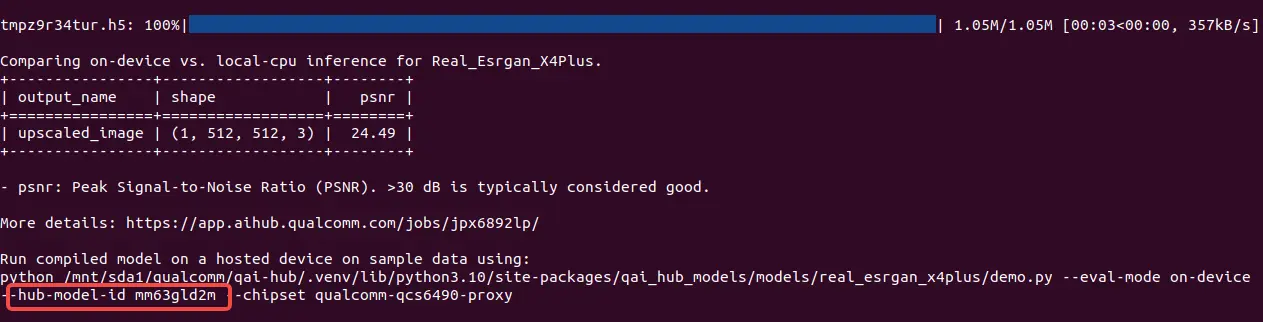
Location of the hub-model-id parameter
python3 -m qai_hub_models.models.real_esrgan_x4plus.demo --eval-mode on-device --hub-model-id mm63gld2m --chipset ${PRODUCT_CHIP}
(.venv) (gen_py3.10) radxa@vms-max:~/Job/git_clone/ai-hub-models$ python3 -m qai_hub_models.models.real_esrgan_x4plus.demo --eval-mode on-device --hub-model-id mm63gld2m --chipset qualcomm-qcs6490-proxy
/mnt/sda1/git_clone/ai-hub-models/.venv/lib/python3.10/site-packages/qai_hub_models/utils/onnx_torch_wrapper.py:22: UserWarning: pkg_resources is deprecated as an API. See https://setuptools.pypa.io/en/latest/pkg_resources.html. The pkg_resources package is slated for removal as early as 2025-11-30. Refrain from using this package or pin to Setuptools<81.
  import pkg_resources
Model Loaded
Uploading dataset: 104kB [00:02, 52.5kB/s]
Scheduled inference job (jgj29j8e5) successfully. To see the status and results:
    https://app.aihub.qualcomm.com/jobs/jgj29j8e5/

Waiting for inference job (jgj29j8e5) completion. Type Ctrl+C to stop waiting at any time.
    ✅ SUCCESS
tmpe9b4q_c2.h5: 100%|██████████████████████████████████████████████████████████████████████████████████| 1.03M/1.03M [00:00<00:00, 2.04MB/s]
Displaying original image
Displaying upscaled image
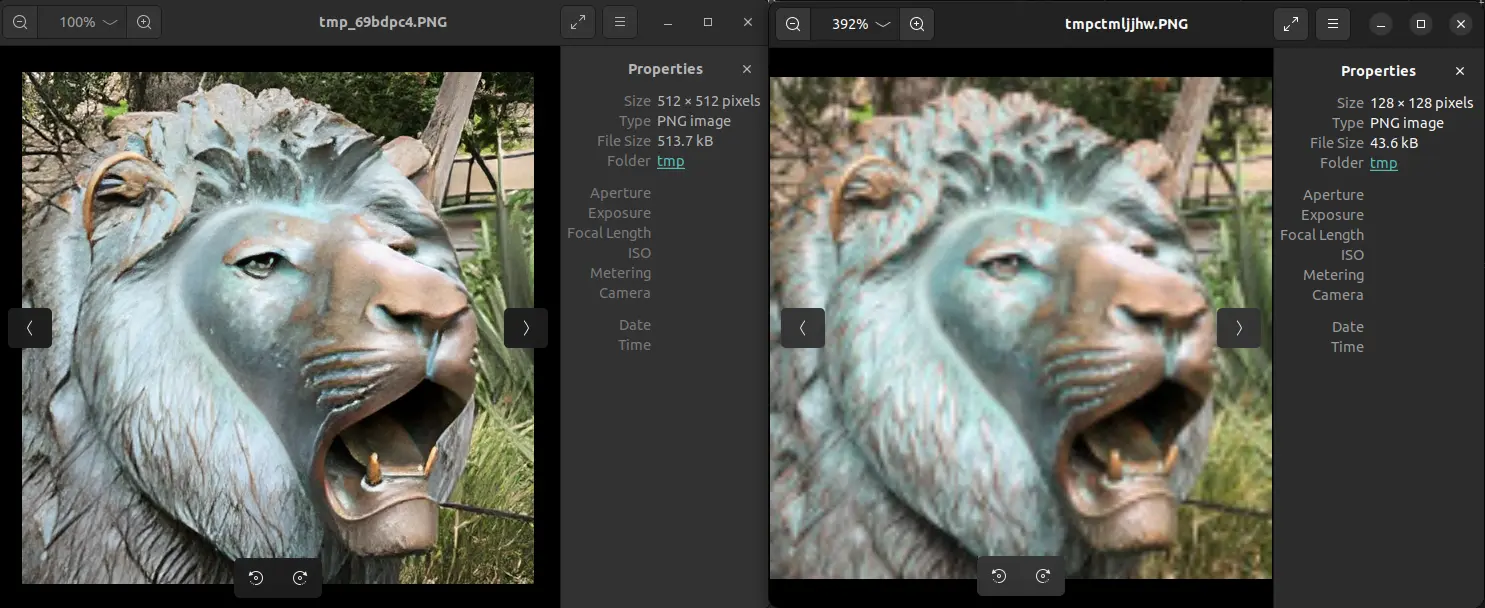
The left side shows the result image, and the right side shows the input image
Model List
Computer Vision
Multimodal
| Model | README |
|---|---|
| EasyOCR | qai_hub_models.models.easyocr |
| Nomic-Embed-Text | qai_hub_models.models.nomic_embed_text |
| OpenAI-Clip | qai_hub_models.models.openai_clip |
| TrOCR | qai_hub_models.models.trocr |