QAIRT SDK Installation
The QAIRT (Qualcomm® AI Runtime) SDK is a software package that integrates Qualcomm® AI software products, including Qualcomm® AI Engine Direct, Qualcomm® Neural Processing SDK, and Qualcomm® Genie. QAIRT provides developers with all the necessary tools for porting and deploying AI models on Qualcomm® hardware accelerators, along with the runtime for running models on CPU, GPU, and NPU.
Currently, the QAIRT SDK supports model porting for Pytorch, TensorFlow, TFLite, and ONNX frameworks.
Supported inference hardware accelerators: CPU, GPU, NPU.
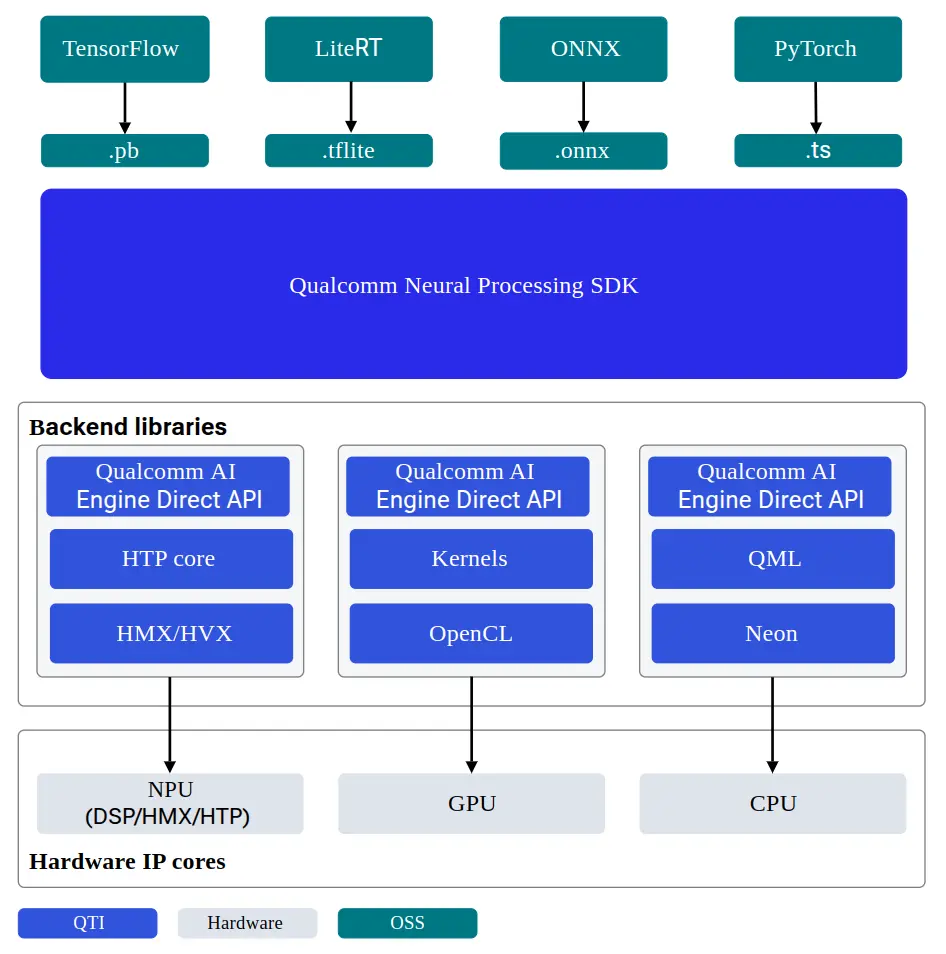
QAIRT SDK Architecture
QAIRT SDK System Requirements
- 64-bit x86 processor
- Ubuntu 22.04
- Python 3.10
Download QAIRT SDK Package
Please use QAIRT SDK version 2.42.0.251225
export QAIRT_VERSION=2.42.0.251225
-
Download the
2.42.0.251225QAIRT SDK from Qualcomm® Software CenterX86 Linux PC / Qualcomm Devicewget https://softwarecenter.qualcomm.com/api/download/software/sdks/Qualcomm_AI_Runtime_Community/All/${QAIRT_VERSION}/v${QAIRT_VERSION}.zip -
Extract the QAIRT SDK package
X86 Linux PC / Qualcomm Deviceunzip v${QAIRT_VERSION}.zip
cd qairt/${QAIRT_VERSION}
Configure QAIRT Environment
Create Python Environment
QAIRT requires a Python 3.10 environment. Users can create one using Anaconda.
-
For Anaconda installation, refer to: Conda Installation
-
For creating a conda Python environment, refer to: Creating a Specific Python Version Environment
After installing Anaconda, create and activate a Python 3.10 environment using the terminal:
conda create -n qairt python=3.10
conda activate qairt
Configure QAIRT Environment Variables
source bin/envsetup.sh
Check Dependencies
-
Check library dependencies
X86 Linux PCsudo ${QAIRT_SDK_ROOT}/bin/check-linux-dependency.shChecking for libncurses5
Checking for libgl1
Checking for libgtk-3-dev
Checking for libasound2-dev
Checking for libnss3
Checking for git
Checking for nodejs
Checking for npm
Checking for libgbm-dev
Checking for desktop-file-utils
Checking for python3-dev
Checking for python3-pip
Checking for python3-setuptools
Checking for clang
Checking for libc++-dev
Checking for libc++abi-dev
Checking for flatbuffers-compiler
Checking for libflatbuffers-dev
Checking for rename
=============================================================
All Dependency Packages Found
Done!! -
Check Toolchain Dependencies
X86 Linux PC${QAIRT_SDK_ROOT}/bin/envcheck -cChecking Clang Environment
--------------------------------------------------------------
[INFO] Found clang++ at /usr/bin/clang++
-------------------------------------------------------------- -
Install Python Library Dependencies
X86 Linux PCpython3 "${QAIRT_SDK_ROOT}/bin/check-python-dependency"
Install AI Frameworks
Select the model framework libraries to install based on your business model format. It's not necessary to install all of them.
| Package Name | Version |
|---|---|
| TensorFlow | 2.10.1 |
| TFLite | 2.3.0 |
| PyTorch | 1.13.1 |
| ONNX | 1.16.1 |
| ONNX Runtime | 1.17.1 |
| ONNX Simplifier | 0.4.36 |
Complete SDK Documentation
The QAIRT SDK integrates Qualcomm® AI Engine Direct (QNN), Qualcomm® Neural Processing SDK (SNPE), and Qualcomm® Genie (Genie). The detailed documentation is available at the following locations:
Local Documentation
-
qairt/2.42.0.251225/docs/QNN -
qairt/2.42.0.251225/docs/SNPE -
qairt/2.42.0.251225/docs/Genie
Online Documentation
ARM64 Docker Image
Radxa provides a Docker image for using the QAIRT SDK on the board. Alternatively, you can follow the instructions in this document to install it manually.
-
Install Docker
tipRefer to Docker Usage for Docker installation instructions
-
Pull the Docker image
- QCS6490
- SC8280XP
- QCS9075
Devicesudo docker pull radxazifeng278/qairt-npu-v68:v1.2- Run the Docker image
Devicesudo docker run --privileged -it -v /dev:/dev -v $(pwd):/workspace --name qairt-sdk radxazifeng278/qairt-npu-v68:v1.2 /bin/bashDevicesudo docker pull radxazifeng278/qairt-npu-v68:v1.0- 运行 docker 镜像
Devicesudo docker run --privileged -it -v /dev:/dev -v $(pwd):/workspace --name qairt-sdk radxazifeng278/qairt-npu-v68:v1.0 /bin/bashDevicesudo docker pull radxazifeng278/qairt-npu-9075:v1.1- Run the Docker image
Devicesudo docker run --privileged -it -v /dev:/dev -v $(pwd):/workspace --name qairt-sdk radxazifeng278/qairt-npu-9075:v1.1 /bin/bashNote: In the
radxazifeng278/qairt-npu-9075:v1.1image, the QAIRT directory is located at/root/qairt. If you are unsure after entering the container, confirm it with:find / -name "qairt"