Power Button / Pins
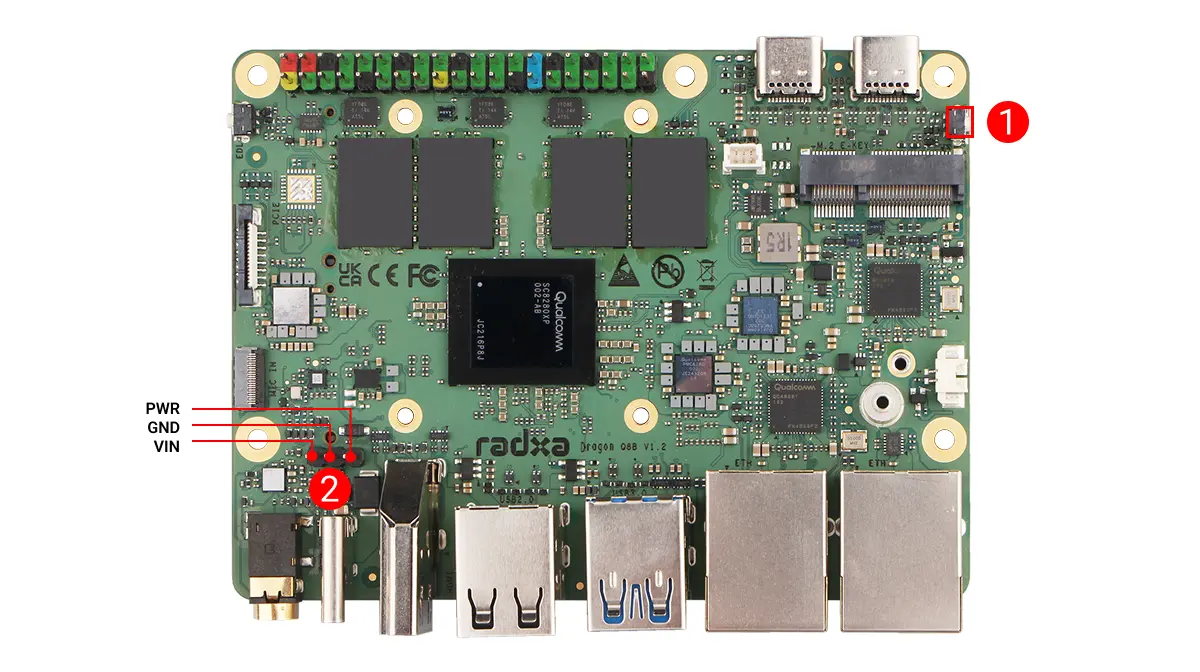
The Radxa Dragon Q8B has an onboard power button (PER_BTN) and exposed power (PWR) pins for controlling the motherboard power switch.
① : Power button
② : PWR pins
User Guide
Power Button
When the motherboard is powered off, press the power button to start the motherboard.
When the motherboard is powered on, press the power button and the system enters sleep mode by default.
Note: The action triggered by pressing the power button can be changed in system settings: Power -> Power Button Behavior. Available options are: Suspend, Power off, and Nothing.
PWR Pins
When the motherboard is powered off, briefly short the PWR pin and GND pin to start the motherboard.
When the motherboard is powered on, briefly short the PWR pin and GND pin and the system enters sleep mode by default.
Note: The action triggered by shorting the power pins can be changed in system settings: Power -> Power Button Behavior. Available options are: Suspend, Power off, and Nothing.