USB-A / C Ports
The Radxa Dragon Q8B has 3 USB-C ports, 2 USB 2.0 Type-A ports, and 2 USB 3.2 Gen2 Type-A ports.
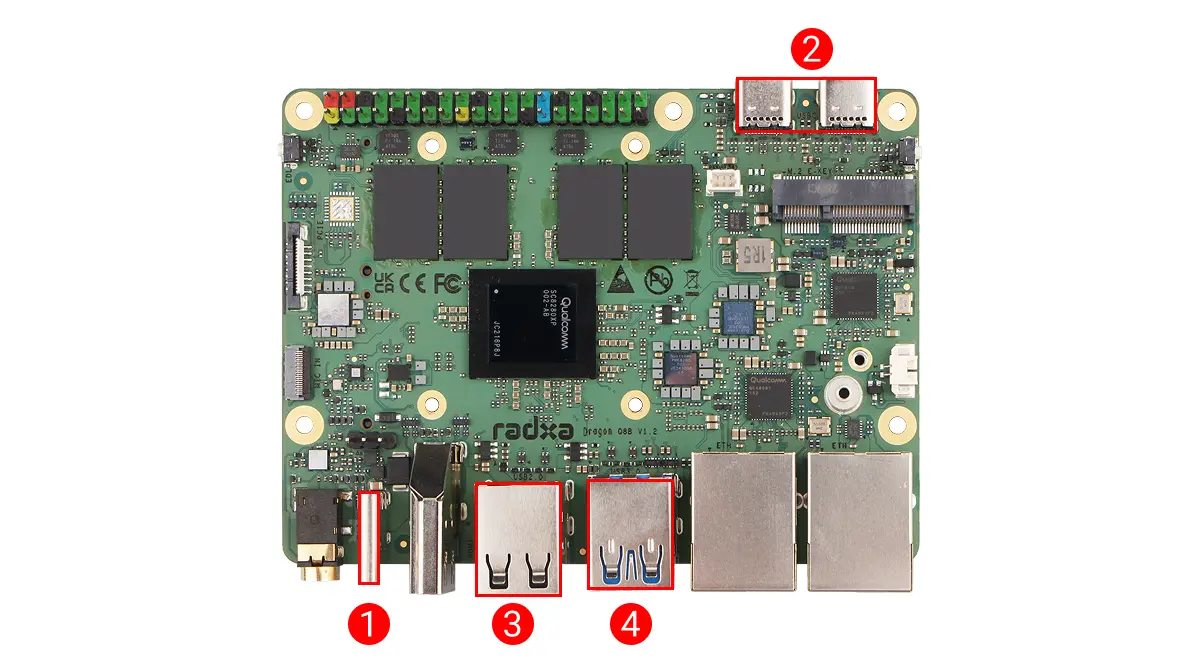
- USB-C port
Only supports 20 V power input for the motherboard and is compatible with the PD protocol.
- 2x USB-C ports
Support flashing and DP Alt Mode.
- USB 2.0 Type-A ports
The theoretical maximum transfer rate is 480 Mbps. The internal color of the ports is black.
- USB 3.2 Gen2 Type-A ports
The theoretical maximum transfer rate is 10 Gbps. The internal color of the ports is blue.
Hardware Connection
To test the HOST mode functionality of the USB ports, you can test the basic functionality of devices connected to the USB ports and the read/write speed of USB drives.
Basic Functionality
You can connect devices such as card readers, mice, and keyboards to the USB ports, and test whether they are recognized and work normally by plugging and unplugging them.
No External Devices Connected
Use the lsusb command to view the devices currently recognized by the system.
lsusb
Terminal output example:
Bus 001 Device 001: ID 1d6b:0002 Linux Foundation 2.0 root hub
Bus 001 Device 003: ID 1a86:8091 QinHeng Electronics USB HUB
Bus 002 Device 001: ID 1d6b:0003 Linux Foundation 3.0 root hub
Bus 003 Device 001: ID 1d6b:0002 Linux Foundation 2.0 root hub
Bus 004 Device 001: ID 1d6b:0003 Linux Foundation 3.0 root hub
Bus 005 Device 001: ID 1d6b:0002 Linux Foundation 2.0 root hub
Bus 006 Device 001: ID 1d6b:0003 Linux Foundation 3.0 root hub
External Device Connected
Connect devices such as card readers, mice, and keyboards to a USB port, and use the lsusb command to check whether a new device has been added.
lsusb
Terminal output example: I connected a card reader to the USB port.
Bus 001 Device 001: ID 1d6b:0002 Linux Foundation 2.0 root hub
Bus 001 Device 003: ID 1a86:8091 QinHeng Electronics USB HUB
Bus 002 Device 001: ID 1d6b:0003 Linux Foundation 3.0 root hub
Bus 002 Device 002: ID 3535:6300 aigo     U330
Bus 003 Device 001: ID 1d6b:0002 Linux Foundation 2.0 root hub
Bus 004 Device 001: ID 1d6b:0003 Linux Foundation 3.0 root hub
Bus 005 Device 001: ID 1d6b:0002 Linux Foundation 2.0 root hub
Bus 006 Device 001: ID 1d6b:0003 Linux Foundation 3.0 root hub
By comparing the two outputs, you can confirm that the newly added USB device has been recognized correctly. The new device ID is 3535:6300.
After the USB device is recognized correctly, you can use the device to verify whether its functionality works properly.
Read/Write Test
Connect a USB flash drive to a USB port and use the dd command to test its read/write speed.
Confirm Storage Device
Use the lsblk command to confirm the device name of the USB flash drive.
lsblk
Terminal output example: sda is the device name of my current USB flash drive. Replace it according to your actual situation.
NAME        MAJ:MIN RM   SIZE RO TYPE MOUNTPOINTS
sda           8:0    1  29.3G  0 disk
├─sda1        8:1    1    16M  0 part
└─sda2        8:2    1  29.3G  0 part
Test Write Performance
sudo dd if=/dev/zero of=/dev/sda bs=1M count=100
dd: A command-line tool in Linux systems used to copy and convert files.if=/dev/zero: Specifies the input file as/dev/zero, a special file that provides an infinite stream of zero bytes.of=/dev/sda: Specifies the output file as/dev/sda, which is the USB flash drive device.bs=1M: Specifies the block size as 1MB.count=100: Specifies to copy 100 blocks.
This command writes 100MB of zero bytes to the USB flash drive and displays the write speed.
Terminal output example:
100+0 records in
100+0 records out
104857600 bytes (105 MB, 100 MiB) copied, 0.0680485 s, 1.5 GB/s
Test Read Performance
sudo dd if=/dev/sda of=/dev/null bs=1M count=100
dd: A command-line tool in Linux systems used to copy and convert files.if=/dev/sda: Specifies the input file as/dev/sda, which is the USB flash drive device.of=/dev/null: Specifies the output file as/dev/null, a special file that discards all written data.bs=1M: Specifies the block size as 1MB.count=100: Specifies to copy 100 blocks.
This command reads 100MB of data from the USB flash drive to /dev/null and displays the read speed.
Terminal output example:
100+0 records in
100+0 records out
104857600 bytes (105 MB, 100 MiB) copied, 0.016431 s, 6.6 GB/s