AIMET Quantization Tool
AIMET (AI Model Efficiency Toolkit) is a quantization tool for deep learning models such as PyTorch and ONNX. AIMET enhances the performance of deep learning models by reducing computational load and memory usage.
With AIMET, developers can quickly iterate to find the optimal quantization configuration that balances accuracy and latency. The quantized models exported by AIMET can be compiled and deployed on Qualcomm NPUs using QAIRT, or run directly with ONNX-Runtime.
AIMET helps developers with:
- Quantization simulation
- Model quantization using Post-Training Quantization (PTQ) techniques
- Quantization-Aware Training (QAT) on PyTorch models using AIMET-Torch
- Visualizing and experimenting with the impact of different precision settings on activation values and weights
- Creating mixed-precision models
- Exporting quantized models to deployable ONNX format
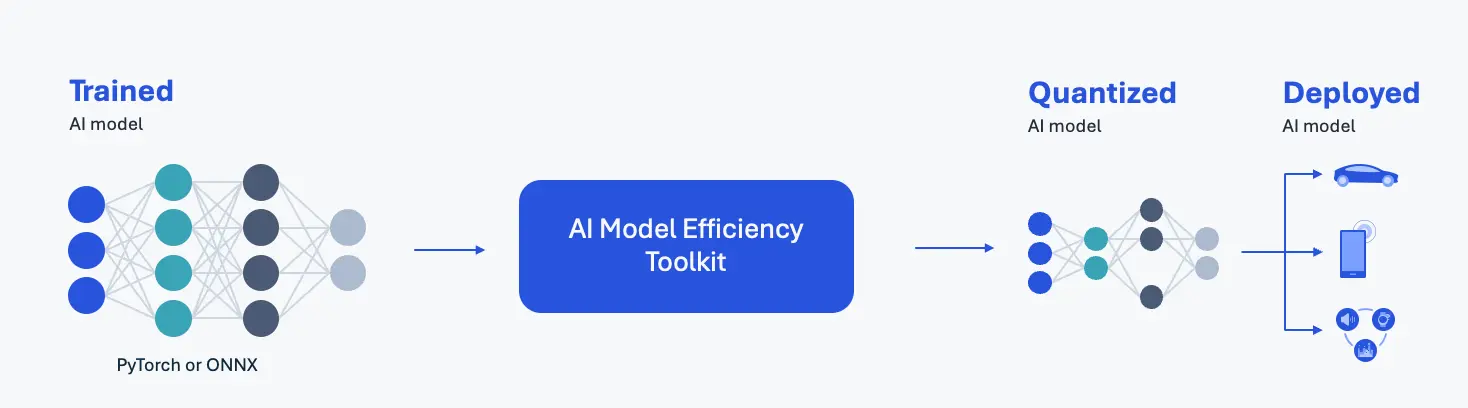
AIMET Overview
AIMET System Requirements
- 64-bit x86 processor
- Ubuntu 22.04
- Python 3.10
- Nvidia GPU
- Nvidia driver version 455 or higher
AIMET Installation
Create Python Environment
AIMET requires a Python 3.10 environment, which can be created using Anaconda.
-
For Anaconda installation, refer to: Conda Installation
-
For creating a conda Python environment, refer to: Creating a Specific Python Version Environment
After installing Anaconda, use the terminal to create and activate a Python 3.10 environment
conda create -n aimet python=3.10
conda activate aimet
Install AIMET
AIMET provides two Python packages:
-
AIMET-ONNX: Quantizes ONNX models using PTQ technology
X86 Linux PCpip3 install aimet-onnx -
AIMET-Torch: Performs QAT on PyTorch models
X86 Linux PCpip3 install aimet-torch -
Install jupyter-notebook
AIMET examples are provided as jupyter-notebooks, so we need to install jupyter kernel for the aimet Python environment
X86 Linux PCpip3 install jupyter ipykernel
python3 -m ipykernel install --user --name=aimet
AIMET Usage Example
This example uses PyTorch's resnet50 object detection model, converting it to ONNX format and then performing PTQ quantization using AIMET-ONNX. For implementation details, please refer to the resnet50 example notebook
The model exported in this example can be used in the QAIRT SDK Example for NPU porting of the AIMET quantized model.
Prepare the Example Notebook
Clone the AIMET Repository
git clone https://github.com/quic/aimet.git && cd aimet
Configure PYTHONPATH
export PYTHONPATH=$PYTHONPATH:$(pwd)
Download the Example Notebook
cd Examples/onnx/quantization
wget https://github.com/ZIFENG278/resnet50_qairt_example/raw/refs/heads/main/notebook/quantsim-resnet50.ipynb
Download the Dataset
Prepare a calibration dataset. To reduce download time, we'll use ImageNet-Mini as a substitute for ImageNet.
- Download the ImageNet-Mini dataset from Kaggle
Execute the Example Notebook
Start jupyter-notebook
cd aimet
jupyter-notebook
After starting jupyter-notebook, it will automatically open in your default browser. If it doesn't open automatically, you can click on the URL printed after startup.
Change Kernel
On the jupyter-notebook homepage, select /Examples/onnx/quantization/quantsim-resnet50.ipynb
In the notebook's top-left menu bar, select Kernel -> Change Kernel -> Select Kernel and choose the aimet kernel created during AIMET installation.
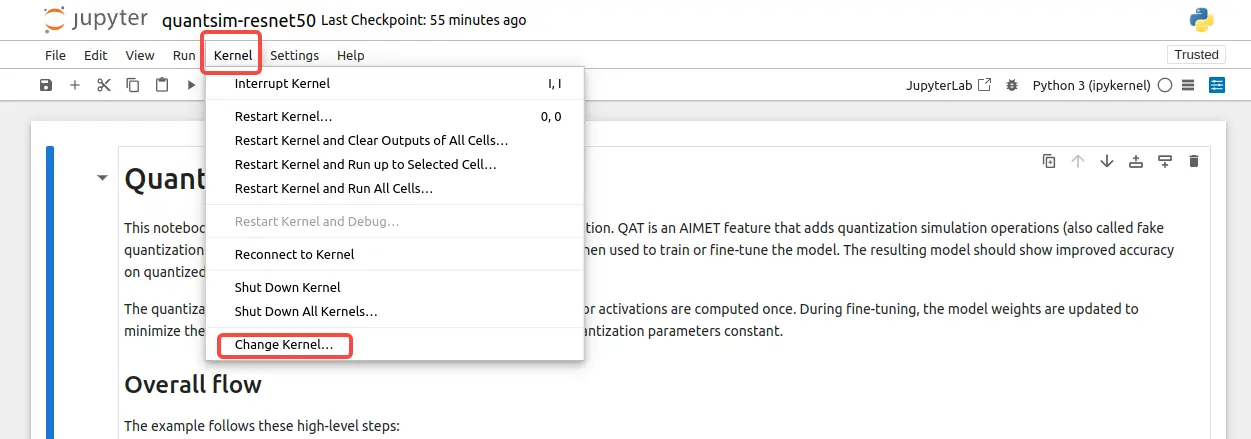
Change Notebook Kernel
Update Dataset Path
Modify the DATASET_DIR path in the Dataset section to point to your downloaded ImageNet-Mini dataset folder.
DATASET_DIR = '<ImageNet-Mini Path>' # Please replace this with a real directory
Run the Entire Notebook
In the notebook's top-left menu bar, select Run -> Run All Cells to execute the entire notebook.
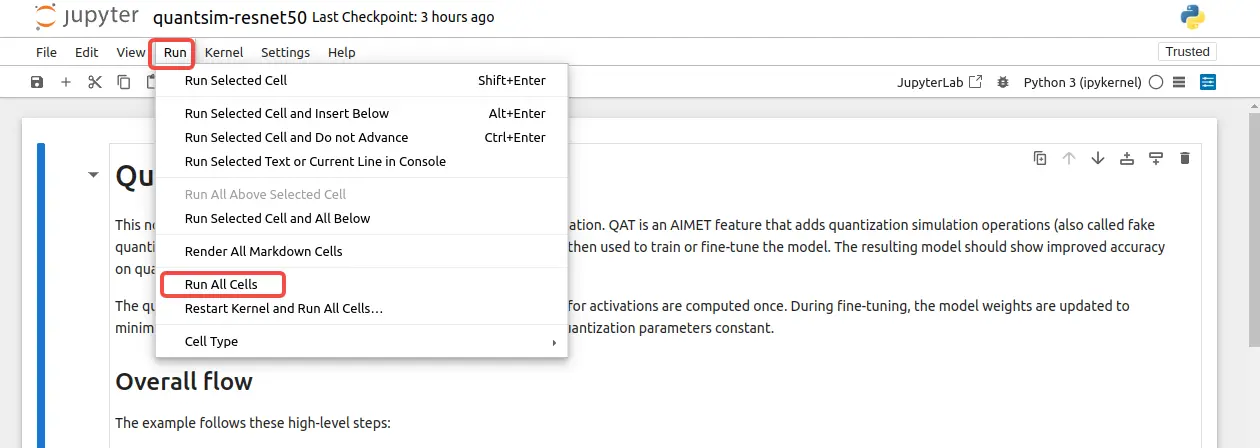
Run All Cells
The exported resnet50 model files will be saved in the aimet_quant folder, with the outputs being resnet50.onnx and resnet50.encodings.
Deploying AIMET Models
AIMET exports models from different frameworks into specific file formats as shown in the table below:
| Framework | Format |
|---|---|
| PyTorch | .onnx |
| ONNX | .onnx |
| TensorFlow | .h5 or .pb |
The quantized output files from AIMET can be deployed on target devices using QAIRT. For the deployment process, please refer to:
Complete Documentation
For more detailed documentation about AIMET, please refer to:
More Examples
For more AIMET examples, please refer to: