EasyOCR Example
This document describes how to use the QAI AppBuilder Python API to run inference with the EasyOCR text recognition model on Qualcomm® Hexagon™ Processor (NPU).
Supported devices
| Device | SoC |
|---|---|
| Fogwise® AIRbox Q900 | QCS9075 |
Install QAI AppBuilder
-
Install QAI AppBuilder by following the QAI AppBuilder installation guide.
-
Configure ADSP environment variables as described in Create ADSP environment variables.
Run the sample
Install dependencies
Install sample dependencies in the activated virtual environment:
pip3 install requests tqdm qai-hub py3-wget Pillow torch torchvision opencv-python-headless easyocr
Run the script
-
Enter the upstream samples directory
Devicecd qai-appbuilder/samples -
Prepare input data (bundled
ch_en.png/english.png, or pass--Image_Path)
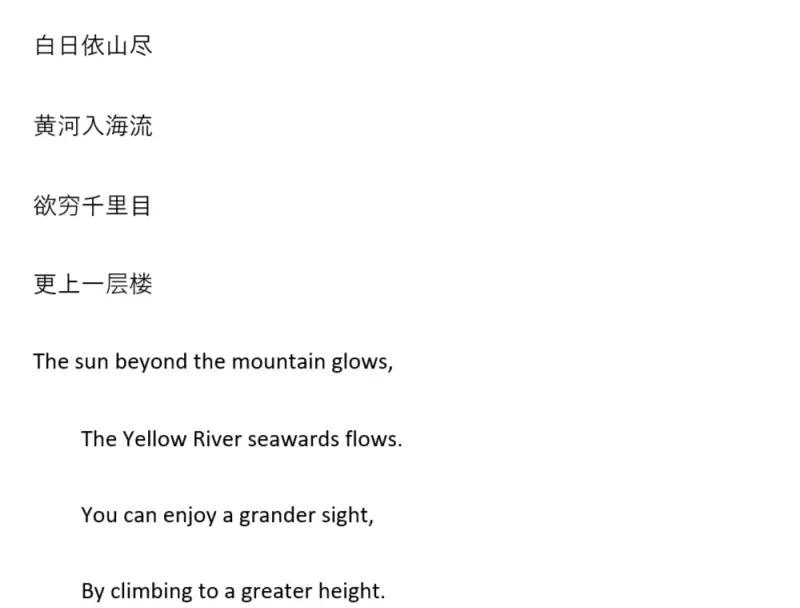
input image
Verified on AIRbox Q900 (QCS9075): upstream easy_ocr.py uses DataLoader(..., num_workers=1), which forks worker processes and releases the QNN HTP context. Recognition then fails with:
RuntimeError: Cannot perform 'Inference': context 'EasyOCRRecognizer' has been released.
Before running, change every num_workers=int(workers) in Multimodal/Image_To_Text/easy_ocr/easy_ocr.py to num_workers=0 (or set the workers default in recognizer_get_text to 0).
-
Run inference
Devicepython3 Multimodal/Image_To_Text/easy_ocr/easy_ocr.py --chipset 9075
On success the terminal prints recognized Chinese and English lines, for example (default bilingual sample image):
白日依山尽
黄河入海流
欲穷千里目
更上一层楼
The sun beyond the mountain glows,
The Yellow River seawards flows_
You can enjoy a grander sight,
By climbing to a greater height。
Saving image to .../samples/build/image.png
The first run downloads Detector / Recognizer models (including Chinese-English) via Qualcomm® AI Hub. Apply the num_workers=0 change first, then you can use the launcher:
python3 run_inference.py --list
python3 run_inference.py --model easy_ocr --args "--chipset 9075"