MediaPipe-Hand-Detection Example
This document describes how to use the QAI AppBuilder Python API to run inference with the MediaPipe-Hand-Detection hand pose recognition model on Qualcomm® Hexagon™ Processor (NPU).
Supported devices
| Device | SoC |
|---|---|
| Fogwise® AIRbox Q900 | QCS9075 |
Install QAI AppBuilder
-
Install QAI AppBuilder by following the QAI AppBuilder installation guide.
-
Configure ADSP environment variables as described in Create ADSP environment variables.
Run the sample
Install dependencies
Install sample dependencies in the activated virtual environment:
pip3 install requests tqdm qai-hub py3-wget Pillow torch torchvision opencv-python-headless pygame
The script also looks under ~/.qaihm for MediaPipePyTorch (provides blazepalm and related modules). If missing:
mkdir -p ~/.qaihm
git clone --depth 1 https://github.com/zmurez/MediaPipePyTorch.git ~/.qaihm/MediaPipePyTorch
Run the script
-
Enter the upstream samples directory
Devicecd qai-appbuilder/samples -
Prepare input data (camera UI needs a GUI; use a static image in headless environments)

input image
-
Run inference
Devicepython3 ComputerVision/Pose_Estimation/mediapipe_hand/mediapipe_hand.py \
--chipset 9075 \
--imagefile /path/to/hand_image.png \
--displayPredict False \
--DemoMode False -
Example result:
output.jpgis written in the sample directory
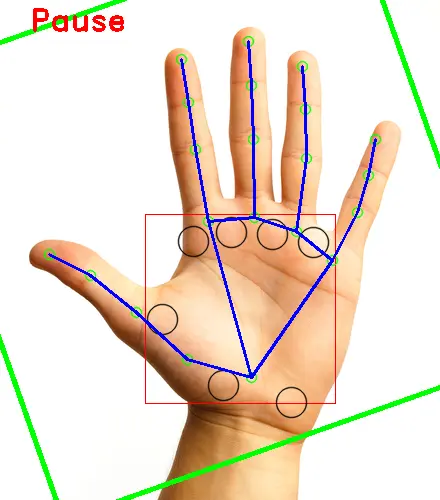
output image
The first run downloads handdetector and landmarkdetector via Qualcomm® AI Hub. Prefer --imagefile when no display is available, and use opencv-python-headless to avoid Qt plugin initialization failures.
python3 run_inference.py --list
python3 run_inference.py --model mediapipe_hand --args "--chipset 9075 --imagefile /path/to/hand_image.png --displayPredict False --DemoMode False"