QNN Execution Provider
ONNX Runtime's QNN Execution Provider enables NPU hardware-accelerated inference for ONNX models on Qualcomm SoC platforms. It uses Qualcomm® AI Runtime (QAIRT SDK) to build an ONNX model into a QNN compute graph, and executes the graph through an accelerator backend library. ONNX Runtime's QNN Execution Provider can be used on Linux, Android, and Windows devices that are based on Qualcomm SoCs.
Supported devices
-
Radxa Dragon Q6A (Linux)
-
Radxa Fogwise AIRbox Q900 (Linux)
Installation
There are two installation methods: install via pip or build from source.
Regardless of the method you choose, you must download the QAIRT SDK by following QAIRT SDK Installation.
Create a Python virtual environment
sudo apt install python3-venv
python3 -m venv .venv
source .venv/bin/activate
pip3 install --upgrade pip
Install via pip
Radxa provides a prebuilt Linux onnxruntime-qnn wheel.
pip3 install https://github.com/ZIFENG278/onnxruntime/releases/download/v1.23.2/onnxruntime_qnn-1.23.2-cp312-cp312-linux_aarch64.whl
Build from source
Clone the onnxruntime repository
git clone --depth 1 -b v1.23.2 https://github.com/microsoft/onnxruntime.git
Modify CMakeLists.txt
Since onnxruntime does not directly support Linux for QNN in this setup, to build an onnxruntime-qnn wheel for Linux you need to manually change line 840 in cmake/CMakeLists.txt.
Change L840 from set(QNN_ARCH_ABI aarch64-android) to set(QNN_ARCH_ABI aarch64-oe-linux-gcc11.2).
You do not need this change when building for Android or Windows.
cd onnxruntime
vim cmake/CMakeLists.txt
diff --git a/cmake/CMakeLists.txt b/cmake/CMakeLists.txt
index 0b37ade..f4621e5 100644
--- a/cmake/CMakeLists.txt
+++ b/cmake/CMakeLists.txt
@@ -837,7 +837,7 @@ if (onnxruntime_USE_QNN OR onnxruntime_USE_QNN_INTERFACE)
           if (${GEN_PLATFORM} STREQUAL "x86_64")
             set(QNN_ARCH_ABI x86_64-linux-clang)
           else()
-            set(QNN_ARCH_ABI aarch64-android)
+            set(QNN_ARCH_ABI aarch64-oe-linux-gcc11.2)
           endif()
         endif()
       endif()
Build the project
Update QNN_SDK_PATH to match your actual QAIRT SDK path.
pip3 install -r requirements.txt
./build.sh --use_qnn --qnn_home [QNN_SDK_PATH] --build_shared_lib --build_wheel --config Release --parallel --skip_tests --build_dir build/Linux
After the build completes, the target wheel will be generated under build/Linux/Release/dist.
pip3 install ./build/Linux/Release/dist/onnxruntime_qnn-1.23.2-cp312-cp312-linux_aarch64.whl
Verify the QNN Execution Provider
Before verifying the QNN Execution Provider, follow Enable NPU on the device and Quick NPU validation to confirm that the NPU is working properly, then test the QNN Execution Provider.
Export environment variables
- QCS6490
- SC8280XP
- QCS9075
export PRODUCT_SOC=6490 DSP_ARCH=68
export PRODUCT_SOC=8280 DSP_ARCH=68
export PRODUCT_SOC=9075 DSP_ARCH=73
cd qairt/2.42.0.251225
source bin/envsetup.sh
export ADSP_LIBRARY_PATH=$QNN_SDK_ROOT/lib/hexagon-v${DSP_ARCH}/unsigned
Download an INT8-quantized ONNX model
Download a w8a8 quantized model in ONNX Runtime format from Qualcomm AI Hub.
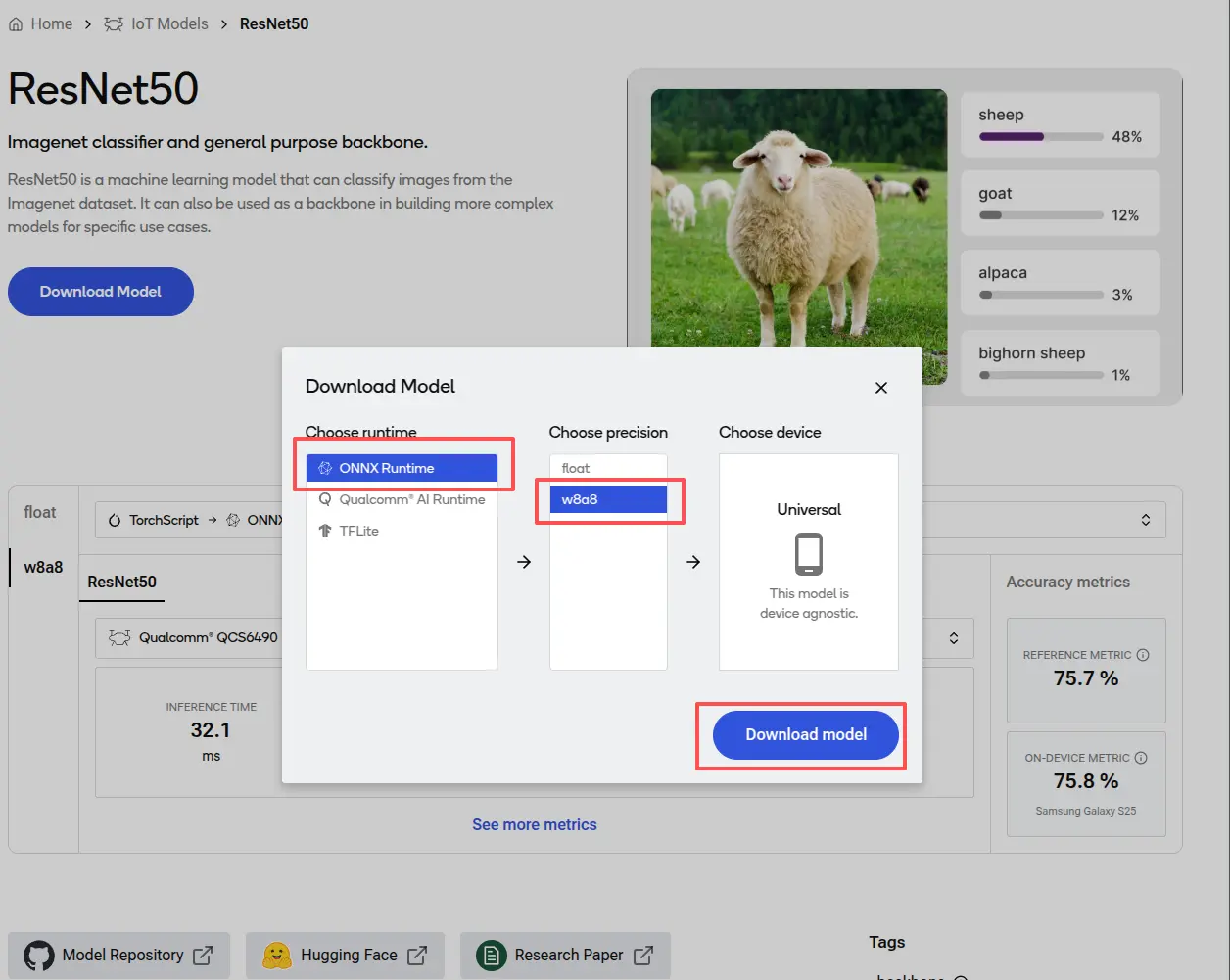
Test the QNN Execution Provider
The Python code below creates an ONNX Runtime session with the QNN EP and runs inference on the NPU using a w8a8 quantized ONNX model. It is based on Running a quantized model on Windows ARM64.
vim run_qdq_model.py
Update backend_path to match your actual QAIRT SDK path.
Update the model path parameter in InferenceSession to point to your downloaded ONNX model.
# run_qdq_model.py

import onnxruntime
import numpy as np

options = onnxruntime.SessionOptions()

# (Optional) Enable configuration that raises an exception if the model can't be
# run entirely on the QNN HTP backend.
options.add_session_config_entry("session.disable_cpu_ep_fallback", "1")

# Create an ONNX Runtime session.
# NOTE: Replace with your ONNX model path before running.
session = onnxruntime.InferenceSession("job_jpy6ye005_optimized_onnx/model.onnx",
                                       sess_options=options,
                                       providers=["QNNExecutionProvider"],
                                       provider_options=[{"backend_path": "libQnnHtp.so"}]) # Provide path to Htp dll in QNN SDK

# Run the model with your input.
# NOTE: Replace with real input loading logic (file or generated sample) before running.
input0 = np.ones((1,3,224,224), dtype=np.uint8)
result = session.run(None, {"image_tensor": input0})

# Print output.
print(result)
python3 run_qdq_model.py
(.venv) rock@radxa-dragon-q6a:~/ssd/qualcomm/onnxruntime/build/Linux/Release$ python3 run_qdq_model.py
2025-12-22 06:31:37.527811909 [W:onnxruntime:Default, device_discovery.cc:164 DiscoverDevicesForPlatform] GPU device discovery failed: device_discovery.cc:89 ReadFileContents Failed to open file: "/sys/class/drm/card0/device/vendor"
/prj/qct/webtech_scratch20/mlg_user_admin/qaisw_source_repo/rel/qairt-2.37.1/point_release/SNPE_SRC/avante-tools/prebuilt/dsp/hexagon-sdk-5.4.0/ipc/fastrpc/rpcmem/src/rpcmem_android.c:38:dummy call to rpcmem_init, rpcmem APIs will be used from libxdsprpc

====== DDR bandwidth summary ======
spill_bytes=0
fill_bytes=0
write_total_bytes=65536
read_total_bytes=25976832

[array([[47, 55, 49, 46, 56, 55, 45, 47, 44, 49, 50, 46, 44, 46, 44, 47,
        46, 46, 45, 45, 47, 49, 55, 48, 47, 49, 48, 49, 52, 54, 46, 61,
        51, 48, 57, 41, 47, 41, 62, 50, 50, 44, 49, 48, 48, 50, 51, 52,
        46, 43, 47, 51, 51, 52, 52, 54, 44, 40, 44, 65, 60, 49, 52, 57,
        55, 50, 55, 47, 55, 57, 47, 62, 44, 62, 44, 51, 50, 53, 57, 57,
        47, 51, 46, 39, 45, 44, 45, 46, 49, 52, 46, 42, 50, 48, 54, 42,
        50, 36, 43, 47, 48, 44, 43, 54, 46, 41, 46, 63, 52, 46, 51, 75,
        58, 58, 51, 49, 50, 64, 41, 44, 49, 43, 45, 47, 48, 50, 62, 50,
        52, 52, 49, 44, 54, 41, 43, 46, 40, 42, 40, 41, 45, 46, 41, 46,
        46, 47, 45, 49, 46, 50, 43, 51, 50, 52, 46, 47, 45, 43, 48, 46,
        42, 48, 48, 52, 47, 47, 47, 47, 44, 45, 44, 47, 46, 49, 39, 45,
        43, 45, 53, 44, 45, 47, 43, 44, 46, 48, 44, 51, 45, 48, 50, 46,
        41, 44, 46, 52, 45, 38, 42, 44, 44, 41, 42, 51, 53, 37, 43, 48,
        48, 44, 40, 43, 43, 44, 43, 46, 50, 45, 42, 46, 50, 48, 48, 50,
        49, 42, 41, 41, 47, 45, 43, 46, 48, 47, 44, 46, 48, 45, 45, 48,
        42, 45, 44, 42, 46, 46, 48, 45, 44, 43, 50, 49, 48, 45, 52, 36,
        42, 47, 47, 46, 49, 42, 50, 43, 48, 47, 48, 43, 44, 48, 51, 47,
        48, 43, 47, 45, 50, 55, 47, 50, 50, 53, 48, 57, 51, 58, 46, 46,
        53, 48, 45, 48, 44, 50, 47, 43, 47, 48, 47, 53, 47, 54, 44, 53,
        47, 45, 56, 58, 57, 46, 57, 51, 56, 55, 58, 58, 52, 55, 59, 53,
        50, 42, 40, 46, 51, 44, 56, 51, 52, 42, 44, 50, 49, 48, 43, 45,
        42, 45, 47, 42, 46, 46, 42, 39, 39, 47, 41, 45, 45, 46, 48, 47,
        44, 47, 49, 46, 52, 45, 50, 50, 45, 52, 52, 49, 52, 47, 45, 50,
        44, 44, 44, 45, 41, 45, 45, 44, 50, 50, 48, 41, 49, 45, 46, 46,
        46, 47, 41, 45, 44, 52, 48, 43, 50, 45, 47, 50, 48, 52, 54, 64,
        50, 62, 61, 48, 45, 52, 45, 45, 44, 64, 42, 47, 48, 60, 47, 43,
        67, 54, 63, 63, 52, 60, 54, 55, 51, 50, 53, 55, 46, 61, 51, 45,
        58, 53, 49, 57, 45, 57, 64, 53, 56, 60, 59, 52, 47, 51, 59, 55,
        49, 46, 42, 60, 46, 51, 40, 54, 54, 61, 44, 56, 44, 55, 58, 55,
        60, 60, 48, 44, 53, 58, 68, 50, 43, 63, 46, 54, 40, 52, 54, 60,
        55, 62, 57, 49, 44, 58, 59, 62, 64, 46, 55, 57, 53, 49, 55, 46,
        48, 54, 59, 68, 49, 56, 51, 61, 61, 52, 57, 61, 60, 39, 50, 44,
        63, 64, 48, 57, 52, 57, 51, 52, 44, 46, 49, 56, 51, 43, 53, 60,
        57, 55, 71, 62, 43, 47, 58, 52, 45, 41, 53, 59, 48, 56, 64, 57,
        51, 54, 61, 41, 45, 59, 54, 59, 58, 54, 43, 44, 52, 56, 59, 55,
        52, 48, 57, 60, 43, 45, 51, 57, 52, 46, 61, 48, 60, 48, 64, 42,
        45, 57, 53, 59, 48, 48, 46, 62, 58, 60, 43, 61, 50, 49, 53, 55,
        55, 64, 57, 43, 62, 51, 54, 56, 63, 53, 62, 39, 70, 61, 61, 64,
        55, 45, 54, 51, 44, 56, 51, 55, 63, 54, 58, 67, 55, 46, 61, 63,
        40, 41, 73, 50, 51, 66, 51, 57, 58, 61, 39, 59, 52, 49, 53, 43,
        45, 62, 55, 64, 77, 44, 52, 55, 48, 51, 69, 54, 53, 55, 47, 46,
        44, 51, 52, 51, 45, 39, 55, 49, 60, 45, 65, 53, 51, 41, 45, 46,
        52, 60, 65, 42, 48, 65, 58, 59, 59, 60, 54, 58, 61, 60, 59, 48,
        57, 48, 38, 54, 60, 50, 45, 60, 66, 49, 49, 62, 60, 52, 54, 49,
        54, 41, 40, 53, 57, 53, 60, 68, 56, 57, 66, 47, 54, 41, 47, 59,
        69, 43, 63, 52, 49, 60, 52, 51, 53, 50, 46, 62, 55, 56, 44, 49,
        62, 59, 52, 51, 56, 53, 50, 53, 56, 59, 52, 58, 52, 64, 47, 49,
        52, 57, 60, 54, 48, 39, 51, 58, 60, 66, 40, 61, 57, 50, 49, 65,
        48, 66, 56, 53, 66, 60, 54, 48, 66, 56, 58, 46, 49, 53, 57, 63,
        63, 57, 50, 52, 36, 60, 48, 51, 57, 52, 48, 50, 58, 49, 56, 54,
        51, 46, 46, 44, 62, 48, 56, 47, 49, 54, 54, 49, 59, 61, 47, 48,
        43, 47, 72, 57, 42, 49, 53, 57, 49, 47, 70, 57, 61, 43, 49, 54,
        51, 47, 58, 48, 59, 62, 52, 56, 54, 54, 48, 48, 58, 70, 65, 45,
        56, 55, 55, 61, 69, 44, 68, 64, 40, 55, 51, 53, 50, 57, 62, 53,
        46, 36, 45, 51, 50, 51, 46, 45, 57, 55, 37, 61, 53, 52, 53, 57,
        55, 60, 51, 64, 49, 56, 56, 48, 53, 60, 45, 47, 59, 58, 51, 47,
        60, 53, 61, 57, 52, 61, 64, 57, 53, 62, 60, 58, 57, 50, 54, 48,
        39, 47, 41, 41, 65, 47, 52, 57, 59, 50, 47, 47, 49, 47, 45, 52,
        49, 56, 50, 47, 49, 46, 51, 48, 49, 53, 52, 39, 49, 42, 50, 50,
        46, 55, 48, 46, 62, 58, 59, 59, 51, 51, 59, 45, 52, 54, 51, 49,
        51, 48, 47, 48, 48, 48, 66, 60, 66, 57, 45, 61, 44, 40, 52, 48,
        46, 43, 52, 43, 56, 52, 50, 52, 48, 61, 52, 52, 53, 45, 52, 45,
        42, 40, 43, 44, 40, 41, 51, 61]], dtype=uint8)]
/prj/qct/webtech_scratch20/mlg_user_admin/qaisw_source_repo/rel/qairt-2.37.1/point_release/SNPE_SRC/avante-tools/prebuilt/dsp/hexagon-sdk-5.4.0/ipc/fastrpc/rpcmem/src/rpcmem_android.c:42:dummy call to rpcmem_deinit, rpcmem APIs will be used from libxdsprpc
Further documentation
For detailed usage of QNNExecutionProvider, refer to: