Monocular Depth Estimation
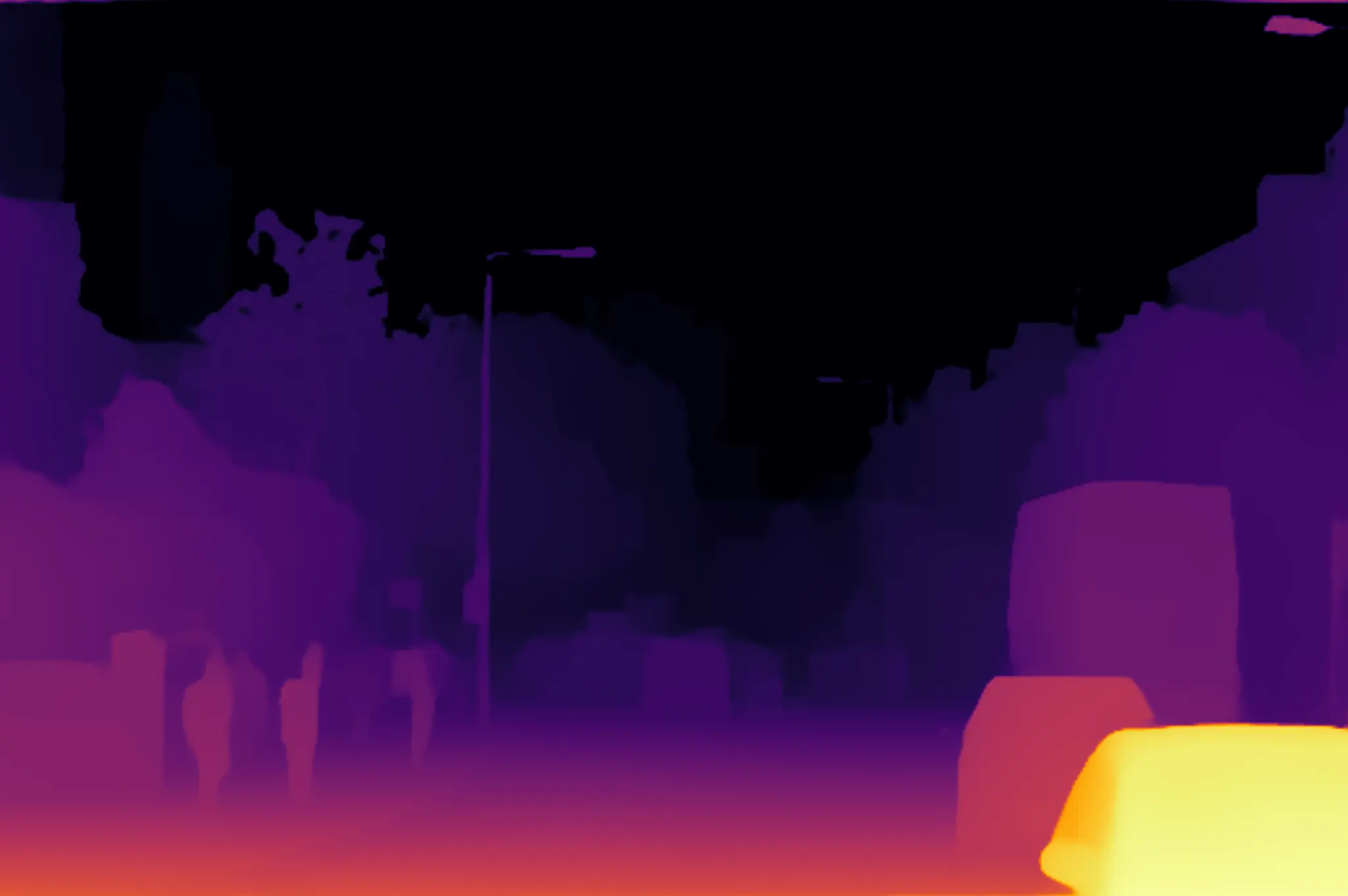
Run Depth Anything V2 monocular depth estimation with the preinstalled RGB image. The sample uses the QNN HTP backend on the DSP, normalizes the result, converts it to an Inferno color map, and publishes it on /sample_container/depth_map.
This topic visualizes relative depth within the scene; it does not contain metric distances or raw floating-point depth values. This page covers image input only. GMSL and QRB camera input were not verified.
Pipeline
input_image.jpg
  -> image_publisher -> /image_raw
  -> image resize, padding, and normalization
  -> /sample_container/qrb_inference_input_tensor
  -> QNN Depth Anything V2 inference
  -> /sample_container/qrb_inference_output_tensor
  -> crop, resize restoration, and Inferno color mapping
  -> /sample_container/depth_map
Prerequisites
- QIR SDK installed
- GitHub and Hugging Face access from the Q900
- At least 70 MB free under
/opt/model
Prepare the Model
Download the fixed Depth Anything V2 model revision published by Qualcomm:
sudo mkdir -p /opt/model
sudo wget \
  https://huggingface.co/qualcomm/Depth-Anything-V2/resolve/19ce3645e11de17eed7e869eebcc07dd352834f3/Depth-Anything-V2.bin?download=true \
  -O /opt/model/Depth-Anything-V2.bin
Verify the model:
echo "890891c3699ee9dbe98c6f30cf0bb93c48372b2fb150c9415d1b0684fa0c637b  /opt/model/Depth-Anything-V2.bin" | \
  sha256sum --check
Expected output:
/opt/model/Depth-Anything-V2.bin: OK
Build from Source
Step 1: Install Dependencies
sudo apt install -y ros-dev-tools ros-jazzy-qrb-ros-camera
QIR SDK provides the remaining runtime dependencies, including image_publisher, qrb_ros_nn_inference, cv_bridge, and the message interfaces.
The current rosdep database cannot resolve the source package's
qrb_ros_camerakey, sorosdep installexits withCannot locate rosdep definition for [qrb_ros_camera]. Install the Debian package above and build directly.
Step 2: Clone the Source
mkdir -p ~/qrb_ros_ws/src && cd ~/qrb_ros_ws/src
git clone -b jazzy-rel https://github.com/qualcomm-qrb-ros/qrb_ros_samples.git
Step 3: Build the Sample
cd ~/qrb_ros_ws/src/qrb_ros_samples/ai_vision/sample_depth_estimation
source /opt/ros/jazzy/setup.bash
colcon build --cmake-args -DBUILD_TESTING=OFF
Expected output:
Starting >>> sample_depth_estimation
Finished <<< sample_depth_estimation
Summary: 1 package finished
Run
cd ~/qrb_ros_ws/src/qrb_ros_samples/ai_vision/sample_depth_estimation
source /opt/ros/jazzy/setup.bash
source install/setup.bash
export ROS_DOMAIN_ID=123
ros2 launch sample_depth_estimation launch_with_image_publisher.py
The launch file publishes resource/input_image.jpg from the source at 10 Hz by default. You can also supply absolute paths for another image or model:
ros2 launch sample_depth_estimation launch_with_image_publisher.py \
  image_path:=<your-local-image-path> \
  model_path:=<your-local-model-path>
Expected Output
The model initializes, repeatedly executes inference, and publishes depth maps:
Loading model from binary file: /opt/model/Depth-Anything-V2.bin
/usr/lib/libQnnHtp.so initialize successfully
Qnn device initialize successfully
Initialize Qnn graph from binary file successfully
Inference init successfully!
Inference execute successfully!
Published depth map
The /sample_container/depth_map captured on the device is shown below:
Validation
Confirm the result topic from another terminal:
export ROS_DOMAIN_ID=123
source /opt/ros/jazzy/setup.bash
ros2 topic info /sample_container/depth_map -v
The result should include:
Type: sensor_msgs/msg/Image
Publisher count: 1
Node name: depth_estimation_node
Node namespace: /sample_container
The default result should be a 2048 x 1362 bgr8 image. Near regions normally appear as brighter yellow or red, while distant regions appear as darker purple or black.
For graphical viewing, start rqt in a ROS 2 Jazzy desktop environment using the same ROS_DOMAIN_ID as the Q900. Select Plugins > Visualization > Image View, then select /sample_container/depth_map.
Stop
Press Ctrl + C in the terminal running the sample.
When stopped during continuous inference, the QNN container may print a FastRPC transport error and exit with -11. This occurs during shutdown and does not affect depth maps published earlier; confirm that the related processes have exited.
Limitations
- Only the preinstalled image input was verified. GMSL and QRB camera input were not tested.
- Cross-device
rqtdisplay was not verified. Only local Q900 inference and result-topic publication were validated. - The output is a per-image normalized relative-depth color map and cannot be used directly to measure physical distance.