Follow Me Person Tracking
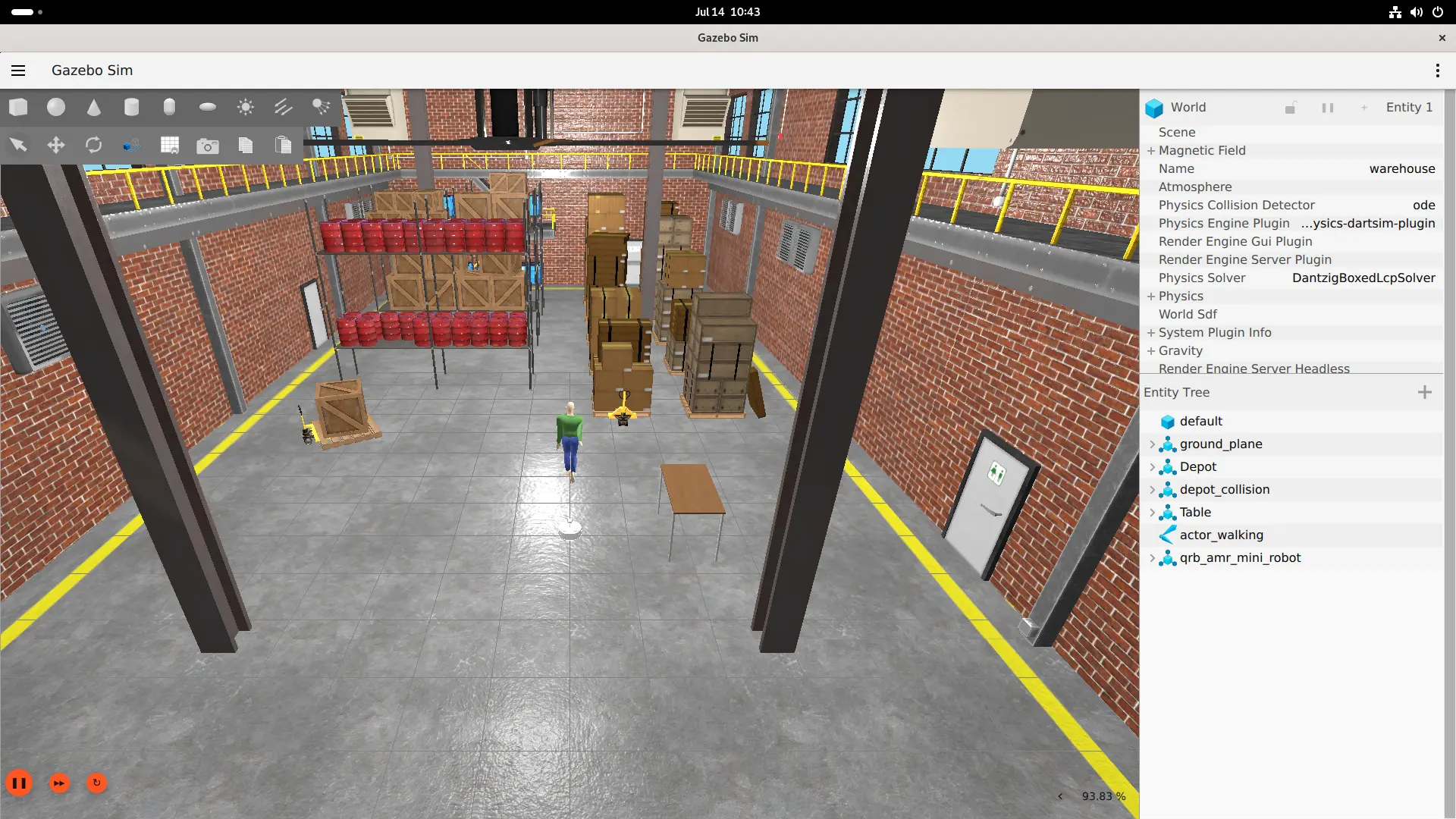
FastestDet NCNN-based person detection and depth tracking. The simulated RGB-D camera continuously detects a person, and the controller publishes /cmd_vel based on depth and horizontal angle to drive the robot towards the moving target.
Prerequisites
- QIR SDK installed
- Display connected (GUI mode)
Source Preparation
radxa@airbox$
# Simulation environment
git clone https://github.com/qualcomm-qrb-ros/qrb_ros_simulation.git
cd qrb_ros_simulation
source /opt/ros/jazzy/setup.bash
colcon build

# Camera parameter file (clone only, no build needed)
cd ..
git clone -b jazzy-rel https://github.com/qualcomm-qrb-ros/qrb_ros_samples.git
Pipeline
warehouse_followme_path2 actor
  → Gazebo RGB + depth camera
  → /camera/color/image_raw + /camera/depth/image_raw
  → follow_me FastestDet NCNN detection and depth tracking
  → /cmd_vel
  → Gazebo AMR
Model Installation
The follow_me pre-installed binary hardcodes the following model paths:
/usr/share/follow-me/model/FastestDet.param
/usr/share/follow-me/model/FastestDet.bin
/usr/share/follow-me/model/labels.txt
Download the model and label files:
radxa@airbox$
sudo mkdir -p /usr/share/follow-me/model

sudo wget -O /usr/share/follow-me/model/FastestDet.bin \
  https://raw.githubusercontent.com/dog-qiuqiu/FastestDet/main/example/ncnn/FastestDet.bin

sudo wget -O /usr/share/follow-me/model/FastestDet.param \
  https://raw.githubusercontent.com/dog-qiuqiu/FastestDet/main/example/ncnn/FastestDet.param

sudo wget -O /usr/share/follow-me/model/labels.txt \
  https://raw.githubusercontent.com/amikelive/coco-labels/master/coco-labels-2014_2017.txt
Run
Use the same environment in all terminals:
radxa@airbox$
source /opt/ros/jazzy/setup.bash
export ROS_DOMAIN_ID=128
export ROS_LOCALHOST_ONLY=1
source qrb_ros_simulation/install/setup.bash
Terminal 1: Start Gazebo Warehouse Follow Scene
Run from the desktop terminal:
radxa@airbox$
ros2 launch qrb_ros_sim_gazebo gazebo_robot_base_mini.launch.py \
  world_model:=warehouse_followme_path2 \
  rgb_camera_config_file:="$HOME/qrb_ros_samples/robotics/simulation_follow_me/followme_rgb_camera_params.yaml" \
  enable_laser:=false enable_imu:=false enable_depth_camera:=true
Gazebo starts paused. Click the play button at the bottom-left to start the simulation.
Terminal 2: Start Follow Me
radxa@airbox$
source /opt/ros/jazzy/setup.bash
export ROS_DOMAIN_ID=128
export ROS_LOCALHOST_ONLY=1
follow_me
Expected Output
Continuous person detection output:
Human detected - Depth: 2.00756, Angle X: -0.00312499
Human detected - Depth: 1.80109, Angle X: -0.00937472
Human detected - Depth: 1.49213, Angle X: -0.256708
Human detected - Depth: 1.78986, Angle X:  0.230219
The AMR should be visible in Gazebo following the moving actor. The controller publishes nonzero /cmd_vel (up to approximately linear.x = 0.396 m/s, angular.z = -0.310 rad/s).
Limitations
simulation_follow_meprovides only a Gazebo world and camera parameters; it has no independent ROS package to build. The runtime depends on the APT pre-installedfollow_mebinary (NCNN FastestDet pipeline).- The latest
sample_followmedocumentation describes a YOLO + Re-ID architecture that is incompatible with the current Q900 APT FastestDet pipeline. - Validation used simulated Gazebo RGB-D camera and AMR; no physical Orbbec camera or real robot base was tested.