Hand Detection
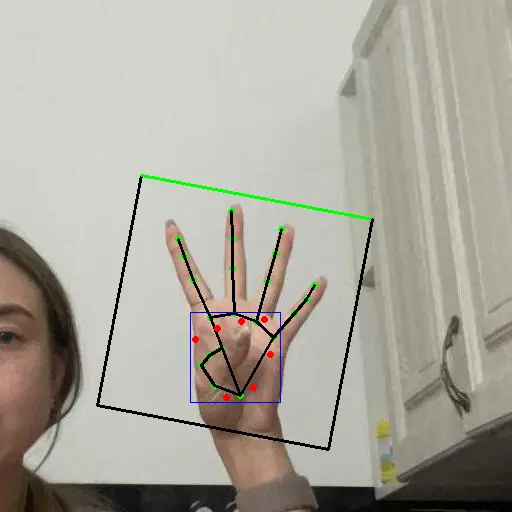
Run the MediaPipe hand detection pipeline with the preinstalled image. The sample uses the QNN HTP backend on the DSP for palm detection followed by hand landmark inference, then publishes an annotated image with a detection box and 21-point hand skeleton on /handlandmark_result.
This page covers image input only. Camera input was not verified.
Pipeline
input_image.jpg
  -> image_publisher -> /image_raw
  -> palm preprocessing -> /palm_detector_input_tensor
  -> QNN palm detection -> /palm_detector_output_tensor
  -> landmark preprocessing -> /landmark_detector_input_tensor
  -> QNN landmark detection -> /landmark_detector_output_tensor
  -> result rendering -> /handlandmark_result
Prerequisites
- QIR SDK installed
- GitHub access from the Q900 to download the palm anchor file omitted from the package
Prepare the Runtime
Step 1: Create the Output Directories
sudo install -d -m 0777 \
  /opt/ros/jazzy/share/sample_hand_detection/output_MediaPipeHandDetector \
  /opt/ros/jazzy/share/sample_hand_detection/output_MediaPipeHandLandmarkDetector
Step 2: Install the Palm Anchor File
ros-jazzy-sample-hand-detection 1.1.0.1 omits the anchors_palm.npy file required by the postprocessing node. Download it from the MediaPipePyTorch upstream referenced by the node source:
sudo curl -fL \
  https://raw.githubusercontent.com/zmurez/MediaPipePyTorch/master/anchors_palm.npy \
  -o /opt/model/anchors_palm.npy
Verify the file:
echo "24fa4a27ad6bee24ba3185a42fe3a47115540b0b27fa5956a291f03756183b41  /opt/model/anchors_palm.npy" | \
  sha256sum --check
Expected output:
/opt/model/anchors_palm.npy: OK
Run
export ROS_DOMAIN_ID=123
source /opt/ros/jazzy/setup.bash
ros2 launch sample_hand_detection launch_with_image_publisher.py
The launch file publishes this preinstalled image at 10 Hz by default:
/opt/ros/jazzy/share/sample_hand_detection/input_image.jpg
Expected Output
Both models initialize and repeatedly execute inference:
Loading model from binary file: /opt/model/MediaPipeHandDetector.bin
/usr/lib/libQnnHtp.so initialize successfully
Qnn device initialize successfully
Initialize Qnn graph from binary file successfully
Inference init successfully!
Inference execute successfully!

Loading model from binary file: /opt/model/MediaPipeHandLandmarkDetector.bin
/usr/lib/libQnnHtp.so initialize successfully
Qnn device initialize successfully
Initialize Qnn graph from binary file successfully
Inference init successfully!
Inference execute successfully!
The /handlandmark_result captured on the device is shown below:
Validation
Confirm the result topic from another terminal:
export ROS_DOMAIN_ID=123
source /opt/ros/jazzy/setup.bash
ros2 topic info /handlandmark_result -v
The result should include:
Type: sensor_msgs/msg/Image
Publisher count: 1
Node name: qrb_ros_hand_detector
The result should be a 512 x 512 bgr8 image containing the palm detection box, rotated region of interest, and 21-point hand skeleton.
For graphical viewing, start rqt in a ROS 2 Jazzy desktop environment using the same ROS_DOMAIN_ID as the Q900. Select Plugins > Visualization > Image View, then select /handlandmark_result.
Stop
Press Ctrl + C in the terminal running the sample.
Limitations
- Only the preinstalled image input was verified. Orbbec and QRB camera input were not tested.
- The current package and the Qualcomm
qrb_ros_samplesjazzy-relsource both omitanchors_palm.npy; install it separately before running the sample. - Cross-device
rqtdisplay was not verified. Only local Q900 inference and result-topic publication were validated.