HRNet Human Pose Estimation
Run HRNet human pose estimation with the preinstalled image. The sample uses the QNN HTP backend on the DSP and publishes both an image with the rendered skeleton and human keypoints in the original image coordinate system.
This page covers image input only. QRB, GMSL, and USB camera input were not verified.
Pipeline
input_image.jpg
  -> image_publisher -> /image_raw
  -> HRNet image preprocessing
  -> /qrb_inference_input_tensor
  -> QNN HRNetPose inference
  -> /qrb_inference_output_tensor
  -> heatmap postprocessing and confidence filtering
  -> /pose_estimation_results + /pose_estimation_points
Output Topics
| Topic | Type | Description |
|---|---|---|
/pose_estimation_results | sensor_msgs/msg/Image | Result image with keypoints and skeleton |
/pose_estimation_points | geometry_msgs/msg/PolygonStamped | Human keypoint coordinates in the input image |
Prerequisites
- QIR SDK installed
- GitHub and Hugging Face access from the Q900
- At least 60 MB free under
/opt/model
Install Dependencies
sudo apt install -y \
  ros-jazzy-qrb-ros-camera \
  ros-jazzy-qrb-ros-nn-inference \
  ros-jazzy-qrb-ros-tensor-list-msgs \
  ros-dev-tools
Initialize rosdep before using it for the first time:
sudo rosdep init
rosdep update
If sudo rosdep init reports that /etc/ros/rosdep/sources.list.d/20-default.list already exists, rosdep is already initialized; run only rosdep update.
Prepare the Source and Model
Step 1: Clone the Source
Use the workspace path from the official sample:
mkdir -p ~/qrb_ros_sample_ws/src && cd ~/qrb_ros_sample_ws/src
git clone https://github.com/qualcomm-qrb-ros/qrb_ros_samples.git
Step 2: Download the Model
sudo mkdir -p /opt/model
sudo wget \
  https://huggingface.co/qualcomm/HRNetPose/resolve/6011b6e69a84dad8f53fb555b11035a5e26c8755/HRNetPose.bin?download=true \
  -O /opt/model/HRNetPose.bin
Verify the model:
echo "f593694f4e8afecd8be7bc5304ea9408c33b99f412b5eb2493123ea718cb2838  /opt/model/HRNetPose.bin" | \
  sha256sum --check
Expected output:
/opt/model/HRNetPose.bin: OK
Build from Source
Step 1: Install Source Dependencies
cd ~/qrb_ros_sample_ws/src/qrb_ros_samples/ai_vision/sample_hrnet_pose_estimation
rosdep install --from-paths . --ignore-src --rosdistro jazzy -y \
  --skip-keys "qrb_ros_tensor_list_msgs qrb_ros_nn_inference qrb_ros_camera"
Step 2: Build
source /opt/ros/jazzy/setup.bash
colcon build --cmake-args -DBUILD_TESTING=OFF
source install/setup.bash
Expected output:
Starting >>> sample_hrnet_pose_estimation
Finished <<< sample_hrnet_pose_estimation
Summary: 1 package finished
Run
cd ~/qrb_ros_sample_ws/src/qrb_ros_samples/ai_vision/sample_hrnet_pose_estimation
source /opt/ros/jazzy/setup.bash
source install/setup.bash
export ROS_DOMAIN_ID=123
ros2 launch sample_hrnet_pose_estimation launch_with_image_publisher.py \
  image_path:=/opt/ros/jazzy/share/sample_hrnet_pose_estimation/input_image.jpg
The launch file publishes the selected image at 10 Hz. The model_path argument is the directory containing HRNetPose.bin; its default is /opt/model/.
Expected Output
The model initializes and repeatedly publishes both image and keypoint results:
Loading model from binary file: /opt/model/HRNetPose.bin
/usr/lib/libQnnHtp.so initialize successfully
Qnn device initialize successfully
Initialize Qnn graph from binary file successfully
Inference init successfully!
Inference execute successfully!
Publisher pose_estimation_results&pose_estimation_points message
The /pose_estimation_results captured on the device is shown below:
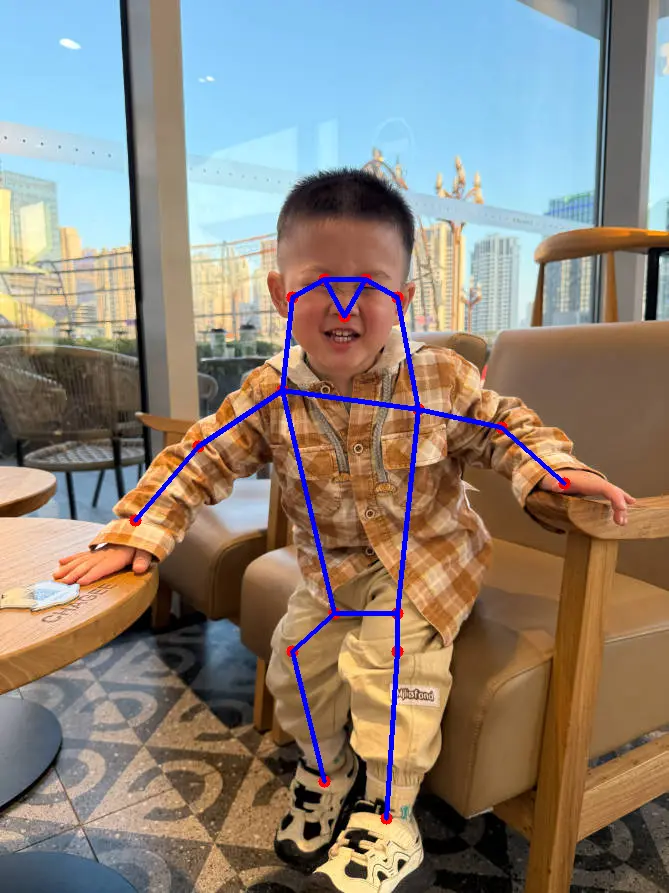
Keypoint Order
/pose_estimation_points uses the following 1-based numbering:
| ID | Body Part | ID | Body Part |
|---|---|---|---|
| 1 | Nose | 10 | Right Wrist |
| 2 | Right Eye | 11 | Left Wrist |
| 3 | Left Eye | 12 | Right Hip |
| 4 | Right Ear | 13 | Left Hip |
| 5 | Left Ear | 14 | Right Knee |
| 6 | Right Shoulder | 15 | Left Knee |
| 7 | Left Shoulder | 16 | Right Ankle |
| 8 | Right Elbow | 17 | Left Ankle |
| 9 | Left Elbow |
The source publishes only points with confidence above 0.3. PolygonStamped does not include confidence values or explicit keypoint IDs, so array positions fully match this table only when all 17 points are emitted.
Validation
Check both result topics from another terminal:
export ROS_DOMAIN_ID=123
source /opt/ros/jazzy/setup.bash
ros2 topic info /pose_estimation_results -v
ros2 topic info /pose_estimation_points -v
ros2 topic echo /pose_estimation_points --once
The default test image should produce 17 polygon.points. Every x coordinate should be between 0 and 668, and every y coordinate should be between 0 and 892.
Stop
Press Ctrl + C in the terminal running the sample.
When stopped during continuous inference, the QNN container may exit with -11, and the Python node may print ExternalShutdownException. These errors occur during shutdown and do not affect results published earlier; confirm that the related processes have exited.
Limitations
- Only the preinstalled image input was verified. QRB, GMSL, and USB camera input were not tested.
- Cross-device
rqtdisplay was not verified. Only local Q900 inference and result-topic publication were validated. - The points message does not contain confidence, names, or explicit IDs; downstream applications must interpret coordinates using the output order and point count.