Model Inference
Demonstrates how to run TensorFlow Lite model inference on the DSP using the QRB ROS NN Inference node, including image preprocessing, inference, and result visualization.
Prerequisites
- QIR SDK installed
- A converted YOLOv8 single-batch model, see Model Export
Method 1: Out-of-the-Box
Use the APT-installed inference node, building only the pre/post-processing test nodes from source.
Step 1: Install the Inference Node
sudo apt install -y ros-jazzy-qrb-ros-nn-inference
Step 2: Clone Repository and Prepare Test Data
mkdir -p ~/ros-ws/src && cd ~/ros-ws/src
git clone https://github.com/qualcomm-qrb-ros/qrb_ros_nn_inference
Download the test image:
wget -P ~/ros-ws/src/qrb_ros_nn_inference/test/qrb_ros_pre_process/image/ \
  https://ultralytics.com/images/bus.jpg
Convert the test image to model input format:
python3 ~/ros-ws/src/qrb_ros_nn_inference/test/qrb_ros_post_process/scripts/yolov8_input_pre_process.py
Step 3: Configure Model and Image Paths
Edit ~/ros-ws/src/qrb_ros_nn_inference/test/qrb_ros_post_process/launch/nn_node_test.launch.py and update:
image_path: absolute path tobus.rawmodel_path: absolute path to the YOLOv8 model
Step 4: Build Pre/Post-Processing Nodes
cd ~/ros-ws
source /opt/ros/jazzy/setup.bash
rm -f ./src/qrb_ros_nn_inference/test/qrb_ros_post_process/COLCON_IGNORE
rm -f ./src/qrb_ros_nn_inference/test/qrb_ros_pre_process/COLCON_IGNORE
colcon build --packages-select qrb_ros_pre_process qrb_ros_post_process \
  --cmake-args -DBUILD_TESTING=OFF
Step 5: Run Inference
cd ~/ros-ws
source /opt/ros/jazzy/setup.bash
source install/local_setup.bash
ros2 launch qrb_ros_post_process nn_node_test.launch.py
The log should show libqrb_ros_inference_node.so loaded from /opt/ros/jazzy/lib/, with Inference execute Successfully! printed after successful inference.
Press Ctrl + C to stop after at least one inference completes.
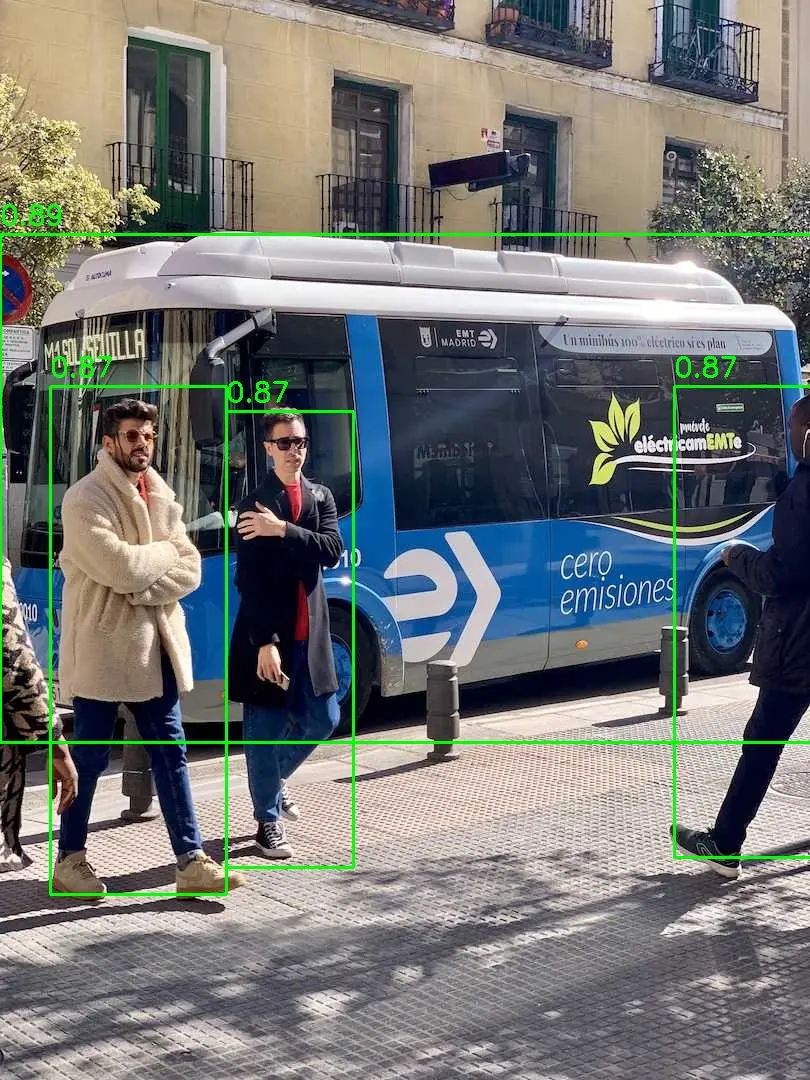
Step 6: Visualize Results
python3 ~/ros-ws/src/qrb_ros_nn_inference/test/qrb_ros_post_process/scripts/qrb_ros_yolo_detection_visualizer.py \
  --original_image ~/ros-ws/src/qrb_ros_nn_inference/test/qrb_ros_pre_process/image/bus.jpg
Results at ~/ros-ws/src/qrb_ros_nn_inference/test/qrb_ros_post_process/inference_result/detection_result.jpg.
Method 2: Build from Source
Build the complete inference pipeline from source: inference manager, NN inference node, Tensor message interfaces, and pre/post-processing.
Step 1: Install Dependencies
sudo apt install -y software-properties-common colcon \
  libtensorflow-lite-c-qcom1 libtensorflow-lite-qcom-dev \
  libqnn-dev libqnn1
Step 2: Clone Repositories
mkdir -p ~/qrb_ros_ws/src && cd ~/qrb_ros_ws/src
git clone https://github.com/qualcomm-qrb-ros/qrb_ros_nn_inference
git clone https://github.com/qualcomm-qrb-ros/qrb_ros_interfaces
Step 3: Fix QNN Header Path
The following verification is based on QAIRT 2.46. In this version, QNN headers are installed under /usr/include/QNN, which the repository's CMake does not include. Add the following to ~/qrb_ros_ws/src/qrb_ros_nn_inference/qrb_inference_manager/CMakeLists.txt:
include_directories(
  include
  /usr/include/QNN
)
Step 4: Build
cd ~/qrb_ros_ws
source /opt/ros/jazzy/setup.bash
colcon build --packages-up-to qrb_ros_nn_inference \
  --allow-overriding qrb_ros_tensor_list_msgs qrb_inference_manager qrb_ros_nn_inference \
  --cmake-args -DBUILD_TESTING=OFF
Step 5: Verify Overlay
source /opt/ros/jazzy/setup.bash
source ~/qrb_ros_ws/install/setup.bash
ros2 pkg prefix qrb_ros_nn_inference
Should output ~/qrb_ros_ws/install/qrb_ros_nn_inference, confirming the source-built version is used.
Step 6: Run Inference
source /opt/ros/jazzy/setup.bash
source ~/qrb_ros_ws/install/setup.bash
ros2 launch qrb_ros_post_process nn_node_test.launch.py
The log should show libqrb_ros_inference_node.so loaded from ~/qrb_ros_ws/install/.
After stopping with Ctrl + C, the visualization step is identical to Method 1.
Verified Results
Both methods produce byte-identical inference outputs (SHA-256 match). For the bus.jpg test image at confidence 0.5, NMS retains 4 detections: 1 bus and 3 persons.