YOLOv8 Object Segmentation
Run YOLOv8-N instance segmentation with the official Ultralytics bus.jpg. The sample runs inference on the CPU through the TFLite XNNPACK delegate and publishes structured detections, instance masks, and an image with rendered segmentation overlays.
This page covers local image input only. QRB, Orbbec, and USB camera input were not verified.
The qrb_ros_nn_inference 1.1.1 and qrb_ros_cv_tensor_common_process 0.0.0 packages currently available on Q900 use a different TensorList ABI than the current sample nodes. Build the interfaces, inference, tensor processing, and sample sources in one workspace so all components use the same TensorList ABI.
Pipeline
bus.jpg
  -> NV12 image publisher -> /image_raw
  -> resize, normalization, and NHWC float32 conversion
  -> /qrb_inference_input_tensor
  -> TFLite YOLOv8 inference
  -> /yolo_segment_tensor_output
  -> NMS, mask coefficients, and COCO label mapping
  -> /yolo_segment_result
  -> bounding-box and instance-mask overlay
  -> /yolo_segment_overlay
ROS 2 Topics
| Topic | Type | Publisher |
|---|---|---|
/image_raw | sensor_msgs/msg/Image | Local NV12 image publisher |
/qrb_inference_input_tensor | qrb_ros_tensor_list_msgs/msg/TensorList | yolo_preprocess_node |
/yolo_segment_tensor_output | qrb_ros_tensor_list_msgs/msg/TensorList | nn_inference_node |
/yolo_segment_result | vision_msgs/msg/Detection2DArray | yolo_segment_postprocess_node |
/yolo_segment_overlay | sensor_msgs/msg/Image | yolo_segment_overlay_node |
Prerequisites
- QIR SDK installed
- GitHub and Ultralytics access from the Q900
- At least 1 GB free on the Q900
Export the Model on the Host
Generate the YOLOv8-Segmentation TFLite float model through QAI Hub.
Step 1: Install QAI Hub Models
python3 -m venv ~/venv_qaihub
source ~/venv_qaihub/bin/activate
pip install qai-hub-models
Step 2: Configure QAI Hub
Obtain an API token from the account settings page in Qualcomm AI Hub:
source ~/venv_qaihub/bin/activate
qai-hub configure --api_token <your-api-token>
Step 3: Export the TFLite Model
Use Dragonwing IQ-9075 EVK as the target device:
source ~/venv_qaihub/bin/activate
python3 -m qai_hub_models.models.yolov8_seg.export \
  --target-runtime tflite \
  --device "Dragonwing IQ-9075 EVK" \
  --skip-profiling \
  --skip-inferencing \
  --output-dir ~/qai_hub_models/yolov8_seg
This command downloads the YOLOv8-N-Seg weights, compiles the model on QAI Hub, and downloads yolov8_seg.tflite.
Step 4: Transfer the Model and Labels
Locate the exported model and the coco8.yaml supplied by Ultralytics:
source ~/venv_qaihub/bin/activate
MODEL_PATH=$(find ~/qai_hub_models/yolov8_seg \
  -type f -name yolov8_seg.tflite -print -quit)
LABEL_PATH=$(python3 -c \
  'import pathlib, ultralytics; print(pathlib.Path(ultralytics.__file__).parent / "cfg/datasets/coco8.yaml")')
test -n "$MODEL_PATH" && test -f "$LABEL_PATH"

scp "$MODEL_PATH" <device-user>@<device-ip>:/tmp/yolov8_seg.tflite
scp "$LABEL_PATH" <device-user>@<device-ip>:/tmp/coco8.yaml
Install both files on the Q900:
sudo install -d -m 0755 /opt/model
sudo install -m 0644 /tmp/yolov8_seg.tflite \
  /opt/model/yolov8_seg.tflite
sudo install -m 0644 /tmp/coco8.yaml /opt/coco8.yaml
Build from Source
Step 1: Install Dependencies
sudo apt install -y \
  ros-dev-tools \
  ros-jazzy-sample-object-segmentation \
  ros-jazzy-qrb-ros-cv-tensor-common-process \
  ros-jazzy-image-publisher
Step 2: Clone the Source
Create a workspace and place all related repositories under the same src directory:
mkdir -p ~/qrb_ros_ws/src && cd ~/qrb_ros_ws/src
git clone https://github.com/qualcomm-qrb-ros/qrb_ros_interfaces.git
git clone https://github.com/qualcomm-qrb-ros/qrb_ros_nn_inference.git
git clone https://github.com/qualcomm-qrb-ros/qrb_ros_tensor_process.git
git clone https://github.com/qualcomm-qrb-ros/qrb_ros_samples.git
Step 3: Build the Inference and Sample Packages
cd ~/qrb_ros_ws
source /opt/ros/jazzy/setup.bash
colcon build \
  --packages-up-to sample_object_segmentation \
  --allow-overriding qrb_ros_tensor_list_msgs
Step 4: Build the Image Preprocessing Package
sample_object_segmentation does not declare a source dependency on the image preprocessing package, so build it explicitly:
cd ~/qrb_ros_ws
source /opt/ros/jazzy/setup.bash
source install/setup.bash
colcon build \
  --packages-select qrb_ros_cv_tensor_common_process \
  --allow-overriding qrb_ros_tensor_list_msgs
Prepare the Test Image
Download the official Ultralytics test image:
mkdir -p ~/qrb_ros_ws/input
wget https://ultralytics.com/images/bus.jpg \
  -O ~/qrb_ros_ws/input/bus.jpg
echo "c02019c4979c191eb739ddd944445ef408dad5679acab6fd520ef9d434bfbc63  $HOME/qrb_ros_ws/input/bus.jpg" | \
  sha256sum --check
Create the Static Image Publisher
Create ~/qrb_ros_ws/nv12_image_publisher.py to resize the JPEG to 640 x 640 and convert it to NV12:
import sys

import cv2
import numpy as np
import rclpy
from rclpy.node import Node
from sensor_msgs.msg import Image


class Nv12ImagePublisher(Node):
    def __init__(self, image_path):
        super().__init__("nv12_image_publisher")
        image = cv2.imread(image_path, cv2.IMREAD_COLOR)
        if image is None:
            raise RuntimeError(f"Failed to load image: {image_path}")
        image = cv2.resize(image, (640, 640), interpolation=cv2.INTER_LINEAR)

        height, width = image.shape[:2]
        i420 = cv2.cvtColor(image, cv2.COLOR_BGR2YUV_I420).reshape(-1)
        y_size = width * height
        chroma_size = y_size // 4
        y = i420[:y_size]
        u = i420[y_size : y_size + chroma_size]
        v = i420[y_size + chroma_size : y_size + 2 * chroma_size]
        uv = np.empty(y_size // 2, dtype=np.uint8)
        uv[0::2] = u
        uv[1::2] = v

        self.message = Image()
        self.message.header.frame_id = "camera"
        self.message.height = height
        self.message.width = width
        self.message.encoding = "nv12"
        self.message.is_bigendian = False
        self.message.step = width
        self.message.data = np.concatenate((y, uv)).tobytes()

        self.publisher = self.create_publisher(Image, "/image_raw", 10)
        self.timer = self.create_timer(0.1, self.publish_image)
        self.get_logger().info(
            f"Publishing {image_path} as nv12 ({width}x{height})"
        )

    def publish_image(self):
        self.message.header.stamp = self.get_clock().now().to_msg()
        self.publisher.publish(self.message)


def main():
    if len(sys.argv) != 2:
        raise SystemExit("usage: nv12_image_publisher.py <image-path>")
    rclpy.init()
    node = Nv12ImagePublisher(sys.argv[1])
    try:
        rclpy.spin(node)
    except KeyboardInterrupt:
        pass
    finally:
        node.destroy_node()
        if rclpy.ok():
            rclpy.shutdown()


if __name__ == "__main__":
    main()
Create the Image-Input Launch File
Create ~/qrb_ros_ws/launch_with_image_publisher.py:
from launch import LaunchDescription
from launch.actions import DeclareLaunchArgument, ExecuteProcess
from launch.substitutions import LaunchConfiguration
from launch_ros.actions import ComposableNodeContainer
from launch_ros.descriptions import ComposableNode


def generate_launch_description():
    declared_args = [
        DeclareLaunchArgument("image_path"),
        DeclareLaunchArgument("publisher_script"),
        DeclareLaunchArgument("model"),
        DeclareLaunchArgument("label_file"),
        DeclareLaunchArgument("score_thres", default_value="0.7"),
        DeclareLaunchArgument("iou_thres", default_value="0.5"),
    ]

    image_publisher = ExecuteProcess(
        cmd=[
            "python3",
            LaunchConfiguration("publisher_script"),
            LaunchConfiguration("image_path"),
        ],
        output="screen",
    )

    preprocess = ComposableNode(
        package="qrb_ros_cv_tensor_common_process",
        plugin="qrb_ros::cv_tensor_common_process::CvTensorCommonProcessNode",
        name="yolo_preprocess_node",
        parameters=[
            {"target_res": "640x640"},
            {"normalize": True},
            {"tensor_fmt": "nhwc"},
            {"data_type": "float32"},
        ],
        remappings=[
            ("input_image", "/image_raw"),
            ("encoded_image", "qrb_inference_input_tensor"),
        ],
    )

    inference = ComposableNode(
        package="qrb_ros_nn_inference",
        plugin="qrb_ros::nn_inference::QrbRosInferenceNode",
        name="nn_inference_node",
        parameters=[
            {
                "backend_option": "",
                "model_path": LaunchConfiguration("model"),
            }
        ],
        remappings=[
            ("qrb_inference_output_tensor", "yolo_segment_tensor_output"),
        ],
    )

    postprocess = ComposableNode(
        package="qrb_ros_yolo_process",
        plugin="qrb_ros::yolo_process::YoloSegPostProcessNode",
        name="yolo_segment_postprocess_node",
        parameters=[
            {"label_file": LaunchConfiguration("label_file")},
            {"score_thres": LaunchConfiguration("score_thres")},
            {"iou_thres": LaunchConfiguration("iou_thres")},
        ],
    )

    overlay = ComposableNode(
        package="qrb_ros_yolo_process",
        plugin="qrb_ros::yolo_process::YoloSegOverlayNode",
        name="yolo_segment_overlay_node",
        parameters=[
            {"target_res": "640x640"},
            {"mask_res": "160x160"},
        ],
    )

    container = ComposableNodeContainer(
        name="yolo_node_container",
        namespace="",
        package="rclcpp_components",
        executable="component_container",
        composable_node_descriptions=[overlay, postprocess, inference, preprocess],
        output="screen",
    )

    return LaunchDescription(declared_args + [image_publisher, container])
Run
cd ~/qrb_ros_ws
source /opt/ros/jazzy/setup.bash
source install/setup.bash
export ROS_DOMAIN_ID=123
ros2 launch ~/qrb_ros_ws/launch_with_image_publisher.py \
  publisher_script:="$HOME/qrb_ros_ws/nv12_image_publisher.py" \
  image_path:="$HOME/qrb_ros_ws/input/bus.jpg" \
  model:=/opt/model/yolov8_seg.tflite \
  label_file:=/opt/coco8.yaml
Expected Output
The model initializes and repeatedly performs inference:
Initialized TensorFlow Lite runtime.
Applying 1 TensorFlow Lite delegate(s) lazily.
Created TensorFlow Lite XNNPACK delegate for CPU.
Successfully applied the default TensorFlow Lite delegate indexed at 0.
[QRB INFO] Inference init Successfully!
[INFO] [nn_inference_node]: Inference init successfully!
[INFO] [nv12_image_publisher]: Publishing /home/radxa/qrb_ros_ws/input/bus.jpg as nv12 (640x640)
[INFO] [nn_inference_node]: Got model input data, start executing inference...
[QRB INFO] Inference execute Successfully!
[INFO] [nn_inference_node]: Inference execute successfully!
[INFO] [nn_inference_node]: Publish the inference result...
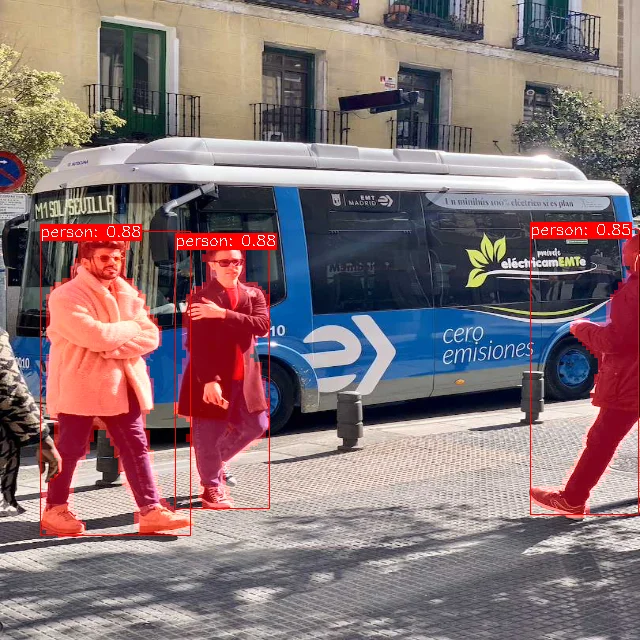
The /yolo_segment_overlay captured on the device is shown below:
Validation
Check the segmentation and overlay topics from another terminal:
cd ~/qrb_ros_ws
source /opt/ros/jazzy/setup.bash
source install/setup.bash
export ROS_DOMAIN_ID=123
ros2 topic info /yolo_segment_result -v
ros2 topic info /yolo_segment_overlay -v
ros2 topic echo /yolo_segment_result --once
At the default score threshold of 0.7, the test image should contain three segmentations:
person  0.8833
person  0.8768
person  0.8496
/yolo_segment_overlay should be a 640 x 640 bgr8 image with the masks rendered as a translucent red overlay. For graphical inspection, start rqt in a ROS 2 Jazzy desktop environment using the same ROS_DOMAIN_ID as the Q900. Select Plugins > Visualization > Image View, then select /yolo_segment_overlay.
Stop
Press Ctrl + C in the terminal running the sample.
Limitations
- Only local image input was verified. QRB, Orbbec, and USB cameras were not tested.
- The input image is resized to
640 x 640; bounding-box and mask coordinates refer to the resized image. - Cross-device
rqtdisplay was not verified. Only local Q900 inference, detection messages, and overlay publication were validated. - The related repositories must be built from source. Mixing Debian and source versions of
TensorListcauses an ABI incompatibility. - The
busclass in the test image is filtered at the0.7threshold; only the threepersoninstances pass.