2.5G Ethernet Interface
The Radxa Fogwise® AIRbox Q900 features two onboard 2.5G Ethernet interfaces (1 WAN port and 1 LAN port), supporting multiple auto-negotiated speeds including 10M/100M/1000M/2500M. These interfaces are primarily used to connect PC devices or local area network (LAN) devices to the AIRbox Q900.
Port Identification: The port closer to the USB Type-C interface is the WAN port, while the one further away is the LAN port.
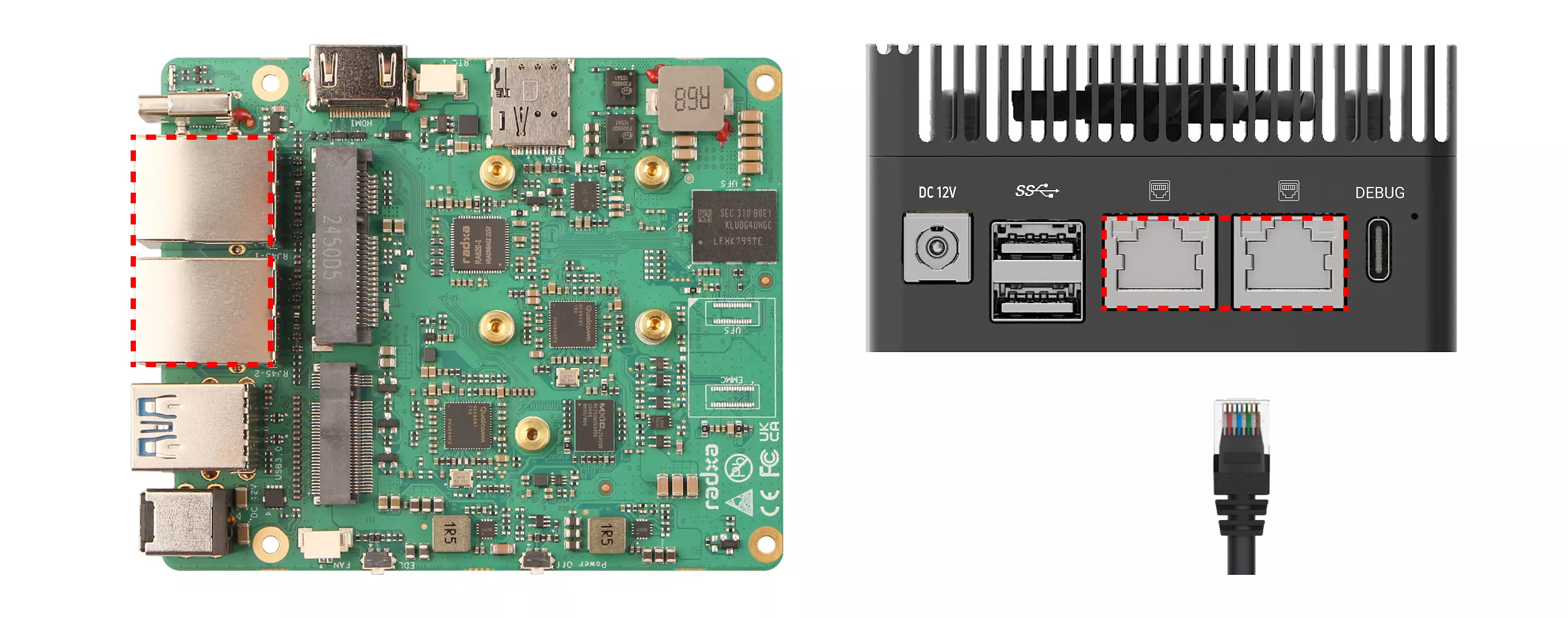
Usage Guide
Connect the Ethernet interface to a PC or LAN device using an Ethernet cable.
Viewing Network Information
Use the ip a command to view network interface information.
ip a
Upon successful connection, the terminal will display output similar to the following: end1 represents the LAN port, end0 represents the WAN port, and 192.168.11.102 is the IP address assigned by the router.
···
2: end1: <BROADCAST,MULTICAST,UP,LOWER_UP> mtu 1500 qdisc mq state UP group default qlen 1000
    link/ether 6e:1b:2b:cf:7e:b7 brd ff:ff:ff:ff:ff:ff
    inet 192.168.150.1/24 brd 192.168.150.255 scope global noprefixroute end1
       valid_lft forever preferred_lft forever
    inet6 fe80::6c1b:2bff:fecf:7eb7/64 scope link
       valid_lft forever preferred_lft forever
3: end0: <NO-CARRIER,BROADCAST,MULTICAST,UP> mtu 1500 qdisc mq state DOWN group default qlen 1000
    link/ether 36:62:88:56:74:aa brd ff:ff:ff:ff:ff:ff
    inet 192.168.11.102/24 brd 192.168.11.255 scope global dynamic noprefixroute end0
       valid_lft 86142sec preferred_lft 86142sec
    inet6 fe80::3462:88ff:fe56:74aa/64 scope link
       valid_lft forever preferred_lft forever
···
Network Bandwidth Performance Testing
Use the iperf tool to test network bandwidth (throughput) performance. It's recommended to perform multiple tests and calculate the average for accurate results.
Prerequisites
- Hardware Requirements
You'll need two devices:
-
Server: A PC, server, or similar device
-
Client: The board you want to test
-
Network Setup
Both server and client must be on the same local area network and able to ping each other.
Installing iperf
Both the server and client need to have iperf installed.
sudo apt update
sudo apt install iperf
Testing Procedure
Server (PC)
Open a terminal and start the server with the following command:
iperf -s
After successful startup, the terminal will display output similar to:
------------------------------------------------------------
Server listening on TCP port 5001
TCP window size:  128 KByte (default)
------------------------------------------------------------
Client (Board)
- Upload Test
Open a terminal and test the upload bandwidth using the following command. Replace <server_ip> with the actual server IP address (you can find this using the ip a command).
iperf -c <server_ip> -t <time>
# Example
iperf -c 192.168.11.101 -t 60
Parameters:
<server_ip>: Server IP address<time>: Test duration in seconds
- Download Test
Open a terminal and test the download bandwidth using the following command. Replace <server_ip> with the actual server IP address (you can find this using the ip a command).
iperf -c <server_ip> -t <time> -R
# Example
iperf -c 192.168.11.101 -t 60 -R
Parameters:
<server_ip>: Server IP address<time>: Test duration in seconds-R: Reverse test, where the client acts as the server and the server acts as the client