Fan Interface
The Radxa Fogwise® AIRbox Q900 features an onboard fan interface for connecting cooling fans.
Metal Enclosure
The Radxa Fogwise® AIRbox Q900 metal enclosure comes with a built-in PWM fan.
Hardware Connection
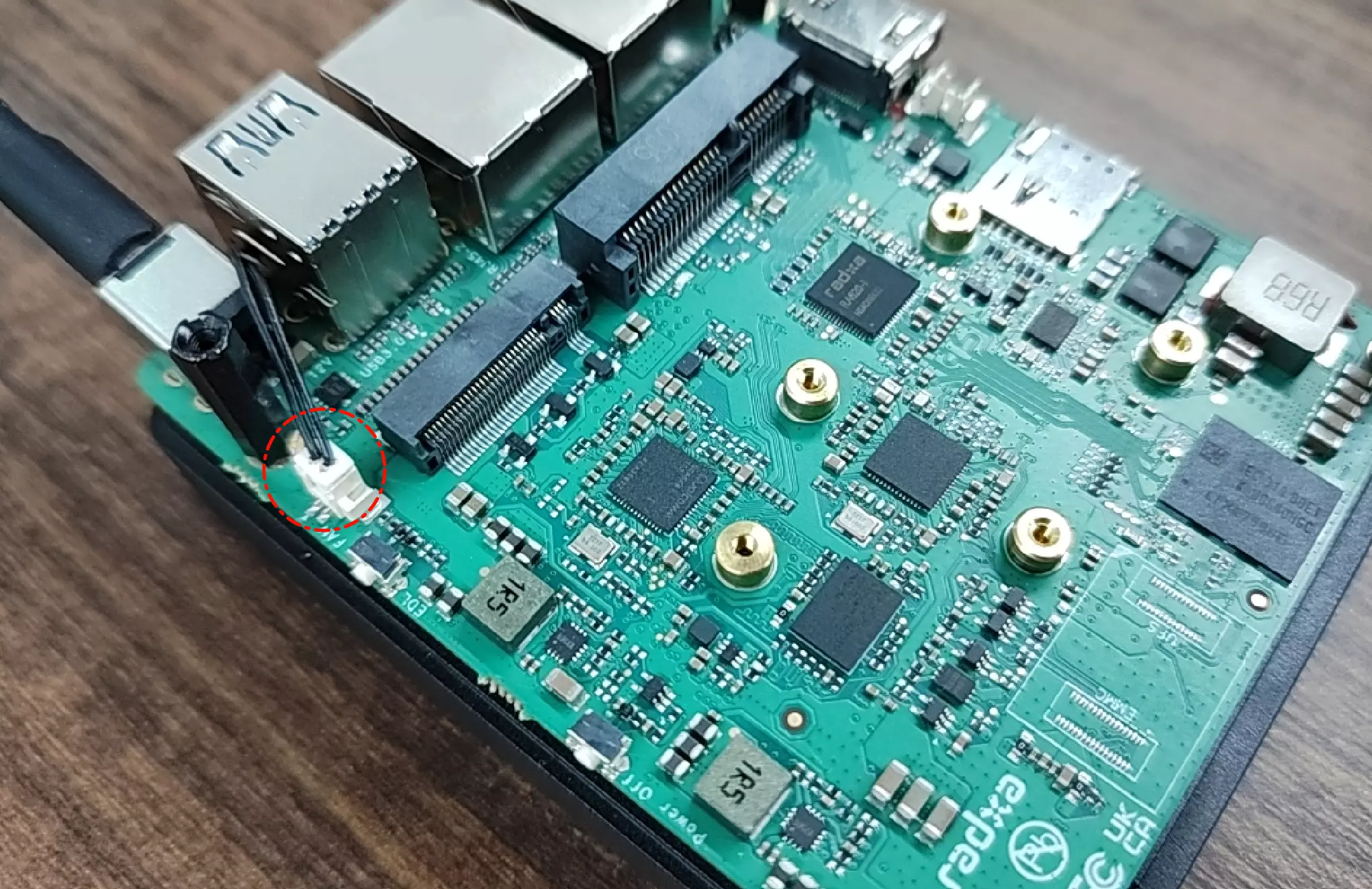
Connect the PWM fan interface of the metal enclosure to the fan interface on the Radxa Fogwise® AIRbox Q900.
Software Enablement
Use the built-in Rsetup tool in Radxa OS to enable the fan, and it is recommended to control the fan with a thermal governor.
Rsetup Usage Guide
- Highlight an option: the selected item is highlighted
- Confirm: press
Enter - Cancel: press
ESC - Navigate: use
Up,Down,Left,Right - Multi-select: press
Spaceto select andEnterto confirm; after enabling a function, a*appears in the option box
Run rsetup in the terminal to start the Rsetup tool:
radxa@device$
rsetup
In Rsetup, go to Hardware -> Thermal governor.
- Use the arrow keys to find the [ ]
step_wiseoption - Press
Spaceuntil it shows [*]step_wiseto select it - Press
Enterto confirm and save the settings to enable thermal fan control.