Nano SIM Card Slot
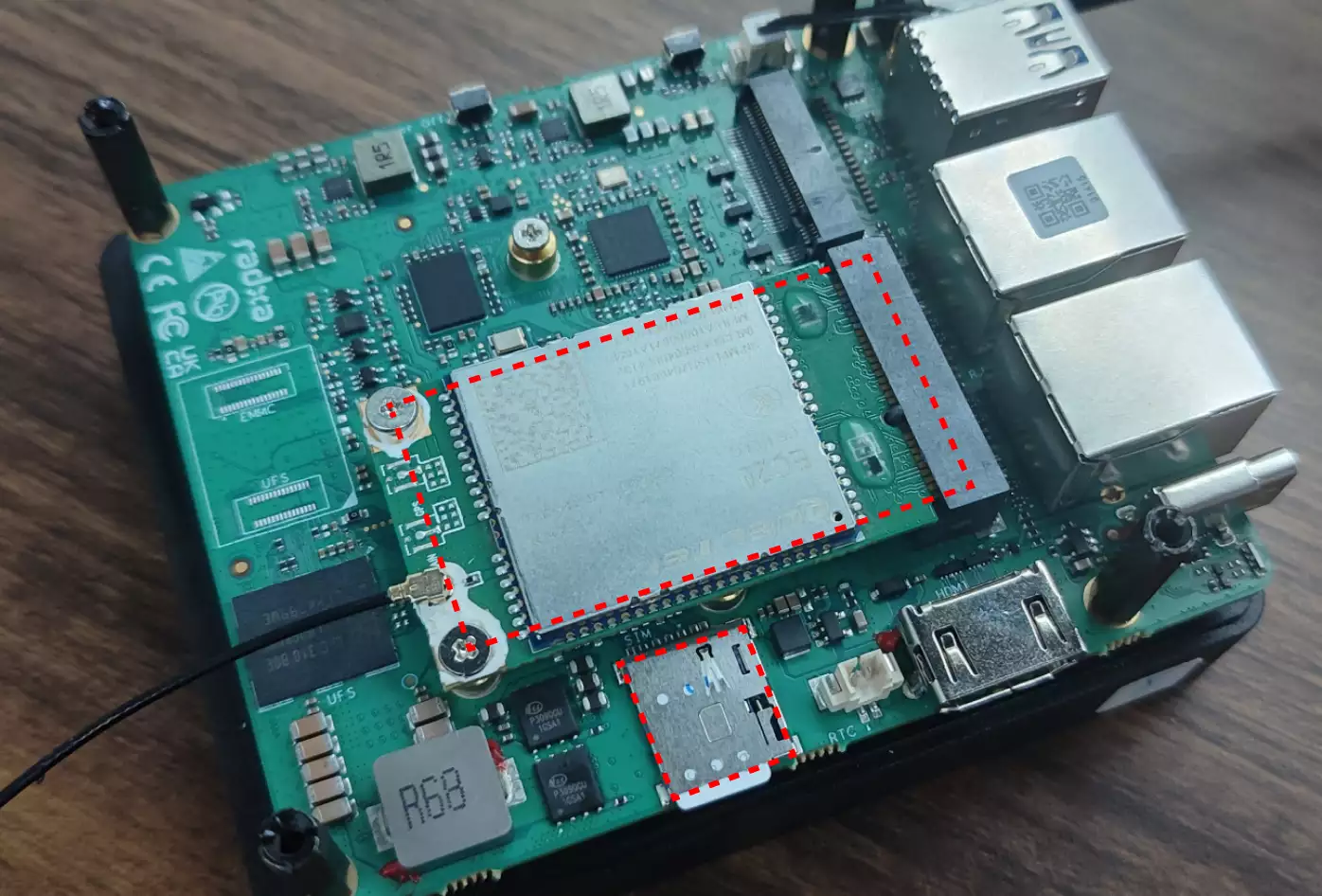
The Radxa Fogwise® AIRbox Q900 features 1 onboard Nano SIM card slot that supports Nano SIM card installation.
Hardware Connection
To enable mobile network connectivity, you need to install both a Nano SIM card and a 4G/5G module.
Note: This tutorial uses the Quectel LTE EC20 as an example.
Usage Guide
Verify 4G/5G Module
Use the lsusb command to check if the 4G/5G module is properly recognized.
lsusb | grep -i Quectel
If the system recognizes the module correctly, the terminal will display output similar to:
Bus 005 Device 002: ID 2c7c:0125 Quectel Wireless Solutions Co., Ltd. EC25 LTE modem
Check cdc-wdm Device
Use the ls command to verify if the system has successfully enumerated the cdc-wdm device.
ls /dev/cdc-wdm*
If recognized correctly, the terminal will display output similar to:
/dev/cdc-wdm0
Install Required Software
Install the necessary dial-up networking packages.
sudo apt install libqmi-utils modemmanager -y
Check Data Port Format
sudo qmicli -d /dev/cdc-wdm0 -e
This should be set to raw-ip. If not, use sudo qmicli -d /dev/cdc-wdm0 -E raw-ip and reboot the board.
- Check Data Network Interface
sudo qmicli -d /dev/cdc-wdm0 -w
This should be set to wwan0. If not, use sudo qmicli -d /dev/cdc-wdm0 -w wwan0 and reboot the board.
Create Network Interface Configuration
Use the nmcli command to create a network interface configuration.
sudo nmcli connection add type gsm ifname cdc-wdm0
If successful, the terminal will display output similar to:
Connection 'gsm-cdc-wdm0' (6a044568-6947-436e-9b46-51a1f2a9b65d) successfully added.
This step is optional. If you experience network connection issues, you may need to edit carrier-specific settings such as APN, username, and password.
sudo nmcli connection edit gsm-cdc-wdm0
The terminal will enter an interactive interface. Type help or ? to view available commands.
===| nmcli interactive connection editor |===

Editing existing 'gsm' connection: 'gsm-cdc-wdm0'

Type 'help' or '?' for available commands.
Type 'print' to show all the connection properties.
Type 'describe [<setting>.<prop>]' for detailed property description.

You may edit the following settings: connection, gsm, serial, ppp, match, ipv4, ipv6, hostname, link, tc, proxy
nmcli> set gsm.apn ctlte
nmcli> save
Connection 'gsm-cdc-wdm0' (e26d1d79-ba6b-44f3-9135-1ef7a80d982a) successfully updated.
nmcli> quit
Verify Network
Use the ip a command to check if the wwan0 interface has been assigned an IP address.
ip a
If connected successfully, the terminal will display output similar to:
···
4: wwan0: <POINTOPOINT,MULTICAST,NOARP,UP,LOWER_UP> mtu 1500 qdisc pfifo_fast state UNKNOWN group default qlen 1000
    link/none
    inet 10.10.24.33/30 brd 10.10.24.35 scope global noprefixroute wwan0
       valid_lft forever preferred_lft forever
···
If the interface doesn't have an IP address, you can restart the network interface with sudo nmcli connection up gsm-cdc-wdm0.
Test the network connection using the ping command.
sudo ping baidu.com -I wwan0 -c 5
If the network is functioning properly, the terminal will display output similar to:
PING baidu.com (220.181.7.203) from 10.10.24.33 wwan0: 56(84) bytes of data.
64 bytes from 220.181.7.203: icmp_seq=1 ttl=52 time=60.6 ms
64 bytes from 220.181.7.203: icmp_seq=2 ttl=52 time=59.5 ms
64 bytes from 220.181.7.203: icmp_seq=3 ttl=52 time=68.7 ms
64 bytes from 220.181.7.203: icmp_seq=4 ttl=52 time=66.9 ms
64 bytes from 220.181.7.203: icmp_seq=5 ttl=52 time=64.2 ms

--- baidu.com ping statistics ---
5 packets transmitted, 5 received, 0% packet loss, time 4006ms
rtt min/avg/max/mdev = 59.494/63.983/68.727/3.540 ms