CIX Multi-Channel Video Recognition
This is a multi-channel video stream YOLO object detection inference system based on Radxa O6/O6N.
Environment Setup
The relevant environment needs to be configured in advance.
Features
- Multi-channel video stream parallel processing
- Thread/process dual-mode inference
- NPU hardware acceleration
- Real-time FPS display
- Multi-stream combined display, fullscreen switching
Project Structure
cix-multistream-yolo/
├── main.py                      # Program entry point
├── src/
│   ├── capture/                # Video capture
│   │   ├── video_reader.py     # Video frame reading
│   │   └── video_reader_pipeline.py  # Read pipeline
│   ├── processing/              # Inference processing
│   │   ├── inference.py         # NPU inference engine
│   │   ├── inference_pipeline.py # Inference pipeline
│   │   └── post_processing.py  # Post-processing (NMS)
│   └── utils/
│       ├── manager.py          # Main coordinator
│       ├── tools.py            # Utility functions
│       ├── displaying.py       # Display module
│       └── download_model.sh   # Model download script
├── models/                     # Model files
├── data/                       # Test videos
│   ├── test_videos_360P/
│   └── test_videos_720P/
└── test/                       # Test code
Dependencies
- Python 3.11+
- OpenCV
- FFmpeg
- NumPy
- libnoe (NPU library)
Usage
Environment Dependencies
O6 / O6N
pip install opencv-python numpy
Download Project
O6 / O6N
git clone https://github.com/Ronin-1124/cix-multistream-yolo.git
cd cix-multistream-yolo
Basic Usage
python main.py
Specify Parameters
# Specify video source
python main.py -i video.mp4
python main.py -i video1.mp4 video2.mp4
python main.py -i data/test_videos_360P/

# Specify model
python main.py -m models/yolov8s.cix

# Select inference mode (thread or process)
python main.py -t process
Demo
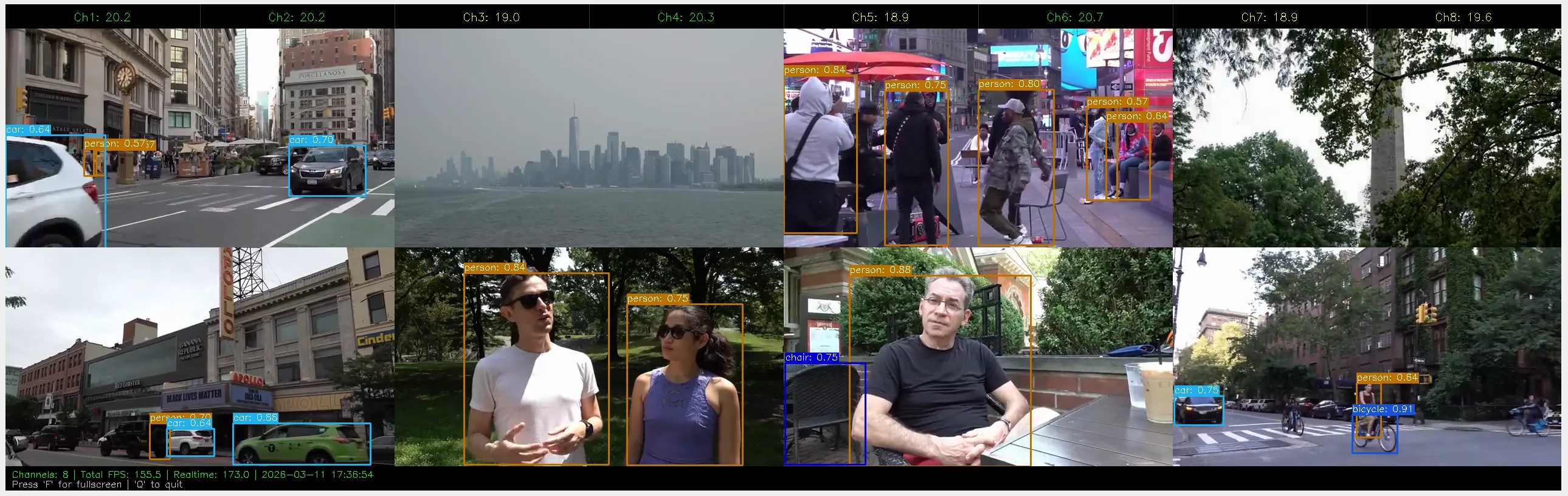
As shown, with 8-channel inference, it can achieve up to 173 FPS real-time throughput, with an average of about 20 FPS per channel.
Parameter Description
| Parameter | Description | Default |
|---|---|---|
-i, --input | Video file, directory or multiple paths | data/test_videos_360P |
-m, --model | Model file path | models/yolov8n.cix |
-t, --type | Inference mode: thread/t or process/p | thread |
Keyboard Shortcuts
| Key | Function |
|---|---|
q | Quit program |
f | Toggle fullscreen mode |
Supported Models
yolov8n- YOLOv8 Nanoyolov8s- YOLOv8 Small
Model files are automatically downloaded from ModelScope if not present.
Architecture Design
Video Reading (VideoReader)
       ↓
   Frame Queue (Queue)
       ↓
  Preprocessing (pre_processing)
       ↓
 NPU Inference (InferenceEngine)
       ↓
 Post-processing (NMS)
       ↓
 Result Queue
       ↓
 Display Module (Display)
Testing
pytest test/