BIOS Development
Prerequisites
You need to have Visual Studio Code and Docker environment set up in advance, then use Dev Container to run the BIOS compilation environment.
You can follow the tutorial below to complete the environment setup for BIOS development.
Download EDK II Source Code
Use the git clone command to clone the EDK II source code.
git clone --recurse-submodules <git_repo_url>
Replace <git_repo_url> with: https://github.com/radxa-pkg/edk2-cix.git
Start Development Environment
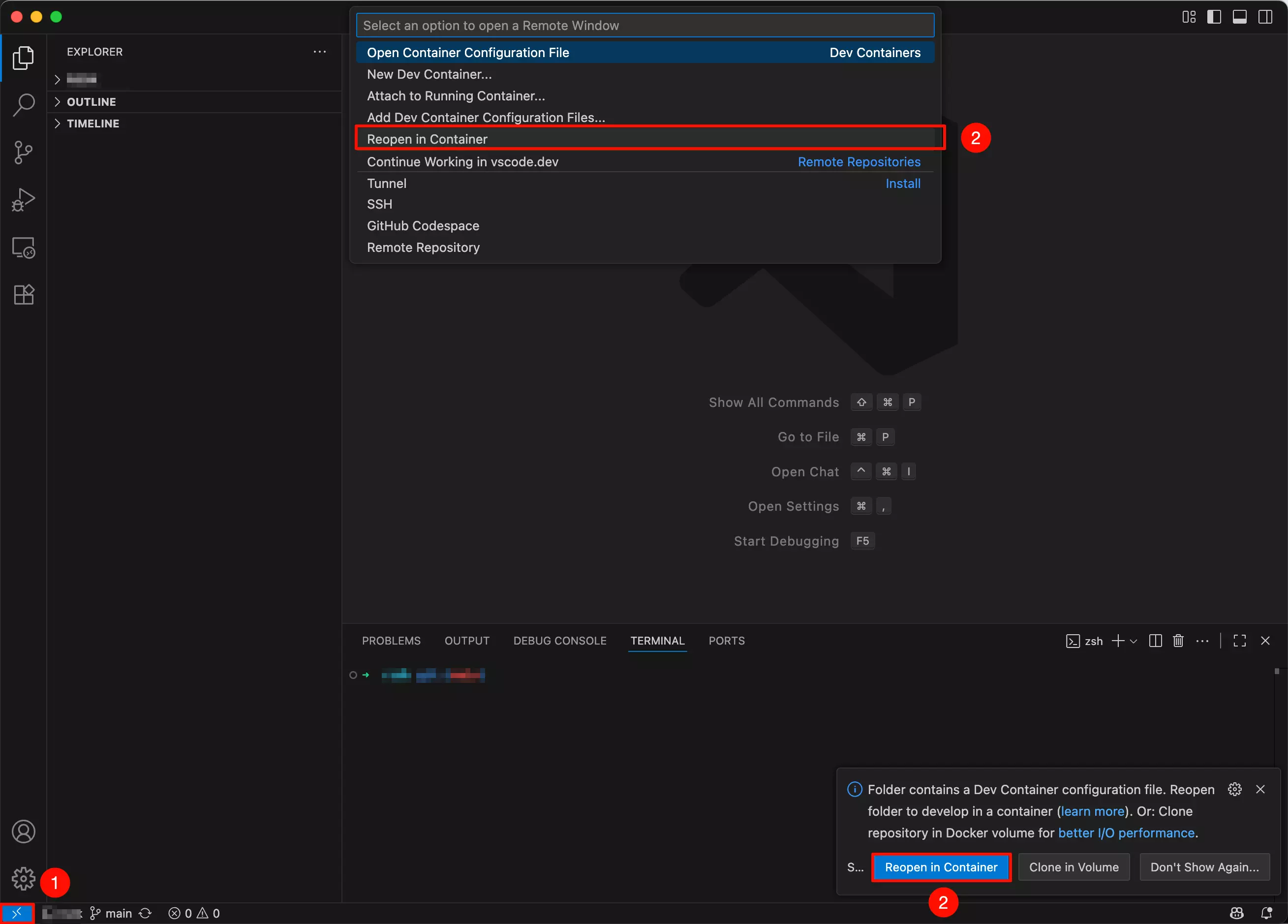
Open the EDK II source code directory with Visual Studio Code: The Dev Container extension will usually automatically detect the configuration file in the folder and prompt you to reopen in the container development environment.
When starting the development environment for the first time, Dev Containers will automatically download and install dependencies. Please be patient as this may take some time.
- Click the
Remoteoption in the bottom-left corner - Select the
Reopen in Containeroption
Compile BIOS
After starting the development environment, use the make deb command to compile the BIOS.
make deb