Simulate YOLOv5 Segmentation Inference
This document demonstrates how to use rknn-toolkit2 on an x86 PC to perform simulation inference of the YOLOv5 segmentation model without a motherboard. For the required environment setup, please refer to RKNN Installation.
Prepare the Model
This example uses a pre-trained ONNX model from the rknn_model_zoo as a case study, converting the model and running simulation inference on the PC.
-
If you are using Conda, first activate the
rknnConda environment:X86 Linux PCconda activate rknn -
Download the
yolov5s-seg.onnxmodel:X86 Linux PCcd rknn_model_zoo/examples/yolov5_seg/model
# Download the pre-trained yolov5s-seg.onnx model
bash download_model.shtipIf you encounter network issues, you can visit this page to manually download the model and place it in the corresponding folder.
-
Rename the ONNX model file suffix to
.rknn(only for PC-side result simulation):X86 Linux PCcp yolov5s-seg.onnx yolov5s-seg.rknn -
(Optional) Use
rknn-toolkit2to convert the model toyolov5s-seg.rknn:X86 Linux PCcd rknn_model_zoo/examples/yolov5_seg/python
python3 convert.py <onnx_model> <TARGET_PLATFORM> <dtype> <output_rknn_path>
# python3 convert.py ../model/yolov5s-seg.onnx rk3588 i8 ../model/yolov5s-seg.rknnParameter explanation:
<onnx_model>: Path to the ONNX model.<TARGET_PLATFORM>: Name of the NPU platform. Options:rk3562, rk3566, rk3568, rk3576, rk3588, rk1808, rv1109, rv1126.<dtype>: Choosei8orfp.i8is for INT8 quantization;fpis for FP16 quantization. The default isi8.<output_rknn_path>: Path to save the RKNN model. By default it is saved in the same directory as the ONNX model with the filenameyolov5s-seg.rknn.
tipFor RK358X users, set
TARGET_PLATFORMtork3588.
ONNX Model Inference on PC
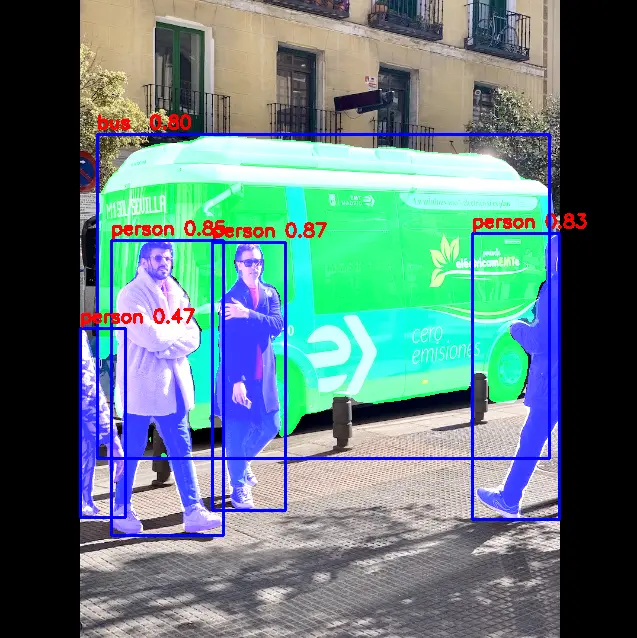
python3 yolov5_seg.py --model_path ../model/yolov5s-seg.onnx --img_show
person @ (212 242 285 510) 0.871
person @ (111 240 223 535) 0.850
person @ (472 233 559 519) 0.831
bus  @ (97 134 549 458) 0.799
person @ (80 328 125 517) 0.470
RKNN Model Simulation Inference on PC
-
Install the required dependencies with
pip3:X86 Linux PCpip3 install torchvision==0.19.0 pycocotools -
Run the simulation inference script:
-
Modify
rknn_model_zoo/py_utils/rknn_executor.pyto the following code (be sure to back up the original file):Python Codefrom rknn.api import RKNN
class RKNN_model_container():
def __init__(self, model_path, target=None, device_id=None) -> None:
rknn = RKNN()
DATASET_PATH = '../../../datasets/COCO/coco_subset_20.txt'
onnx_model = model_path[:-4] + 'onnx'
rknn.config(mean_values=[[0, 0, 0]], std_values=[[255, 255, 255]], target_platform=target)
rknn.load_onnx(model=onnx_model)
rknn.build(do_quantization=True, dataset=DATASET_PATH)
rknn.init_runtime()
self.rknn = rknn
def run(self, inputs):
if isinstance(inputs, list) or isinstance(inputs, tuple):
pass
else:
inputs = [inputs]
result = self.rknn.inference(inputs=inputs)
return result
def release(self):
self.rknn.release()
self.rknn = None -
Run the simulation inference script:
X86 Linux PCpython3 yolov5_seg.py --target <TARGET_PLATFORM> --model_path <RKNN_MODEL_PATH> --img_show
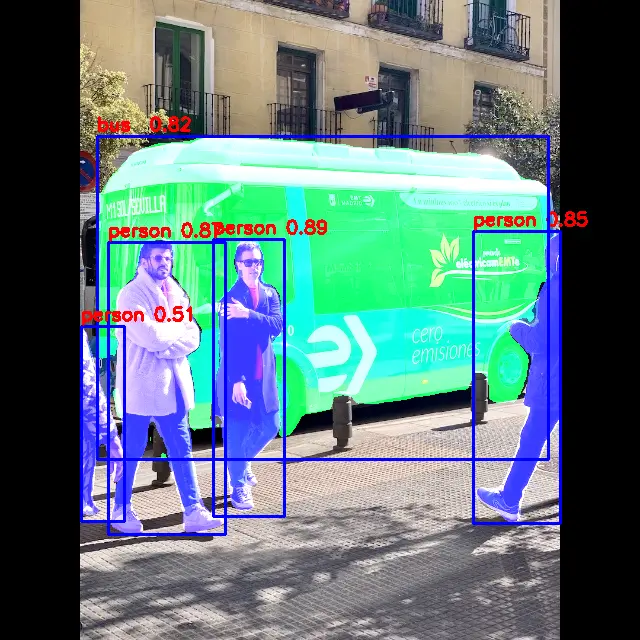
# python3 yolov5_seg.py --target rk3588 --model_path ../model/yolov5s-seg.rknn --img_show--target: Name of the NPU platform to simulate. Options:rk3562, rk3566, rk3568, rk3576, rk3588, rk1808, rv1109, rv1126.--model_path: Path to the RKNN model to be simulated.Resultsperson @ (213 239 284 516) 0.882
person @ (109 240 224 535) 0.869
person @ (473 231 560 523) 0.845
bus @ (97 136 548 459) 0.821
person @ (80 328 124 519) 0.499 -
Simulation inference result (the simulator only simulates NPU computation; actual performance and accuracy are determined by inference on the target board):
-