YOLOv8 Seg
Environment Setup
info
Follow RKNN Installation to set up the environment.
Follow RKNN Model Zoo to download the example files.
Model Download
Download the ONNX model file.
X64 Linux PC
cd rknn_model_zoo/examples/yolov8_seg/model/
bash download_model.sh
Model Conversion
Select the target platform.
- rk3588
- rk356x
- rk3576
X64 Linux PC
export TARGET_PLATFORM=rk3588
X64 Linux PC
export TARGET_PLATFORM=rk356x
X64 Linux PC
export TARGET_PLATFORM=rk3576
Convert the ONNX model to an RKNN model.
X64 Linux PC
cd ../python/
python convert.py ../model/yolov8s-seg.onnx ${TARGET_PLATFORM}
C API
Build the Example
Go to the rknn_model_zoo directory and run build-linux.sh to build.
X64 Linux PC
cd ../../..
bash build-linux.sh -t ${TARGET_PLATFORM} -a aarch64 -d yolov8_seg
Sync Files to the Device
Copy the built demo directory under the install folder to the device.
X64 Linux PC
cd install/${TARGET_PLATFORM}_linux_aarch64/
scp -r rknn_yolov8_seg_demo/ user@your_device_ip:target_directory
Run the Example
Export the runtime libraries to the environment variable.
Device
cd rknn_yolov8_seg_demo/
export LD_LIBRARY_PATH=./lib
Run the example.
Device
./rknn_yolov8_seg_demo ./model/yolov8_seg.rknn ./model/bus.jpg
$ ./rknn_yolov8_seg_demo ./model/yolov8_seg.rknn ./model/bus.jpg
[RKNN] Can not find libdrm.so
load label ./model/coco_80_labels_list.txt
model input num: 1, output num: 13
input tensors:
  index=0, name=images, n_dims=4, dims=[1, 640, 640, 3], n_elems=1228800, size=1228800, fmt=NHWC, type=INT8, qnt_type=AFFINE, zp=-128, scale=0.003922
output tensors:
  index=0, name=375, n_dims=4, dims=[1, 64, 80, 80], n_elems=409600, size=409600, fmt=NCHW, type=INT8, qnt_type=AFFINE, zp=-61, scale=0.115401
  index=1, name=onnx::ReduceSum_383, n_dims=4, dims=[1, 80, 80, 80], n_elems=512000, size=512000, fmt=NCHW, type=INT8, qnt_type=AFFINE, zp=-128, scale=0.003514
  index=2, name=388, n_dims=4, dims=[1, 1, 80, 80], n_elems=6400, size=6400, fmt=NCHW, type=INT8, qnt_type=AFFINE, zp=-128, scale=0.003540
  index=3, name=354, n_dims=4, dims=[1, 32, 80, 80], n_elems=204800, size=204800, fmt=NCHW, type=INT8, qnt_type=AFFINE, zp=27, scale=0.019863
  index=4, name=395, n_dims=4, dims=[1, 64, 40, 40], n_elems=102400, size=102400, fmt=NCHW, type=INT8, qnt_type=AFFINE, zp=-15, scale=0.099555
  index=5, name=onnx::ReduceSum_403, n_dims=4, dims=[1, 80, 40, 40], n_elems=128000, size=128000, fmt=NCHW, type=INT8, qnt_type=AFFINE, zp=-128, scale=0.003555
  index=6, name=407, n_dims=4, dims=[1, 1, 40, 40], n_elems=1600, size=1600, fmt=NCHW, type=INT8, qnt_type=AFFINE, zp=-128, scale=0.003680
  index=7, name=361, n_dims=4, dims=[1, 32, 40, 40], n_elems=51200, size=51200, fmt=NCHW, type=INT8, qnt_type=AFFINE, zp=30, scale=0.022367
  index=8, name=414, n_dims=4, dims=[1, 64, 20, 20], n_elems=25600, size=25600, fmt=NCHW, type=INT8, qnt_type=AFFINE, zp=-55, scale=0.074253
  index=9, name=onnx::ReduceSum_422, n_dims=4, dims=[1, 80, 20, 20], n_elems=32000, size=32000, fmt=NCHW, type=INT8, qnt_type=AFFINE, zp=-128, scale=0.003813
  index=10, name=426, n_dims=4, dims=[1, 1, 20, 20], n_elems=400, size=400, fmt=NCHW, type=INT8, qnt_type=AFFINE, zp=-128, scale=0.003922
  index=11, name=368, n_dims=4, dims=[1, 32, 20, 20], n_elems=12800, size=12800, fmt=NCHW, type=INT8, qnt_type=AFFINE, zp=43, scale=0.019919
  index=12, name=347, n_dims=4, dims=[1, 32, 160, 160], n_elems=819200, size=819200, fmt=NCHW, type=INT8, qnt_type=AFFINE, zp=-119, scale=0.032336
model is NHWC input fmt
model input height=640, width=640, channel=3
origin size=640x640 crop size=640x640
input image: 640 x 640, subsampling: 4:2:0, colorspace: YCbCr, orientation: 1
scale=1.000000 dst_box=(0 0 639 639) allow_slight_change=1 _left_offset=0 _top_offset=0 padding_w=0 padding_h=0
rga_api version 1.10.1_[0]
rknn_run
-- matmul_by_cpu_uint8 use: 13.651000 ms
-- resize_by_opencv_uint8 use: 3.066000 ms
-- crop_mask_uint8 use: 4.863000 ms
-- seg_reverse use: 0.303000 ms
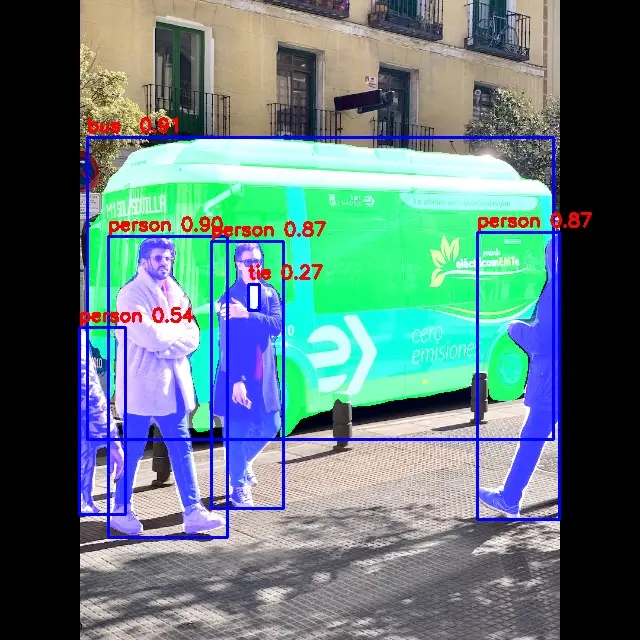
bus @ (87 137 553 439) 0.911
person @ (109 236 226 534) 0.900
person @ (211 241 283 508) 0.869
person @ (476 234 559 519) 0.866
person @ (79 327 125 514) 0.540
tie @ (248 284 259 310) 0.274
write_image path: out.png width=640 height=640 channel=3 data=0xaaab07e88330
Result Preview
Python API
Activate the virtual environment
Device
conda activate rknn
Run the Example
Copy the related files to the device and run the following commands.
Device
python yolov8_seg.py --model_path ../model/yolov8_seg.rknn --target ${TARGET_PLATFORM} --img_save
$ python yolov8_seg.py --model_path ../model/yolov8_seg.rknn --target rk3588 --img_save
/home/radxa/miniforge3/envs/rknn/lib/python3.12/site-packages/rknn/api/rknn.py:51: UserWarning: pkg_resources is deprecated as an API. See https://setuptools.pypa.io/en/latest/pkg_resources.html. The pkg_resources package is slated for removal as early as 2025-11-30. Refrain from using this package or pin to Setuptools<81.
  self.rknn_base = RKNNBase(cur_path, verbose)
I rknn-toolkit2 version: 2.3.2
--> Init runtime environment
I target set by user is: rk3588
done
Model-../model/yolov8_seg.rknn is rknn model, starting val
W inference: The 'data_format' is not set, and its default value is 'nhwc'!


IMG: bus.jpg
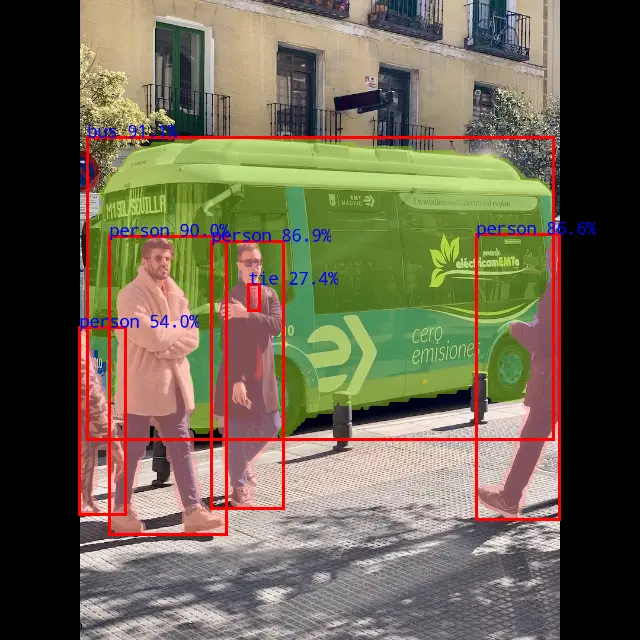
bus  @ (87 137 553 439) 0.911
person @ (108 236 227 537) 0.900
person @ (211 241 283 508) 0.869
person @ (477 232 559 519) 0.866
person @ (79 327 125 514) 0.540
tie @ (248 284 259 310) 0.274
The segmentation results have been saved to ./result/bus.jpg
Result Preview