DeepLabV3
Environment Setup
Follow RKNN Installation to set up the environment.
Follow RKNN Model Zoo to download the example files.
Model Download
Download the ONNX model file.
cd rknn_model_zoo/examples/deeplabv3/model/
bash download_model.sh
Model Conversion
Select the target platform.
- rk3588
- rk356x
- rk3576
export TARGET_PLATFORM=rk3588
export TARGET_PLATFORM=rk356x
export TARGET_PLATFORM=rk3576
Convert the ONNX model to an RKNN model.
If model loading fails, install TensorFlow with the command below:
pip3 install 'tensorflow>=1.12.0,<=2.16.0rc0'
cd ../python/
python convert.py ../model/deeplab-v3-plus-mobilenet-v2.pb ${TARGET_PLATFORM}
C API
Build the Example
Go to the rknn_model_zoo directory and run build-linux.sh to build.
cd ../../..
bash build-linux.sh -t ${TARGET_PLATFORM} -a aarch64 -d deeplabv3
Sync Files to the Device
Copy the built demo directory under the install folder to the device.
cd install/${TARGET_PLATFORM}_linux_aarch64/
scp -r rknn_deeplabv3_demo/ user@your_device_ip:target_directory
Run the Example
Dependency note: The C API example requires the libOpenCL.so library. On RK3588/RK356X platforms, you can use libmali.so.1.9.0 from the Mali GPU driver as a replacement.
On Debian 12 (Bookworm), RK3588/RK356X devices use the Panfrost/Panthor GPU driver by default. Switch to the Mali GPU driver first.
Reference: Switch GPU Driver
Create a symlink (link libmali.so.1.9.0 to libOpenCL.so).
cd rknn_deeplabv3_demo/lib/
ln -s /usr/lib/aarch64-linux-gnu/libmali.so.1.9.0 libOpenCL.so
Export the runtime libraries to the environment variable.
cd ..
export LD_LIBRARY_PATH=./lib
Run the example.
./rknn_deeplabv3_demo ./model/deeplab-v3-plus-mobilenet-v2.rknn ./model/test_image.jpg
$ ./rknn_deeplabv3_demo ./model/deeplab-v3-plus-mobilenet-v2.rknn ./model/test_image.jpg
arm_release_ver: g24p0-00eac0, rk_so_ver: 3
model input num: 1, output num: 1
input tensors:
  index=0, name=sub_7:0, n_dims=4, dims=[1, 513, 513, 3], n_elems=789507, size=789507, fmt=NHWC, type=INT8, qnt_type=AFFINE, zp=0, scale=0.007843
output tensors:
  index=0, name=logits/semantic/BiasAdd:0, n_dims=4, dims=[1, 65, 65, 21], n_elems=88725, size=88725, fmt=NCHW, type=INT8, qnt_type=AFFINE, zp=-109, scale=0.100937
model is NHWC input fmt
model input height=513, width=513, channel=3
origin size=513x513 crop size=512x512
input image: 513 x 513, subsampling: 4:4:4, colorspace: YCbCr, orientation: 1
model is NHWC input fmt
output_mems-> fd = 12, offset = 0, size = 354900
post_buf_mem-> fd = 13, offset = 0, size = 263169
rknn_run
write_image path: out.png width=513 height=513 channel=3 data=0x33a04740
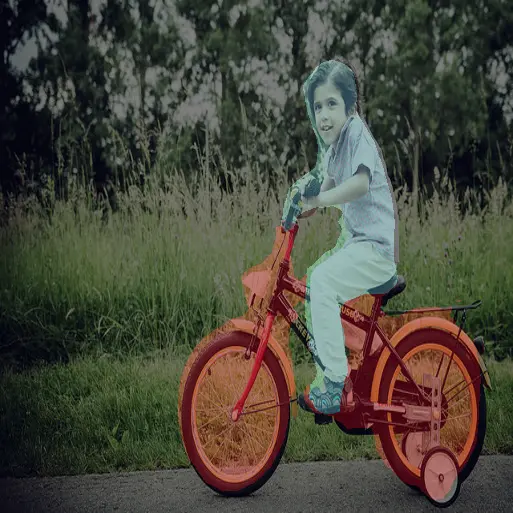
Result Preview
Python API
Activate the virtual environment
Dependency note: The Python API example depends on matplotlib. Install it with the command below.
pip install matplotlib
conda activate rknn
Run the Example
Copy the related files to the device and run the following commands.
python deeplabv3.py --model_path ../model/deeplab-v3-plus-mobilenet-v2.rknn --target ${TARGET_PLATFORM}
$ python deeplabv3.py --model_path ../model/deeplab-v3-plus-mobilenet-v2.rknn --target rk3588
/home/radxa/miniforge3/envs/rknn/lib/python3.12/site-packages/rknn/api/rknn.py:51: UserWarning: pkg_resources is deprecated as an API. See https://setuptools.pypa.io/en/latest/pkg_resources.html. The pkg_resources package is slated for removal as early as 2025-11-30. Refrain from using this package or pin to Setuptools<81.
  self.rknn_base = RKNNBase(cur_path, verbose)
I rknn-toolkit2 version: 2.3.2
done
--> Init runtime environment
I target set by user is: rk3588
done
--> Running model
W inference: The 'data_format' is not set, and its default value is 'nhwc'!
--> done
Result Preview