MobileSAM
Environment Setup
info
Follow RKNN Installation to set up the environment.
Follow RKNN Model Zoo to download the example files.
Model Download
Download the ONNX model file.
X64 Linux PC
cd rknn_model_zoo/examples/mobilesam/model/
bash download_model.sh
Model Conversion
Select the target platform.
info
Currently, the MobileSAM model only supports rk3562 and rk3588 platforms.
- rk3588
- rk356x
- rk3576
X64 Linux PC
export TARGET_PLATFORM=rk3588
X64 Linux PC
export TARGET_PLATFORM=rk356x
X64 Linux PC
export TARGET_PLATFORM=rk3576
Convert the ONNX model to an RKNN model.
X64 Linux PC
cd ../python/decoder/
python convert.py ../../model/mobilesam_decoder.onnx ${TARGET_PLATFORM}
cd ../encoder/
python convert.py ../../model/mobilesam_decoder.onnx ${TARGET_PLATFORM}
C API
Build the Example
Go to the rknn_model_zoo directory and run build-linux.sh to build.
X64 Linux PC
cd ../../../..
bash build-linux.sh -t ${TARGET_PLATFORM} -a aarch64 -d mobilesam
Sync Files to the Device
Copy the built demo directory under the install folder to the device.
X64 Linux PC
cd install/${TARGET_PLATFORM}_linux_aarch64/
scp -r rknn_mobilesam_demo user@your_device_ip:target_directory
Run the Example
Export the runtime libraries to the environment variable.
Device
cd rknn_mobilesam_demo/
export LD_LIBRARY_PATH=./lib
Run the example.
Device
./rknn_mobilesam_demo ./model/mobilesam_encoder.rknn ./model/picture.jpg ./model/mobilesam_decoder.rknn ./model/coords.txt ./model/labels.txt
$ ./rknn_mobilesam_demo ./model/mobilesam_encoder.rknn ./model/picture.jpg ./model/mobilesam_decoder.rknn ./model/coords.txt ./model/labels.txt
--> init mobilesam encoder model
model input num: 1, output num: 1
input tensors:
  index=0, name=input.1, n_dims=4, dims=[1, 448, 448, 3], n_elems=602112, size=1204224, fmt=NHWC, type=FP16, qnt_type=AFFINE, zp=0, scale=1.000000
output tensors:
  index=0, name=2044, n_dims=4, dims=[1, 256, 28, 28], n_elems=200704, size=401408, fmt=NCHW, type=FP16, qnt_type=AFFINE, zp=0, scale=1.000000
model is NHWC input fmt
input image height=448, input image width=448, input image channel=3
--> init mobilesam decoder model
model input num: 5, output num: 2
input tensors:
  index=0, name=image_embeddings, n_dims=4, dims=[1, 28, 28, 256], n_elems=200704, size=401408, fmt=NHWC, type=FP16, qnt_type=AFFINE, zp=0, scale=1.000000
  index=1, name=point_coords, n_dims=3, dims=[1, 2, 2], n_elems=4, size=8, fmt=UNDEFINED, type=FP16, qnt_type=AFFINE, zp=0, scale=1.000000
  index=2, name=point_labels, n_dims=2, dims=[1, 2], n_elems=2, size=4, fmt=UNDEFINED, type=FP16, qnt_type=AFFINE, zp=0, scale=1.000000
  index=3, name=mask_input, n_dims=4, dims=[1, 112, 112, 1], n_elems=12544, size=25088, fmt=NHWC, type=FP16, qnt_type=AFFINE, zp=0, scale=1.000000
  index=4, name=has_mask_input, n_dims=1, dims=[1], n_elems=1, size=2, fmt=UNDEFINED, type=FP16, qnt_type=AFFINE, zp=0, scale=1.000000
output tensors:
  index=0, name=iou_predictions, n_dims=2, dims=[1, 4], n_elems=4, size=8, fmt=UNDEFINED, type=FP16, qnt_type=AFFINE, zp=0, scale=1.000000
  index=1, name=low_res_masks, n_dims=4, dims=[1, 4, 112, 112], n_elems=50176, size=100352, fmt=NCHW, type=FP16, qnt_type=AFFINE, zp=0, scale=1.000000
model is NHWC input fmt
input image height=28, input image width=28, input image channel=256
origin size=769x770 crop size=768x768
input image: 769 x 770, subsampling: 4:2:0, colorspace: YCbCr, orientation: 1
num_lines=2
num_lines=2
--> inference mobilesam encoder model
src_height:770, src_width:769
newh:448 neww:447 padh:0 padw:1
rknn_run
--> inference mobilesam decoder model
rknn_run
write_image path: out.png width=769 height=770 channel=3 data=0xffff79479010
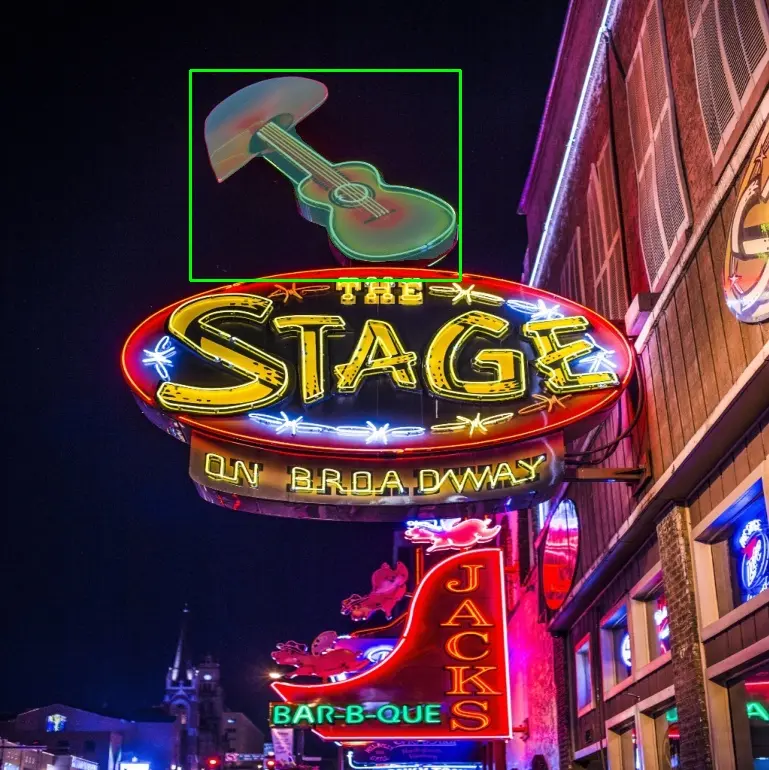
Result Preview
Python API
Activate the virtual environment
Device
conda activate rknn
Run the Example
Copy the related files to the device and run the following command.
Device
python mobilesam.py --encoder ../model/mobilesam_encoder.rknn --decoder ../model/mobilesam_decoder.rknn --target ${TARGET_PLATFORM}
$ python mobilesam.py --encoder ../model/mobilesam_encoder.rknn --decoder ../model/mobilesam_decoder.rknn --target rk3588
/home/radxa/miniforge3/envs/rknn/lib/python3.12/site-packages/rknn/api/rknn.py:51: UserWarning: pkg_resources is deprecated as an API. See https://setuptools.pypa.io/en/latest/pkg_resources.html. The pkg_resources package is slated for removal as early as 2025-11-30. Refrain from using this package or pin to Setuptools<81.
  self.rknn_base = RKNNBase(cur_path, verbose)
I rknn-toolkit2 version: 2.3.2
I target set by user is: rk3588
W inference: The 'data_format' is not set, and its default value is 'nhwc'!
I rknn-toolkit2 version: 2.3.2
I target set by user is: rk3588
[ WARN:[email protected]] global loadsave.cpp:848 imwrite_ Unsupported depth image for selected encoder is fallbacked to CV_8U.
result save to result.jpg
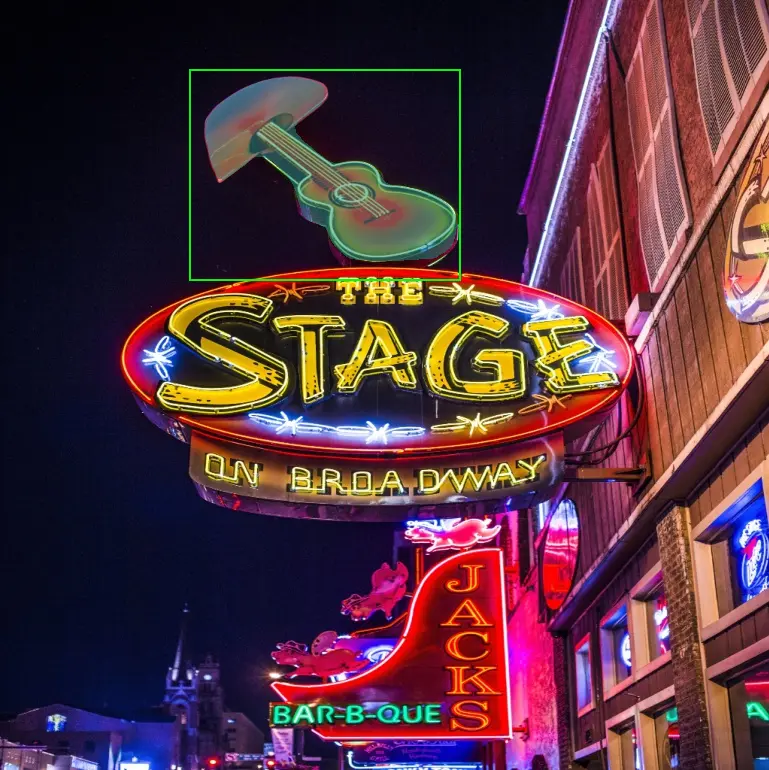
Result Preview