PP-YOLOE
Environment Setup
info
Follow RKNN Installation to set up the environment.
Follow RKNN Model Zoo to download the example files.
Model Download
Download the ONNX model file.
X64 Linux PC
cd rknn_model_zoo/examples/ppyoloe/model/
bash download_model.sh
Model Conversion
Select the target platform.
- rk3588
- rk356x
- rk3576
X64 Linux PC
export TARGET_PLATFORM=rk3588
X64 Linux PC
export TARGET_PLATFORM=rk356x
X64 Linux PC
export TARGET_PLATFORM=rk3576
Convert the ONNX model to an RKNN model.
X64 Linux PC
cd ../python/
python convert.py ../model/ppyoloe_s.onnx ${TARGET_PLATFORM}
C API
Build the Example
Go to the rknn_model_zoo directory and run build-linux.sh to build.
X64 Linux PC
cd ../../..
bash build-linux.sh -t ${TARGET_PLATFORM} -a aarch64 -d ppyoloe
Sync Files to the Device
Copy the built demo directory under the install folder to the device.
X64 Linux PC
cd install/${TARGET_PLATFORM}_linux_aarch64/
scp -r rknn_ppyoloe_demo/ user@your_device_ip:target_directory
Run the Example
Export the runtime libraries to the environment variable.
Device
cd rknn_ppyoloe_demo/
export LD_LIBRARY_PATH=./lib
Run the example.
Device
./rknn_ppyoloe_demo ./model/ppyoloe.rknn ./model/bus.jpg
$ ./rknn_ppyoloe_demo ./model/ppyoloe.rknn ./model/bus.jpg
load label ./model/coco_80_labels_list.txt
model input num: 1, output num: 9
input tensors:
  index=0, name=image, n_dims=4, dims=[1, 640, 640, 3], n_elems=1228800, size=1228800, fmt=NHWC, type=INT8, qnt_type=AFFINE, zp=-128, scale=0.003922
output tensors:
  index=0, name=conv2d_176.tmp_1, n_dims=4, dims=[1, 68, 20, 20], n_elems=27200, size=27200, fmt=NCHW, type=INT8, qnt_type=AFFINE, zp=-42, scale=0.072882
  index=1, name=sigmoid_2.tmp_0, n_dims=4, dims=[1, 80, 20, 20], n_elems=32000, size=32000, fmt=NCHW, type=INT8, qnt_type=AFFINE, zp=-128, scale=0.003802
  index=2, name=clip_0.tmp_0, n_dims=4, dims=[1, 1, 20, 20], n_elems=400, size=400, fmt=NCHW, type=INT8, qnt_type=AFFINE, zp=-128, scale=0.003922
  index=3, name=conv2d_182.tmp_1, n_dims=4, dims=[1, 68, 40, 40], n_elems=108800, size=108800, fmt=NCHW, type=INT8, qnt_type=AFFINE, zp=-47, scale=0.085614
  index=4, name=sigmoid_5.tmp_0, n_dims=4, dims=[1, 80, 40, 40], n_elems=128000, size=128000, fmt=NCHW, type=INT8, qnt_type=AFFINE, zp=-128, scale=0.003736
  index=5, name=clip_1.tmp_0, n_dims=4, dims=[1, 1, 40, 40], n_elems=1600, size=1600, fmt=NCHW, type=INT8, qnt_type=AFFINE, zp=-128, scale=0.003922
  index=6, name=conv2d_188.tmp_1, n_dims=4, dims=[1, 68, 80, 80], n_elems=435200, size=435200, fmt=NCHW, type=INT8, qnt_type=AFFINE, zp=-43, scale=0.102416
  index=7, name=sigmoid_8.tmp_0, n_dims=4, dims=[1, 80, 80, 80], n_elems=512000, size=512000, fmt=NCHW, type=INT8, qnt_type=AFFINE, zp=-128, scale=0.003279
  index=8, name=clip_2.tmp_0, n_dims=4, dims=[1, 1, 80, 80], n_elems=6400, size=6400, fmt=NCHW, type=INT8, qnt_type=AFFINE, zp=-128, scale=0.003922
model is NHWC input fmt
model input height=640, width=640, channel=3
origin size=640x640 crop size=640x640
input image: 640 x 640, subsampling: 4:2:0, colorspace: YCbCr, orientation: 1
scale=1.000000 dst_box=(0 0 639 639) allow_slight_change=1 _left_offset=0 _top_offset=0 padding_w=0 padding_h=0
rga_api version 1.10.1_[0]
rknn_run
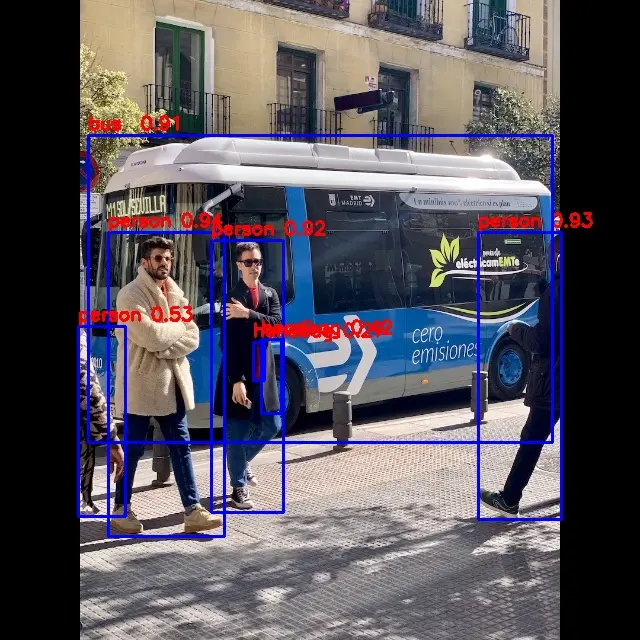
person @ (108 232 224 536) 0.943
person @ (478 232 561 519) 0.928
person @ (211 240 283 512) 0.916
bus @ (88 135 552 442) 0.909
person @ (78 326 125 516) 0.527
handbag @ (261 339 281 413) 0.420
handbag @ (253 342 264 380) 0.272
write_image path: out.png width=640 height=640 channel=3 data=0x6b49a30
Result Preview
Python API
Activate the virtual environment
Device
conda activate rknn
Run the Example
Copy the related files to the device and run the following commands.
Device
python ppyoloe.py --model_path ./model/ppyoloe.rknn --target ${TARGET_PLATFORM} --img_folder ./model/ --img_save
$ python ppyoloe.py --model_path ./model/ppyoloe.rknn --target rk3588 --img_folder ./model/ --img_save
/home/radxa/miniforge3/envs/rknn/lib/python3.12/site-packages/rknn/api/rknn.py:51: UserWarning: pkg_resources is deprecated as an API. See https://setuptools.pypa.io/en/latest/pkg_resources.html. The pkg_resources package is slated for removal as early as 2025-11-30. Refrain from using this package or pin to Setuptools<81.
  self.rknn_base = RKNNBase(cur_path, verbose)
I rknn-toolkit2 version: 2.3.2
--> Init runtime environment
I target set by user is: rk3588
done
Model-./model/ppyoloe.rknn is rknn model, starting val
W inference: The 'data_format' is not set, and its default value is 'nhwc'!


IMG: bus.jpg
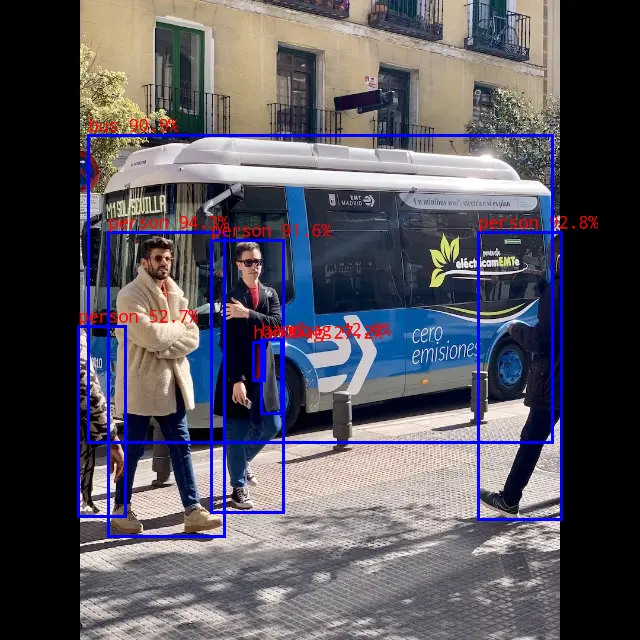
class: person, score: 0.942828357219696
box coordinate left,top,right,down: [108, 232, 224, 536]
class: person, score: 0.9276214241981506
box coordinate left,top,right,down: [478, 232, 561, 519]
class: person, score: 0.916216254234314
box coordinate left,top,right,down: [211, 240, 283, 512]
class: person, score: 0.5267177820205688
box coordinate left,top,right,down: [78, 326, 125, 516]
class: handbag, score: 0.41975846886634827
box coordinate left,top,right,down: [261, 339, 281, 413]
class: handbag, score: 0.27218714356422424
box coordinate left,top,right,down: [253, 342, 264, 380]
class: bus , score: 0.9086127877235413
box coordinate left,top,right,down: [88, 135, 552, 442]
Detection result save to ./result/bus.jpg
Result Preview