Erase eMMC or SPI Flash
Enter to Maskrom Mode
- With onboard eMMC
- Without onboard eMMC
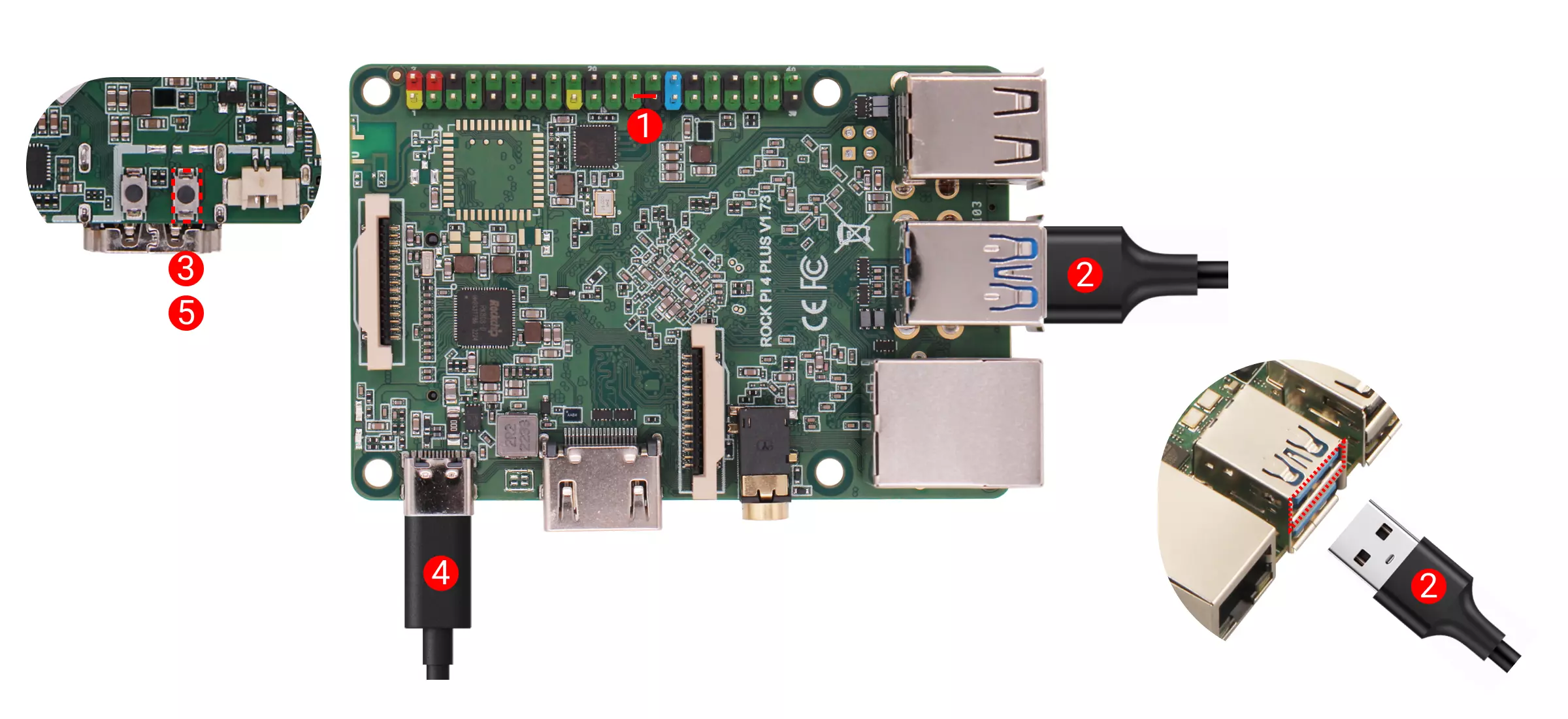
Disconnect the board power and remove the microSD card.
Detailed steps:
① If the board has SPI Flash, connect the corresponding SPI Flash pins to GND
② Use a USB Type-A to USB Type-A cable to connect the board and computer
③ Press and hold the Maskrom button before powering the board
④ Power the board using the power adapter
⑤ Release the Maskrom button after the board is powered
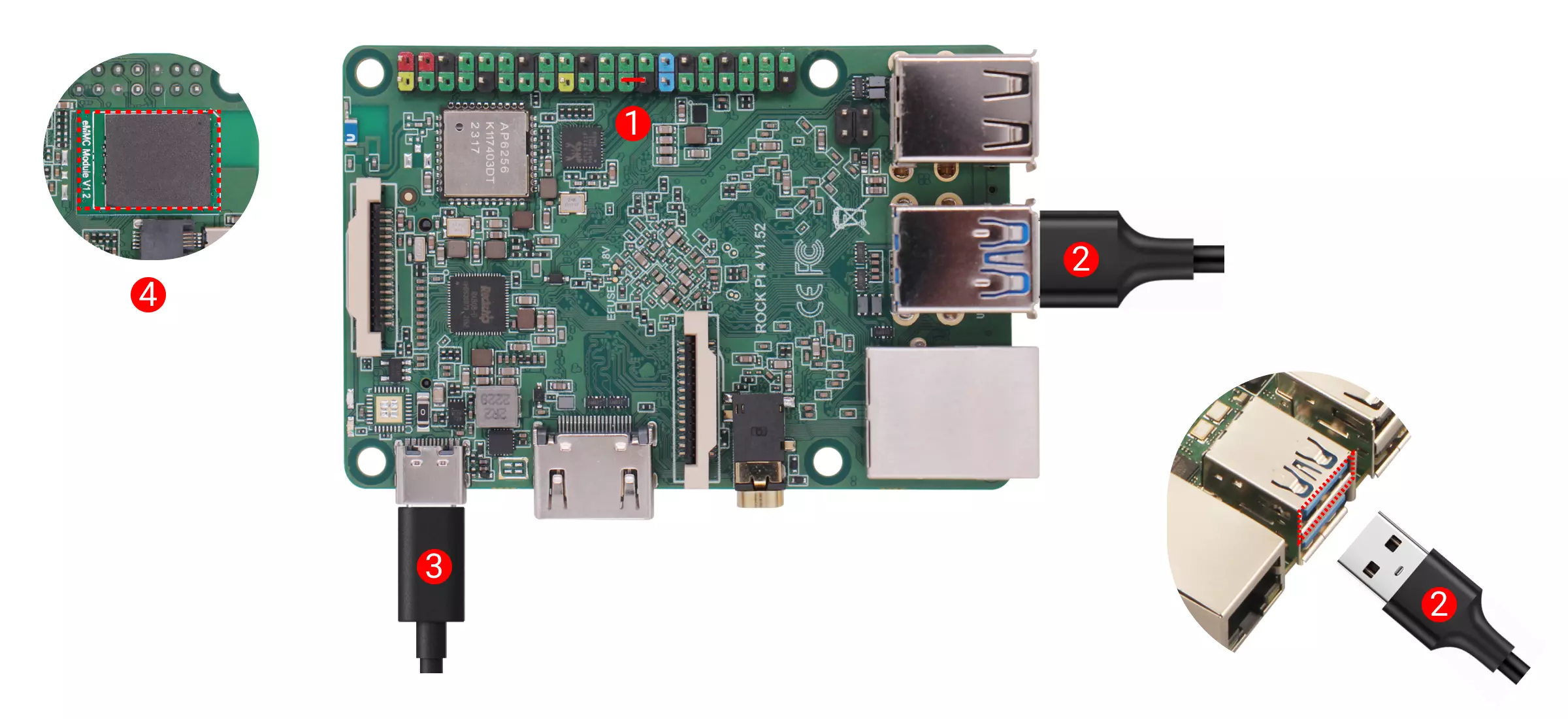
Disconnect the board power and remove bootable media (such as microSD card and eMMC module, etc.).
Detailed steps:
① If the board has SPI Flash, connect the corresponding SPI Flash pins to GND
② Use a USB Type-A to USB Type-A cable to connect the board and computer
③ Power the board using the power adapter
④ Install the eMMC module
If the board power LED stays solid green, it indicates successful entry into Maskrom mode.
Erase eMMC
- Linux/MacOS
- Windows
-
Generate zero.img
dd if=/dev/zero of=./zero.img bs=1M count=64 -
Make sure the host recognises Maskrom
sudo rkdeveloptool ld
DevNo=1 Vid=0x2207,Pid=0x350a,LocationID=109 Maskrom -
Flash Loader
sudo rkdeveloptool db rk3399_loader_spinor_v1.15.114.bin
- Erase eMMC
sudo rkdeveloptool wl 0 zero.img
- Reboot
sudo rkdeveloptool rd
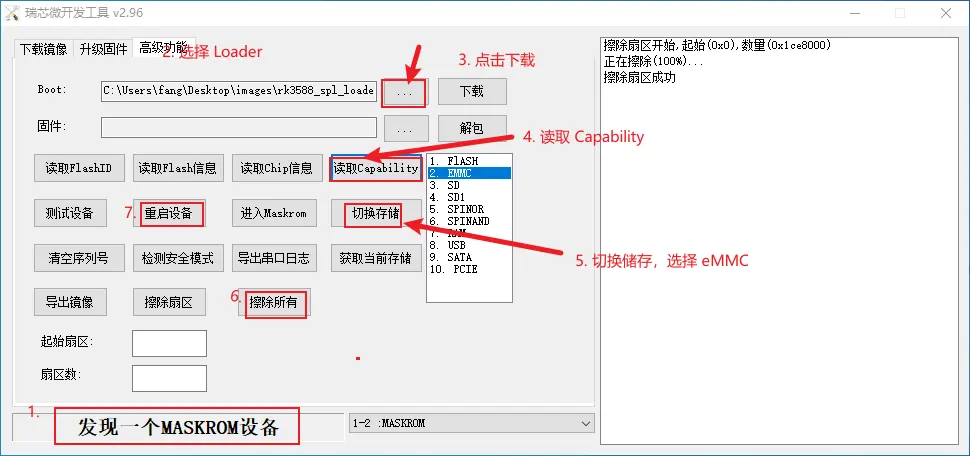
Open the RkDevTool tool and we'll use the RkDevTool to erase
-
Make sure the host recognises Maskrom
-
Click on the button to the left of "Download" to select the Loader
-
Click "Download" to flash the Loader (Go to download page to download file)
-
Click "ReadCapability" to get current storage
-
Click on "Switch storage" to switch the storage to eMMC
-
Click the "EraseAll" button to erase the eMMC
-
Click "ResetDevice"
Erase SPI Flash
- Linux/MacOS
- Windows
-
Make sure the host recognises Maskrom
sudo rkdeveloptool ld
DevNo=1 Vid=0x2207,Pid=0x350a,LocationID=109 Maskrom -
Flash Loader
sudo rkdeveloptool db rk3588_spl_loader_v1.15.113.bin
- Erase SPI Flash
sudo rkdeveloptool ef
- Reboot
sudo rkdeveloptool rd
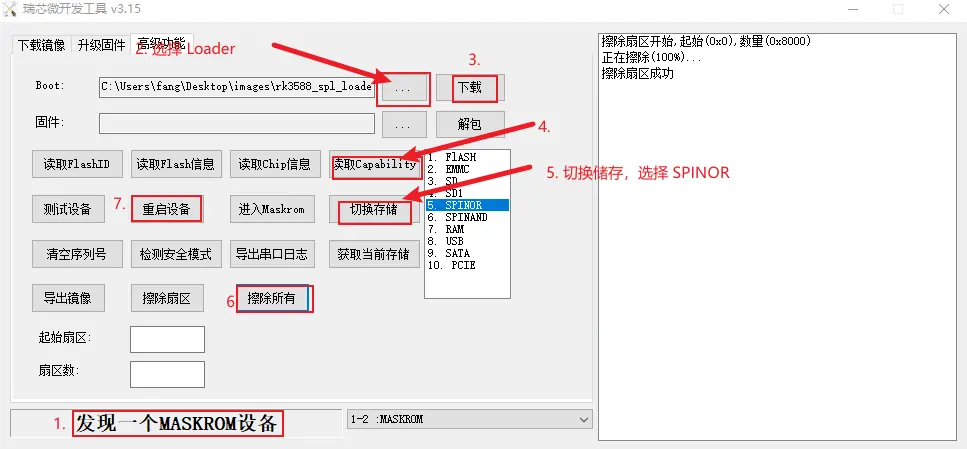
Open the RkDevTool tool and we'll use the RkDevTool to erase
-
Make sure the host recognises Maskrom
-
Click on the button to the left of "Download" to select the Loader
-
Click "Download" to flash the Loader (Go to download page to download file)
-
Click "ReadCapability" to get current storage
-
Click on "Switch storage" to switch the storage to SPINOR
-
Click the "EraseAll" button to erase the SPI Flash
-
Click "ResetDevice"