MIPI CSI Interface
The Radxa ROCK 4D features 2 onboard MIPI CSI interfaces for connecting camera modules:
- 1 x 4-lane MIPI CSI: Radxa 31-Pin / 0.3mm pitch FPC connector (model FH35C-31S-0.3SHW(50))
- 1 x 2-lane MIPI CSI: Raspberry Pi 15-Pin / 1.0mm pitch FPC connector (model FPC1030-15S-TAG; pin-compatible with the official Raspberry Pi 15P CSI camera standard)
The 4-lane MIPI CSI interface supports higher resolution camera modules, allowing users to choose based on their specific requirements.
Interface Overview
| Interface | Lanes | Connector Type | Connector Model | Notes |
|---|---|---|---|---|
| 4-lane CSI | 4 | Radxa 31-Pin / 0.3mm FPC | FH35C-31S-0.3SHW(50) | For high-resolution cameras (Camera 4K) |
| 2-lane CSI | 2 | Raspberry Pi 15-Pin / 1.0mm FPC | FPC1030-15S-TAG | Pin-compatible with the official Raspberry Pi 15P CSI camera standard |


Supported Cameras
| Board | CSI Camera | Notes |
|---|---|---|
| ROCK 4D | Camera 4K | |
| ROCK 4D | Camera 13M 214 | Color preview is being adapted |
| ROCK 4D | Camera 8M 219 | Color preview is being adapted |
Hardware Connection
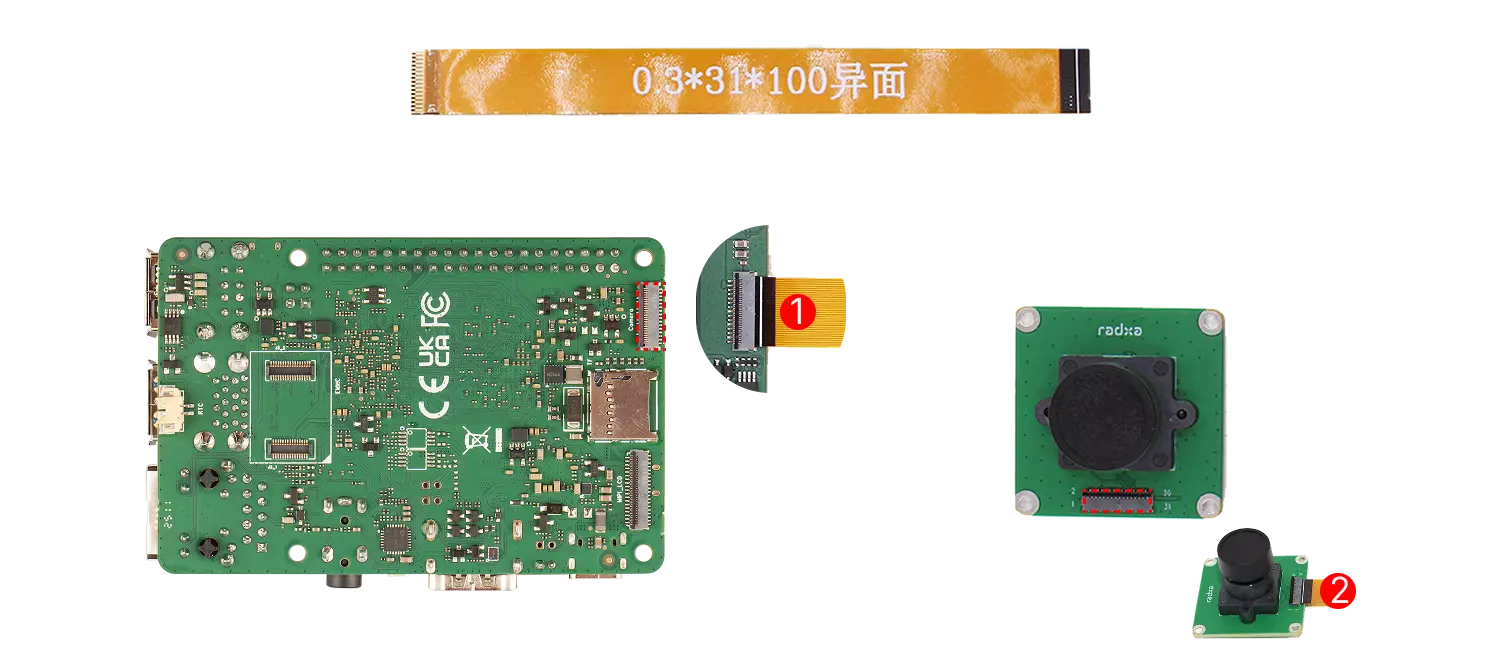
Use the board's MIPI CSI interface to connect the camera. The connection method is as follows: taking the 4-lane MIPI CSI interface connecting Camera 4K as an example
①: Connect to the board's MIPI CSI interface, with the gold fingers (metal contacts) facing towards the board
②: Connect to the camera's interface, with the gold fingers (metal contacts) facing towards the camera
Software Enable
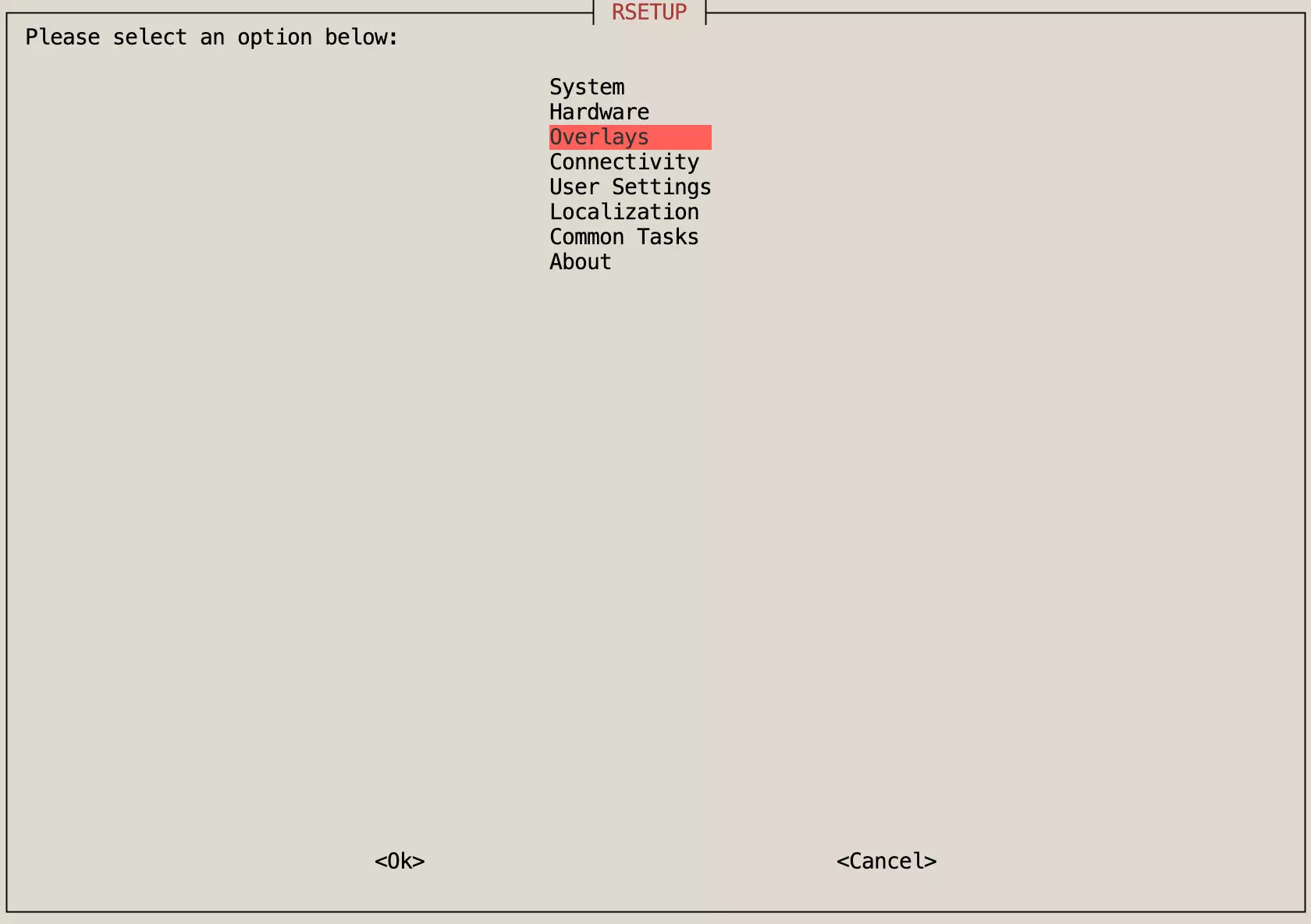
Enter rsetup command in the terminal command line, and use the Rsetup tool to configure camera options.
rsetup
- Use the arrow keys to select the Overlays option, then press Enter to confirm the selection.
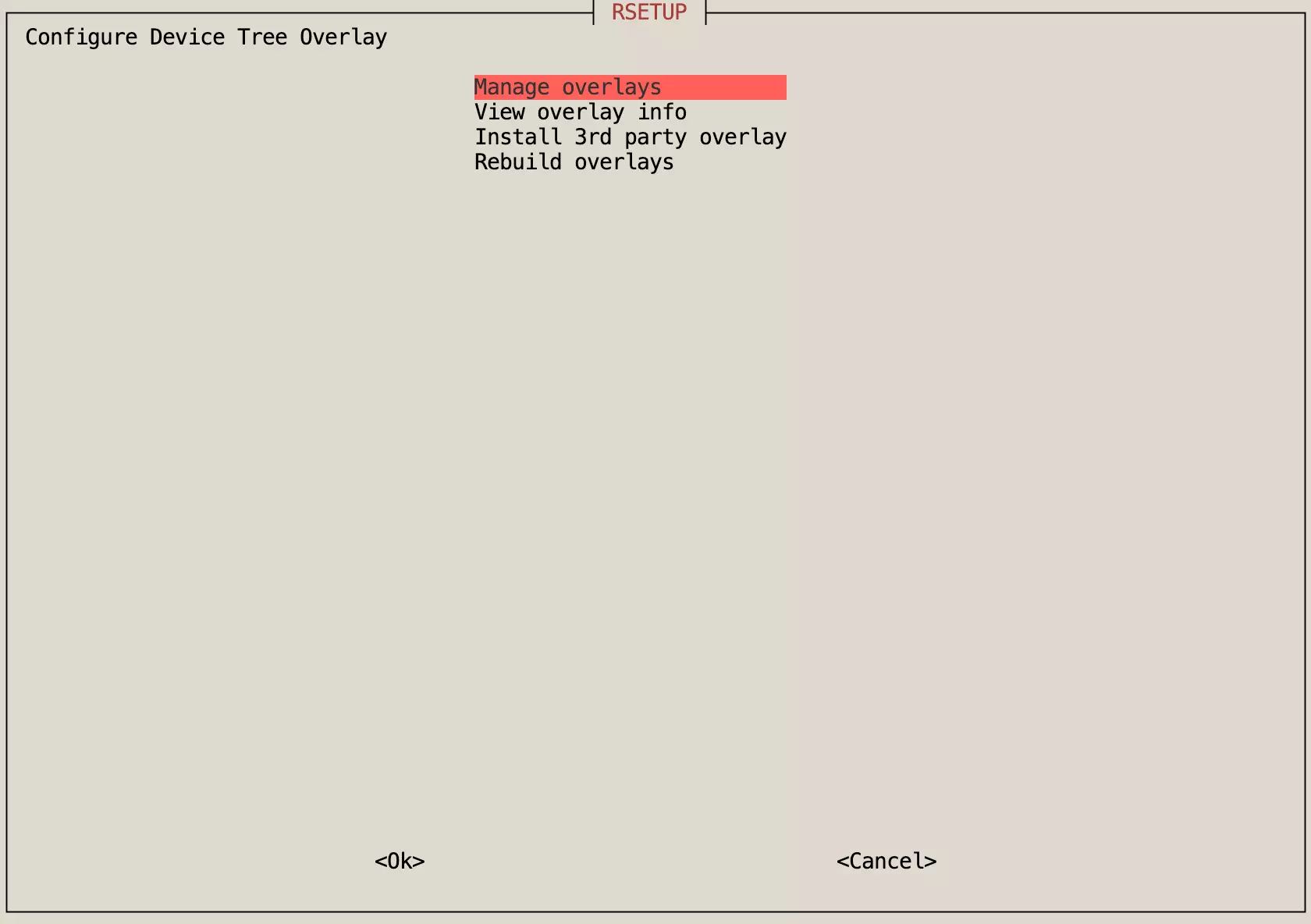
- Use the arrow keys to select the Manage overlays option, then press Enter to confirm the selection.
-
Use the arrow keys to select the corresponding Camera option, press the space key to enable the function (indicated by
*), then press Enter to confirm the selection. -
Restart the system for the configuration to take effect.
Interface Specifications
For detailed interface specifications, please refer to the Hardware Design: Schematics in the download section.
- 4-lane MIPI CSI
- 2-lane MIPI CSI
- 4-lane MIPI CSI Interface Specifications (Radxa 31-Pin / 0.3mm FPC)
- Model: FH35C-31S-0.3SHW (50)
- Pin Pitch: 0.3mm
- Pin Count: 31 Pin
| Pin# | Name | Pin# | Name | Pin# | Name |
|---|---|---|---|---|---|
| 1 | GND | 12 | MIPI_DPHY_CSI1_RX_D1P | 23 | MIPI_CSI0_PDN1_H |
| 2 | MIPI_DPHY_CSI1_RX_D3N | 13 | GND | 24 | I2C5_SCL_M3_MIPI_CSI1 |
| 3 | MIPI_DPHY_CSI1_RX_D3P | 14 | MIPI_DPHY_CSI1_RX_D0N | 25 | I2C5_SDA_M3_MIPI_CSI1 |
| 4 | GND | 15 | MIPI_DPHY_CSI1_RX_D0P | 26 | MIPI_CSI0_PDN2_H |
| 5 | MIPI_DPHY_CSI1_RX_D2N | 16 | GND | 27 | CAM1_RST_L |
| 6 | MIPI_DPHY_CSI1_RX_D2P | 17 | MIPI_DPHY_CSI1_CLKN | 28 | VCC_3V3_S0 |
| 7 | GND | 18 | MIPI_DPHY_CSI1_CLKP | 29 | VCC_3V3_S0 |
| 8 | MIPI_DPHY_CSI2_RX_CLKN | 19 | GND | 30 | VCC5V0_DEVICE_S0 |
| 9 | MIPI_DPHY_CSI2_RX_CLKP | 20 | MIPI_DPHY_CSI1_CAM_CLKOUT | 31 | VCC5V0_DEVICE_S0 |
| 10 | GND | 21 | GND | 32 | GND |
| 11 | MIPI_DPHY_CSI1_RX_D1N | 22 | MIPI_DPHY_CSI0_CAM_CLKOUT | 33 | GND |
- 2-lane MIPI CSI Interface Specifications (Raspberry Pi 15-Pin / 1.0mm FPC; pin-compatible with the official Raspberry Pi 15P CSI camera standard)
- Model: FPC1030-15S-TAG
- Pin Pitch: 1 mm
- Pin Count: 15 Pin
| Pin# | Name | Pin# | Name | Pin# | Name |
|---|---|---|---|---|---|
| 1 | VCC_3V3_S0 | 11 | GND | 21 | MIPI_DPHY_CSI0_RX_D1N |
| 2 | NC | 12 | NC | 22 | NC |
| 3 | I2C4_SDA_M3_MIPI_CSI0 | 13 | MIPI_DPHY_CS0_RX_CLK0P | 23 | GND |
| 4 | NC | 14 | NC | 24 | NC |
| 5 | I2C4_SCL_M3_MIPI_CSI0 | 15 | MIPI_DPHY_CSI0_RX_CLK0N | 25 | MIPI_DPHY_CSI0_RX_D0P |
| 6 | NC | 16 | NC | 26 | NC |
| 7 | MIPI_DPHY_CSI3_CAM_CLKOUT | 17 | GND | 27 | MIPI_DPHY_CSI0_RX_D0N |
| 8 | NC | 18 | NC | 28 | NC |
| 9 | MIPI_CS1_PDN3_H | 19 | MIPI_DPHY_CSI0_RX_D1P | 29 | GND |
| 10 | NC | 20 | NC | 30 | NC |