Power Header
Radxa Rock 4D supports three power supply methods:
① Power supply via standard 5V Type-C interface (Recommended)
② Power supply via 5V external power input interface (Only available in hardware version v1.12 and later)
③ Power supply via PoE+ HAT (Not covered here)
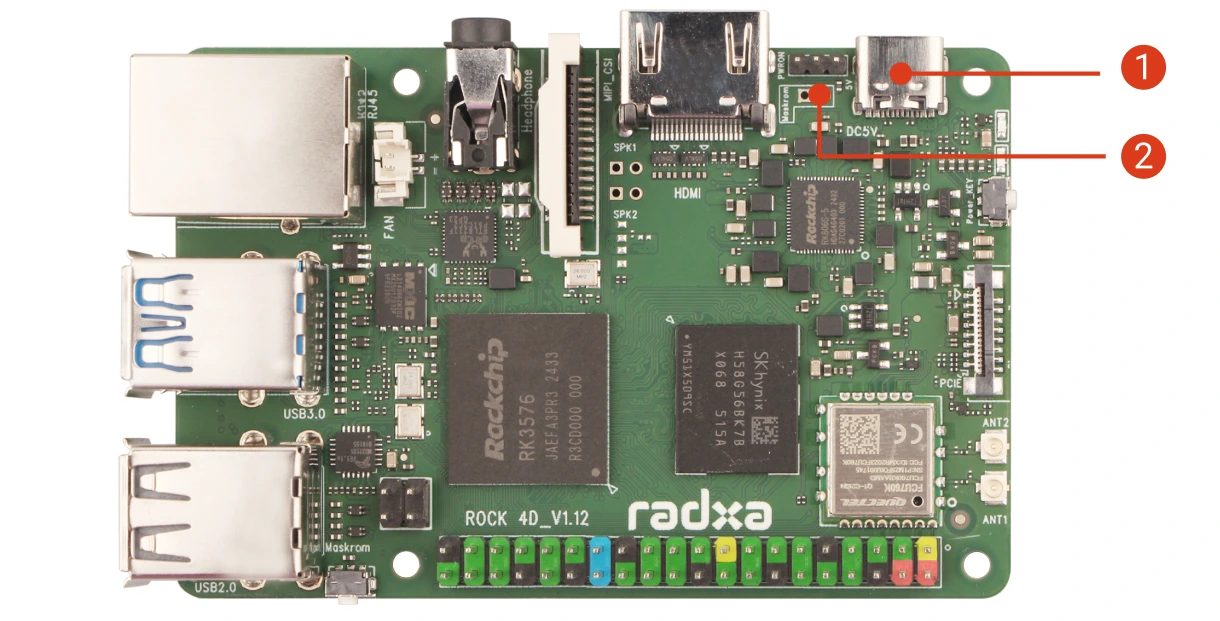
Hardware Connection
Power supply via 5V USB Type-C interface (Recommended)
Use a standard 5V USB Type-C power adapter (compatible with PD protocol) to connect to the USB Type-C interface on the board.
- Radxa PD 30W Power Adapter (Recommended)
- Standard 5V Type-C power adapter, recommended current 2A or above
Power supply via 5V external power input interface (Only available in hardware version v1.12 and later)
Connect the positive and negative terminals of a 5V power supply to the 5V and GND pins on the board.
Do not connect incorrectly or reverse the polarity. Improper operation may cause hardware damage to the device.
Normal Boot
After the system boots normally, the green power LED will be solid on, and the blue power LED will blink.
Interface Pin Definition
Please refer to the hardware schematic on the Resource Download page.