RKLLM Usage
This document explains how to use RKLLM to deploy Hugging Face-format LLMs to RK3588 and run hardware-accelerated inference on the NPU.
Supported models
- LLAMA models
- TinyLLAMA models
- Qwen models
- Phi models
- ChatGLM3-6B
- Gemma2
- Gemma3
- InternLM2 models
- MiniCPM models
- TeleChat models
- Qwen2-VL-2B-Instruct
- MiniCPM-V-2_6
- DeepSeek-R1-Distill
- Janus-Pro-1B
- InternVL2-1B
- Qwen2.5-VL-3B-Instruct
- Qwen3
This guide uses Qwen2.5-1.5B-Instruct as an example and follows the demo scripts in the RKLLM repository to walk through an end-to-end deployment on an RK3588 device with NPU acceleration.
If you haven't installed and configured RKLLM yet, follow RKLLM Installation.
Model Conversion
For RK358x, set TARGET_PLATFORM to rk3588.
This section uses Qwen2.5-1.5B-Instruct as an example. You can also pick any model from the Supported models list.
-
On an x86 Linux PC, download the model weights (install git-lfs if needed):
X86 Linux PCgit lfs install
git clone https://huggingface.co/Qwen/Qwen2.5-1.5B-Instruct -
Activate the
rkllmconda environment (see RKLLM conda installation):X86 Linux PCconda activate rkllm -
Generate the quantization calibration file for the LLM
tipFor LLM models, this guide uses the conversion scripts under
rknn-llm/xamples/DeepSeek-R1-Distill-Qwen-1.5B_Demo/export.For VLM models, use
rknn-llm/examples/Qwen2-VL_Demo/export. For multimodal VLM models, see RKLLM Qwen2-VL.X86 Linux PCcd examples/DeepSeek-R1-Distill-Qwen-1.5B_Demo/export
python3 generate_data_quant.py -m /path/to/Qwen2.5-1.5B-InstructParameter Required Description Notes pathYes Hugging Face model directory N/A generate_data_quant.pygeneratesdata_quant.json, which is used during quantization. -
Update the
modelpathinrknn-llm/xamples/DeepSeek-R1-Distill-Qwen-1.5B_Demo/export/export_rkllm.py:Python Code11 modelpath = '/path/to/Qwen2.5-1.5B-Instruct' -
Adjust
max_context(optional)If you need a different context length, modify
max_contextin thellm.buildcall inrknn-llm/xamples/DeepSeek-R1-Distill-Qwen-1.5B_Demo/export/export_rkllm.py. Default is 4096. Larger values consume more memory. The value must be ≤ 16384 and a multiple of 32 (e.g., 32, 64, 96, …, 16384). -
Run the conversion script
X86 Linux PCpython3 export_rkllm.pyAfter a successful conversion, you should get an RKLLM model such as
Qwen2.5-1.5B-Instruct_W8A8_RK3588.rkllm. The name indicates this model is W8A8-quantized and targeted for RK3588.
Build the executable
-
Download the cross-compilation toolchain: gcc-arm-10.2-2020.11-x86_64-aarch64-none-linux-gnu
-
Update the main program:
rknn-llm/examples/DeepSeek-R1-Distill-Qwen-1.5B_Demo/deploy/src/llm_demo.cppComment out line 165. RKLLM parses the
chat_templatefromtokenizer_config.jsonautomatically during conversion, so you don't need to set it manually.CPP Code165 // rkllm_set_chat_template(llmHandle, "", "<|User|>", "<|Assistant|>"); -
Update
GCC_COMPILER_PATHinrknn-llm/examples/DeepSeek-R1-Distill-Qwen-1.5B_Demo/deploy/build-linux.shBASH8 GCC_COMPILER_PATH=/path/to/gcc-arm-10.2-2020.11-x86_64-aarch64-none-linux-gnu/bin/aarch64-none-linux-gnu -
Build
X86 Linux PCcd rknn-llm/examples/DeepSeek-R1-Distill-Qwen-1.5B_Demo/deploy/
bash build-linux.shThe generated binaries are located at
install/demo_Linux_aarch64.
Deploy to the device
Local terminal mode
-
Copy the converted RKLLM model and the built
demo_Linux_aarch64folder to the device. -
Export environment variables:
Radxa OSexport LD_LIBRARY_PATH=$LD_LIBRARY_PATH:/path/to/demo_Linux_aarch64/lib -
Run
llm_demo(typeexitto quit):Radxa OSexport RKLLM_LOG_LEVEL=1
## Usage: ./llm_demo model_path max_new_tokens max_context_len
./llm_demo /path/to/Qwen2.5-1.5B-Instruct_W8A8_RK3588.rkllm 2048 4096tipIf you see
failed to open rknpu moduleorfailed to open rknn devicehere, it usually means the RKNPU2 userspace package is missing or the driver version doesn't meet RKLLM requirements. Go back to the RKLLM Install board-side driver configuration section, confirm thatrknpu2-rk3588is installed, and check/sys/kernel/debug/rknpu/version.Parameter Required Description Notes pathYes Path to the RKLLM model N/A max_new_tokensYes Max generated tokens/turn Must be ≤ max_context_lenmax_context_lenYes Max context length Must be ≤ export max_context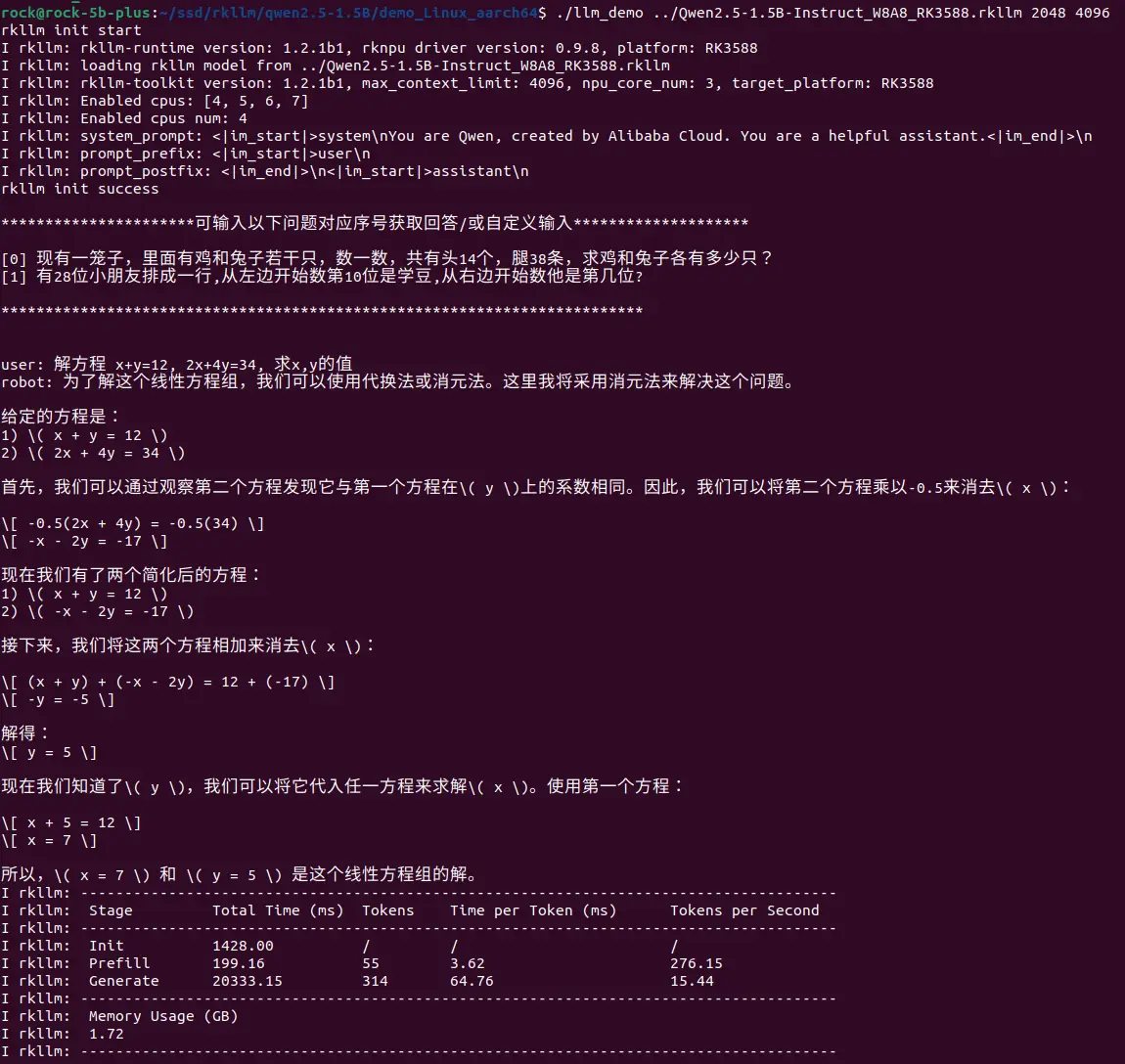
Performance comparison (selected models)
| Model | Parameter Size | Chip | Chip Count | Inference Speed |
|---|---|---|---|---|
| TinyLlama | 1.1B | RK3588 | 1 | 15.03 token/s |
| Qwen | 1.8B | RK3588 | 1 | 14.18 token/s |
| Phi3 | 3.8B | RK3588 | 1 | 6.46 token/s |
| ChatGLM3 | 6B | RK3588 | 1 | 3.67 token/s |
| Qwen2.5 | 1.5B | RK3588 | 1 | 15.44 token/s |