Deploy YOLOv5 on the Device
This document demonstrates how to run on-device inference of the YOLOv5 object detection model on Rockchip RK3588/3566 series chips. For the required environment setup, please refer to RKNN Installation.
This example uses a pre-trained ONNX model from the rknn_model_zoo as a case study, showing the complete process from model conversion to on-device inference.
Deploying YOLOv5 with RKNN involves two main steps:
- On the PC, use rknn-toolkit2 to convert models from different frameworks into RKNN format.
- On the device, use the Python API of rknn-toolkit2-lite to run inference.
Model Conversion on PC
Radxa provides a pre-converted yolov5s_rk35XX.rknn model. Users can skip the PC-side model conversion section and directly refer to YOLOv5 Inference on Device.
-
If you are using Conda, first activate the
rknnConda environment:X86 Linux PCconda activate rknn -
Clone the
rknn_model_zoorepository:X86 Linux PCgit clone -b v2.3.0 https://github.com/airockchip/rknn_model_zoo.git -
Download the
yolov5s_relu.onnxmodel:X86 Linux PCcd rknn_model_zoo/examples/yolov5/model
# Download the pre-trained yolov5s_relu.onnx model
bash download_model.shIf you encounter network issues, you can visit this page to manually download the model and place it in the corresponding folder.
-
Convert the ONNX model to
yolov5s_relu.rknnusing rknn-toolkit2:X86 Linux PCcd rknn_model_zoo/examples/yolov5/python
python3 convert.py <onnx_model> <TARGET_PLATFORM> <dtype> <output_rknn_path>
# python3 convert.py ../model/yolov5s_relu.onnx rk3588 i8 ../model/yolov5s_relu_rk3588.rknnParameter explanation:
<onnx_model>: Path to the ONNX model.<TARGET_PLATFORM>: Name of the NPU platform. Options:rk3562, rk3566, rk3568, rk3576, rk3588, rk1808, rv1109, rv1126.<dtype>: Choosei8orfp.i8is for INT8 quantization;fpis for FP16 quantization. The default isi8.<output_rknn_path>: Path to save the RKNN model. By default it is saved in the same directory as the ONNX model.
tipFor RK358X users, set
TARGET_PLATFORMtork3588. -
Copy the generated RKNN model to the device.
YOLOv5 Inference on Device
For RK356X products, you must enable the NPU using rsetup before running NPU workloads:
sudo rsetup -> Overlays -> Manage overlays -> Enable NPU, then reboot the system.
If there is no Enable NPU option in Overlays, please run: sudo rsetup -> System -> System Update to upgrade the system, reboot, and then repeat the above steps to enable the NPU.
-
(Optional) Download the YOLOv5s RKNN models prepared by Radxa:
Platform Download Link rk3566 yolov5s_rk3566.rknn rk3568 yolov5s_rk3568.rknn rk3588 yolov5s_rk3588.rknn -
Modify
rknn_model_zoo/py_utils/rknn_executor.py(remember to back up the original code):Configure the RKNN Model Zoo repository as described in RKNN Model Zoo.
Python Codefrom rknnlite.api import RKNNLite as RKNN
class RKNN_model_container():
def __init__(self, model_path, target=None, device_id=None) -> None:
rknn = RKNN()
rknn.load_rknn(model_path)
ret = rknn.init_runtime()
self.rknn = rknn
def run(self, inputs):
if self.rknn is None:
print("ERROR: rknn has been released")
return []
if isinstance(inputs, list) or isinstance(inputs, tuple):
pass
else:
inputs = [inputs]
result = self.rknn.inference(inputs=inputs)
return result
def release(self):
self.rknn.release()
self.rknn = None -
Modify line 262 in
rknn_model_zoo/examples/yolov5/python/yolov5.py(remember to back up the original code):Python Code262 outputs = model.run([np.expand_dims(input_data, 0)]) -
Enter the virtual environment:
For virtual environment usage, refer to Python Virtual Environment Usage.
To install the
rknn_toolkit-lite2Python API, see Install rknn_toolkit-lite2. -
Install dependencies:
pip3 install opencv-python-headless -
Run the YOLOv5 example:
Radxa OScd rknn_model_zoo/examples/yolov5/python
python3 yolov5.py --model_path <your model path> --img_saveIf you are using a model converted on the PC, copy it from the PC to the device and specify the model path with the
--model_pathparameter.Results(.venv) rock@rock-5b-plus:~/rknn_model_zoo/examples/yolov5/python$ python3 yolov5.py --model_path ./yolov5s_relu_rk3588.rknn --img_save
use anchors from '../model/anchors_yolov5.txt', which is [[[10.0, 13.0], [16.0, 30.0], [33.0, 23.0]], [[30.0, 61.0], [62.0, 45.0], [59.0, 119.0]], [[116.0, 90.0], [156.0, 198.0], [373.0, 326.0]]]
W rknn-toolkit-lite2 version: 2.3.0
I RKNN: [07:00:34.201] RKNN Runtime Information, librknnrt version: 2.3.0 (c949ad889d@2024-11-07T11:35:33)
I RKNN: [07:00:34.201] RKNN Driver Information, version: 0.9.6
I RKNN: [07:00:34.202] RKNN Model Information, version: 6, toolkit version: 2.3.0(compiler version: 2.3.0 (c949ad889d@2024-11-07T11:39:30)), target: RKNPU v2, target platform: rk3588, framework name: ONNX, framework layout: NCHW, model inference type: static_shape
W RKNN: [07:00:34.225] query RKNN_QUERY_INPUT_DYNAMIC_RANGE error, rknn model is static shape type, please export rknn with dynamic_shapes
W Query dynamic range failed. Ret code: RKNN_ERR_MODEL_INVALID. (If it is a static shape RKNN model, please ignore the above warning message.)
Model-./yolov5s_relu_rk3588.rknn is rknn model, starting val
infer 1/1
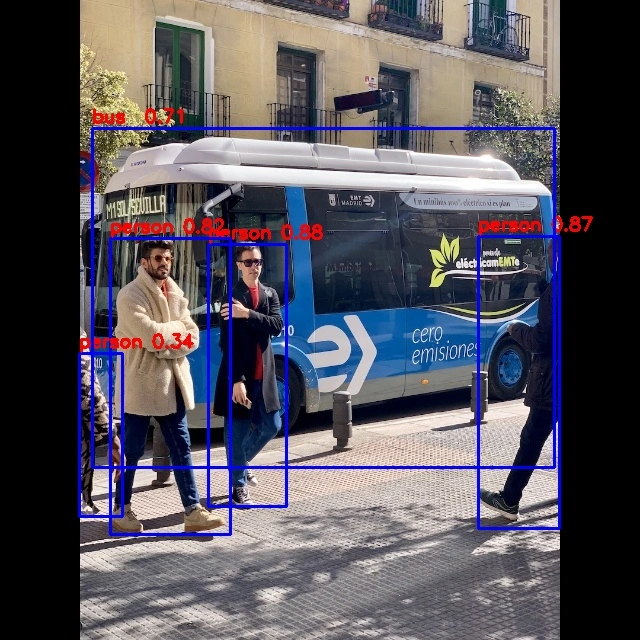
IMG: bus.jpg
person @ (209 243 286 510) 0.880
person @ (479 238 560 526) 0.871
person @ (109 238 231 534) 0.840
person @ (79 353 121 517) 0.301
bus @ (91 129 555 464) 0.692
Detection result save to ./result/bus.jpgParameter explanation:
--model_path: Path to the RKNN model.--img_folder: Folder containing images for inference, default is../model.--img_save: Whether to save the inference result images to./result. Default isFalse.
-
All inference results are stored in the
./resultdirectory.