YOLO World
Environment Setup
info
Follow RKNN Installation to set up the environment.
Follow RKNN Model Zoo to download the example files.
Model Download
Download the ONNX model file.
X64 Linux PC
cd rknn_model_zoo/examples/yolo_world/model/
bash download_model.sh
Model Conversion
Select the target platform.
- rk3588
- rk356x
- rk3576
X64 Linux PC
export TARGET_PLATFORM=rk3588
X64 Linux PC
export TARGET_PLATFORM=rk356x
X64 Linux PC
export TARGET_PLATFORM=rk3576
Convert the ONNX model to an RKNN model.
X64 Linux PC
cd ../python/
python convert.py ../model/clip_text.onnx ${TARGET_PLATFORM}
python convert.py ../model/yolo_world_v2s.onnx ${TARGET_PLATFORM}
C API
Build the Example
Go to the rknn_model_zoo directory and run build-linux.sh to build.
X64 Linux PC
cd ../../..
bash build-linux.sh -t ${TARGET_PLATFORM} -a aarch64 -d yolo_world
Sync Files to the Device
Copy the built demo directory under the install folder to the device.
X64 Linux PC
cd install/${TARGET_PLATFORM}_linux_aarch64/
scp -r rknn_yolo_world_demo/ user@your_device_ip:target_directory
Run the Example
Export the runtime libraries to the environment variable.
Device
cd rknn_yolo_world_demo/
export LD_LIBRARY_PATH=./lib
Run the example.
Device
./rknn_yolo_world_demo ./model/clip_text.rknn ./model/detect_classes.txt ./model/yolo_world_v2s.rknn ./model/bus.jpg
$ ./rknn_yolo_world_demo ./model/clip_text.rknn ./model/detect_classes.txt ./model/yolo_world_v2s.rknn ./model/bus.jpg
--> init clip text model
model input num: 1, output num: 1
input tensors:
  index=0, name=input_ids, n_dims=2, dims=[1, 20], n_elems=20, size=160, fmt=UNDEFINED, type=INT64, qnt_type=AFFINE, zp=0, scale=1.000000
output tensors:
  index=0, name=text_embeds, n_dims=2, dims=[1, 512], n_elems=512, size=1024, fmt=UNDEFINED, type=FP16, qnt_type=AFFINE, zp=0, scale=1.000000
load label ./model/detect_classes.txt
--> init yolo world model
model input num: 2, output num: 6
input tensors:
  index=0, name=images, n_dims=4, dims=[1, 640, 640, 3], n_elems=1228800, size=1228800, fmt=NHWC, type=INT8, qnt_type=AFFINE, zp=-128, scale=0.003922
  index=1, name=texts, n_dims=3, dims=[1, 80, 512], n_elems=40960, size=40960, fmt=UNDEFINED, type=INT8, qnt_type=AFFINE, zp=-52, scale=0.003410
output tensors:
  index=0, name=1168, n_dims=4, dims=[1, 80, 80, 80], n_elems=512000, size=512000, fmt=NCHW, type=INT8, qnt_type=AFFINE, zp=-128, scale=0.003214
  index=1, name=1076, n_dims=4, dims=[1, 4, 80, 80], n_elems=25600, size=25600, fmt=NCHW, type=INT8, qnt_type=AFFINE, zp=-128, scale=0.054310
  index=2, name=1170, n_dims=4, dims=[1, 80, 40, 40], n_elems=128000, size=128000, fmt=NCHW, type=INT8, qnt_type=AFFINE, zp=-128, scale=0.003697
  index=3, name=1121, n_dims=4, dims=[1, 4, 40, 40], n_elems=6400, size=6400, fmt=NCHW, type=INT8, qnt_type=AFFINE, zp=-128, scale=0.057563
  index=4, name=1172, n_dims=4, dims=[1, 80, 20, 20], n_elems=32000, size=32000, fmt=NCHW, type=INT8, qnt_type=AFFINE, zp=-128, scale=0.003884
  index=5, name=1166, n_dims=4, dims=[1, 4, 20, 20], n_elems=1600, size=1600, fmt=NCHW, type=INT8, qnt_type=AFFINE, zp=-128, scale=0.058563
model is NHWC input fmt
model input height=640, width=640, channel=3
num_lines=80
origin size=640x640 crop size=640x640
input image: 640 x 640, subsampling: 4:2:0, colorspace: YCbCr, orientation: 1
--> inference clip text model
rknn_run_1
rknn_run_2
rknn_run_3
rknn_run_4
rknn_run_5
rknn_run_6
rknn_run_7
rknn_run_8
rknn_run_9
rknn_run_10
rknn_run_11
rknn_run_12
rknn_run_13
rknn_run_14
rknn_run_15
rknn_run_16
rknn_run_17
rknn_run_18
rknn_run_19
rknn_run_20
rknn_run_21
rknn_run_22
rknn_run_23
rknn_run_24
rknn_run_25
rknn_run_26
rknn_run_27
rknn_run_28
rknn_run_29
rknn_run_30
rknn_run_31
rknn_run_32
rknn_run_33
rknn_run_34
rknn_run_35
rknn_run_36
rknn_run_37
rknn_run_38
rknn_run_39
rknn_run_40
rknn_run_41
rknn_run_42
rknn_run_43
rknn_run_44
rknn_run_45
rknn_run_46
rknn_run_47
rknn_run_48
rknn_run_49
rknn_run_50
rknn_run_51
rknn_run_52
rknn_run_53
rknn_run_54
rknn_run_55
rknn_run_56
rknn_run_57
rknn_run_58
rknn_run_59
rknn_run_60
rknn_run_61
rknn_run_62
rknn_run_63
rknn_run_64
rknn_run_65
rknn_run_66
rknn_run_67
rknn_run_68
rknn_run_69
rknn_run_70
rknn_run_71
rknn_run_72
rknn_run_73
rknn_run_74
rknn_run_75
rknn_run_76
rknn_run_77
rknn_run_78
rknn_run_79
rknn_run_80
--> inference yolo world model
scale=1.000000 dst_box=(0 0 639 639) allow_slight_change=1 _left_offset=0 _top_offset=0 padding_w=0 padding_h=0
rga_api version 1.10.1_[0]
rknn_run
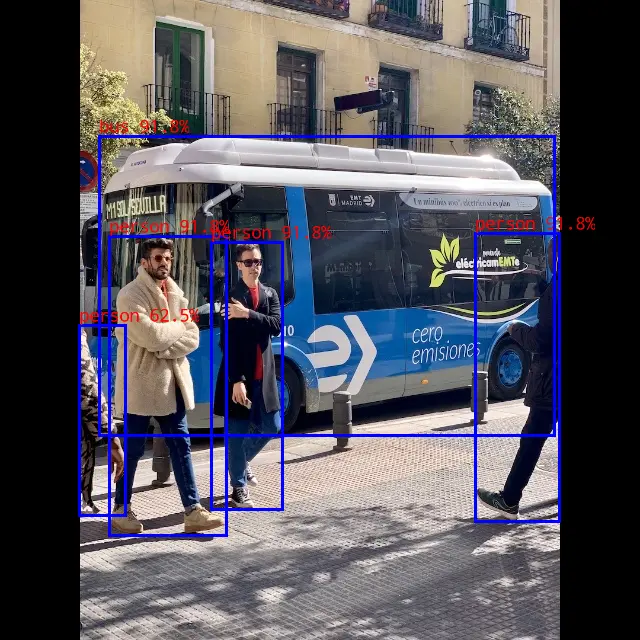
person @ (475 234 559 519) 0.948
person @ (110 237 226 535) 0.948
bus @ (96 135 551 436) 0.932
person @ (212 240 283 510) 0.917
person @ (80 326 125 514) 0.665
write_image path: out.png width=640 height=640 channel=3 data=0xffff8189b010
Result Preview
Python API
Activate the virtual environment
Device
conda activate rknn
Run the Example
Copy the related files to the device and run the following commands.
Device
python yolo_world.py --text_model ../model/clip_text.rknn --yolo_world ../model/yolo_world_v2s.rknn --target ${TARGET_PLATFORM}
$ python yolo_world.py --text_model ../model/clip_text.rknn --yolo_world ../model/yolo_world_v2s.rknn --target rk3588
/home/radxa/miniforge3/envs/rknn/lib/python3.12/site-packages/rknn/api/rknn.py:51: UserWarning: pkg_resources is deprecated as an API. See https://setuptools.pypa.io/en/latest/pkg_resources.html. The pkg_resources package is slated for removal as early as 2025-11-30. Refrain from using this package or pin to Setuptools<81.
  self.rknn_base = RKNNBase(cur_path, verbose)
I rknn-toolkit2 version: 2.3.2
I target set by user is: rk3588
W inference: The 'data_format' is not set, and its default value is 'nhwc'!
W inference: The 'data_format' is not set, and its default value is 'nhwc'!
W inference: The 'data_format' is not set, and its default value is 'nhwc'!
I rknn-toolkit2 version: 2.3.2
I target set by user is: rk3588
W inference: The 'data_format' is not set, and its default value is 'nhwc'!
   class        score      xmin, ymin, xmax, ymax
--------------------------------------------------
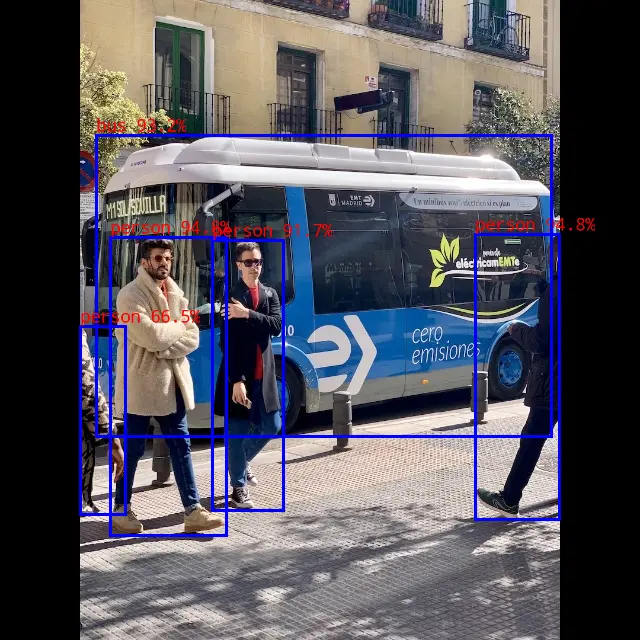
   person       0.948     [ 477,  232,  559,  521]
   person       0.932     [ 110,  236,  226,  536]
   person       0.917     [ 212,  240,  283,  510]
   person       0.595     [  80,  327,  126,  514]
    bus         0.917     [  98,  135,  553,  435]
Save results to result.jpg!
Result Preview