Install System to NVMe SSD
Use the latest version for system installation; older versions may encounter the Write LBA failed ! error.
ROCK 5B+ has two NVMe SSD interfaces. Currently only one NVMe SSD interface is available; the other interface does not yet support booting Android. If the system fails to boot, try installing the NVMe SSD to the other interface.
This guide explains how to install the Android system to an NVMe SSD.
Hardware Connection
Install the NVMe SSD into the M.2 M Key slot of the board, then make the board enter Maskrom mode.
Download System
Use a PC to access the Resource Download page, download the system image, and extract it locally.
System Installation
- Windows
- Linux
- Install Driver
Download and extract DriverAssistant, find DriverInstall.exe, and run it as administrator. Follow the prompts to install the driver.
- Use RKDevTool
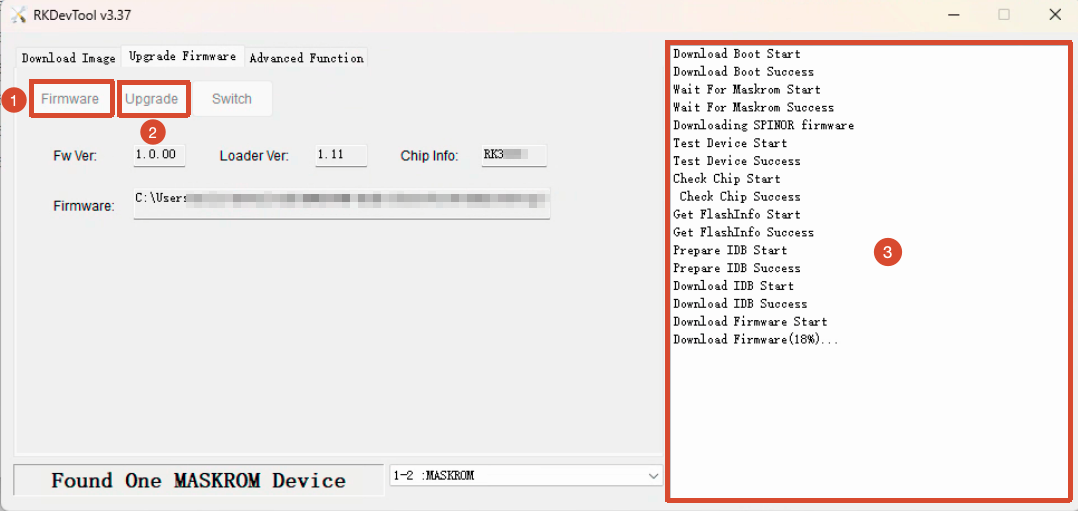
Download and extract RKDevTool. RKDevTool.exe is the executable program; you can double-click it to open the software.
-
Click the
Firmwarebutton and select the extracted system image file. -
Click the
Upgradebutton to start installing the system to the NVMe SSD.
Download Update_Tool_V2.30 and extract it. Then enter the extracted directory in a terminal and execute the following commands:
sudo chmod +x upgrade_tool
sudo ln -s "$(pwd)/upgrade_tool" /usr/local/bin/upgrade_tool
Use the following command to install the system to the NVMe SSD: replace <image> with the path of the extracted system image file.
sudo upgrade_tool uf <image>
Boot the System
After completing the system installation, power the board with a power adapter to boot the Android system.