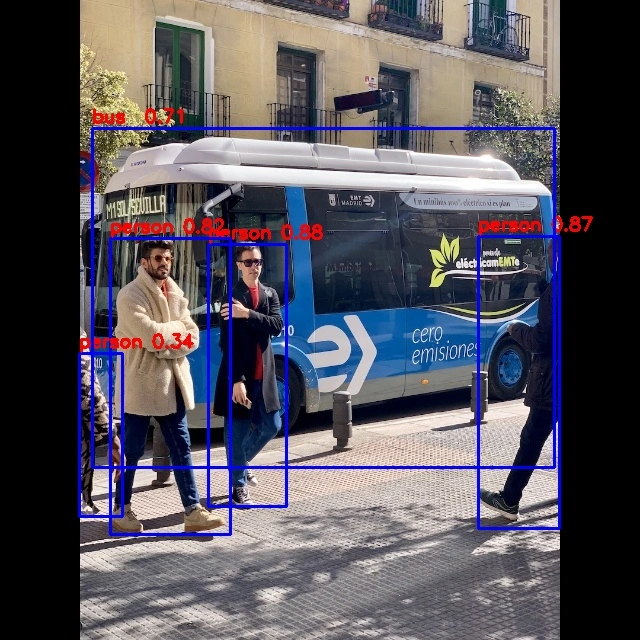
RKNN Toolkit Lite2 YOLOv8
This document demonstrates how to run YOLOv8 object detection inference on the RK3588 board. For the required environment setup, please refer to RKNN Installation.
This example uses a pre-trained ONNX model from the rknn_model_zoo to illustrate the complete process from model conversion on the PC to on-device inference. The target platform in this example is RK3588.
Deploying YOLOv8 with RKNN involves two main steps:
- On the PC, use rknn-toolkit2 to convert models from different frameworks into RKNN format.
- On the device, use the Python API of rknn-toolkit2-lite to run inference.
Model Conversion on PC
Radxa provides a pre-converted yolov8.rknn model. Users can skip the PC-side model conversion section and directly refer to YOLOv8 Inference on Device.
-
If you are using Conda, first activate the
rknnConda environment:X86 Linux PCconda activate rknn -
Download the
yolov8.onnxmodel:X86 Linux PCcd rknn_model_zoo/examples/yolov8/model
# Download the pre-trained yolov8n.onnx model
bash download_model.shIf you encounter network issues, you can visit this page to manually download the model and place it in the corresponding folder.
-
Convert the ONNX model to
yolov8n.rknnusing rknn-toolkit2:X86 Linux PCcd rknn_model_zoo/examples/yolov8/python
python3 convert.py ../model/yolov8n.onnx rk3588Parameter explanation:
<onnx_model>: Path to the ONNX model.<TARGET_PLATFORM>: Name of the NPU platform. Options:rk3562, rk3566, rk3568, rk3576, rk3588, rk1808, rv1109, rv1126.<dtype>(optional): Choosei8orfp.i8is for INT8 quantization;fpis for FP16 quantization. The default isi8.<output_rknn_path>(optional): Path to save the RKNN model. By default it is saved in the same directory as the ONNX model with the filenameyolov8.rknn.
tipFor RK358X users, set
TARGET_PLATFORMtork3588. -
Copy the
yolov8n.rknnmodel to the device.
YOLOv8 Inference on Device
-
Install the
rknn-model-zoo-rk3588package to obtain the YOLOv8 demo (which includes the pre-convertedyolov8.rknnmodel):Radxa OSsudo apt install rknn-model-zoo-rk3588If you are using a CLI-only system, you can download the
rknn-model-zoo-rk3588deb package from the release page. -
Run the YOLOv8 example:
If you are using a model converted on the PC, copy it to the device and specify the model path with the
--model_pathparameter.Radxa OScd /usr/share/rknn_model_zoo/examples/yolov8/python
sudo python3 yolov8.py --model_path ../model/yolov8.rknn --img_saveResults$ sudo python3 yolov8.py --model_path ../model/yolov8.rknn --img_save
import rknn failed,try to import rknnlite
--> Init runtime environment
I RKNN: [09:01:01.819] RKNN Runtime Information, librknnrt version: 1.6.0 (9a7b5d24c@2023-12-13T17:31:11)
I RKNN: [09:01:01.819] RKNN Driver Information, version: 0.8.2
W RKNN: [09:01:01.819] Current driver version: 0.8.2, recommend to upgrade the driver to the new version: >= 0.8.8
I RKNN: [09:01:01.819] RKNN Model Information, version: 6, toolkit version: 1.6.0+81f21f4d(compiler version: 1.6.0 (585b3edcf@2023-12-11T07:56:14)), target: RKNPU v2, target platform: rk3588, framework name: ONNX, framework layout: NCHW, model inference type: static_shape
W RKNN: [09:01:01.836] query RKNN_QUERY_INPUT_DYNAMIC_RANGE error, rknn model is static shape type, please export rknn with dynamic_shapes
W Query dynamic range failed. Ret code: RKNN_ERR_MODEL_INVALID. (If it is a static shape RKNN model, please ignore the above warning message.)
done
Model-../model/yolov8.rknn is rknn model, starting val
infer 1/1
IMG: bus.jpg
person @ (211 241 282 507) 0.872
person @ (109 235 225 536) 0.860
person @ (477 225 560 522) 0.856
person @ (79 327 116 513) 0.306
bus @ (95 136 549 449) 0.860
Detection result save to ./result/bus.jpgParameter explanation:
--model_path: Path to the RKNN model.--img_folder: Folder containing images for inference, default is../model.--img_save: Whether to save the inference result images to./result. Default isFalse.
-
All inference results are stored in the
./resultdirectory.