Install System to microSD Card
System Image
You need to prepare the core-image-minimal-rockchip-rk3588s-rock-5c.rootfs.update.img image file built by the Yocto Project in advance.
For Yocto Project build steps, please refer to the Build System documentation.
Hardware Preparation
You need to prepare the following hardware devices in advance:
- MicroSD card
- MicroSD card reader
Install System
You need to use the official Rockchip SDDiskTool to flash the system image to the MicroSD card.
Installing the system will format the MicroSD card. Please backup important data in advance!
SDDiskTool
SDDiskTool currently only supports Windows systems. Please use it on a Windows system.
After downloading SDDiskTool, unzip it and double-click SDDiskTool.exe to use it.
Hardware Connection
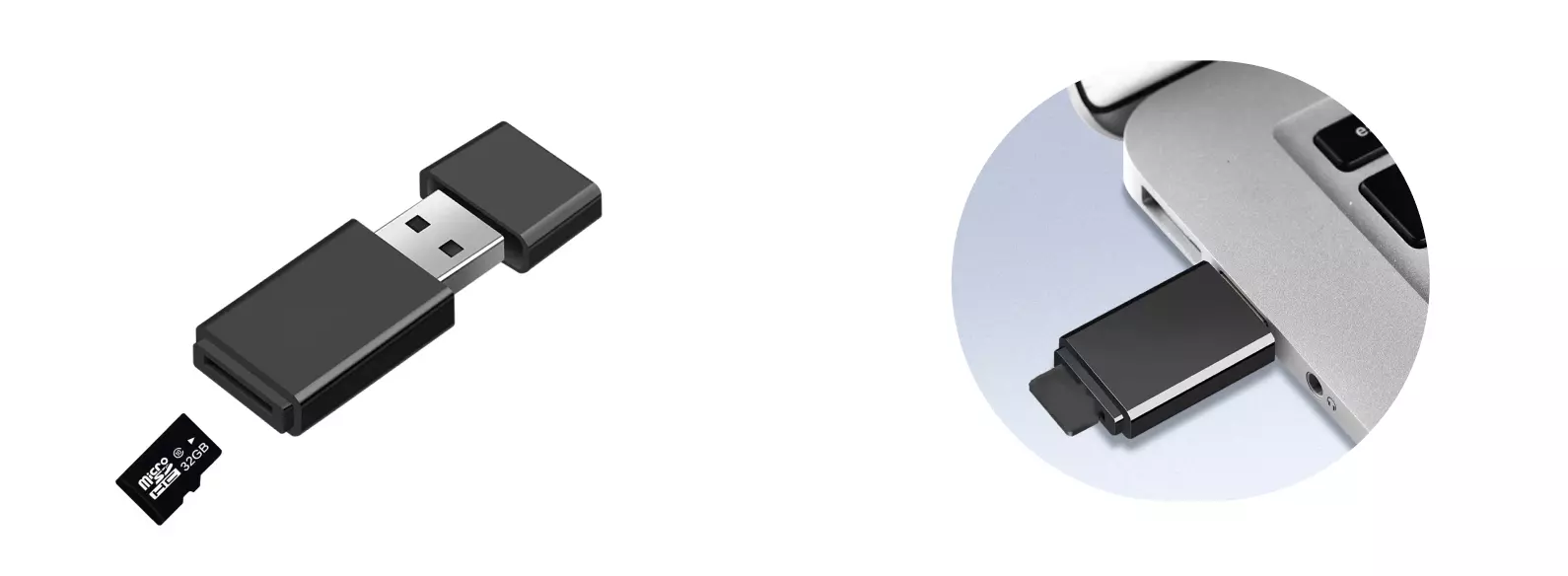
Insert the MicroSD card into the MicroSD card reader, then insert the MicroSD card reader into the computer.
Flash System Image
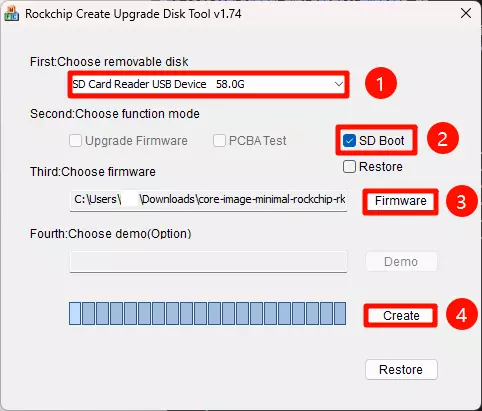
Follow the steps below to use SDDiskTool to flash the system image to the MicroSD card:
① Select the MicroSD card device
② Select the SD Boot option
③ Select the system image file built by the Yocto Project
④ Click the create button to start flashing the system image
Boot System
Insert the MicroSD card into the MicroSD card slot of ROCK 5C, connect a display, and finally power the board using a power adapter.