Mac OS Host
File Download
Please download the related System Images and Loader refer to Summary of resource downloads
Install rkdeveloptool
rkdeveloptool is Rockchip's software for USB burning on Linux/macOS platforms.
The rkdeveloptool can be thought of as an upgrade_tool for the open source version.
If your operating system does not provide rkdeveloptool, you will need to compile and install it from source.
Please install Homebrew first and then run the following command from the command line to install it:
brew install automake autoconf libusb pkg-config git wget
git clone https://github.com/rockchip-linux/rkdeveloptool
cd rkdeveloptool
autoreconf -i
./configure
make -j $(nproc)
cp rkdeveloptool /opt/homebrew/bin/
Enter to Maskrom
- Install the CM3 onto the CM3 IO board
- Remove (unplug) the microSD card from the CM3 IO board
- Before powering on, press and hold the SPI Disable button, and keep it pressed
- Connect a USB-A to Micro-USB cable to the OTG port (Micro-USB port) on the CM3 IO board, and the other end to the computer
- Connect the DC 12V power supply to power the CM3 IO board; if the green power LED stays on, it has successfully entered Maskrom mode (you can release the button at this point)
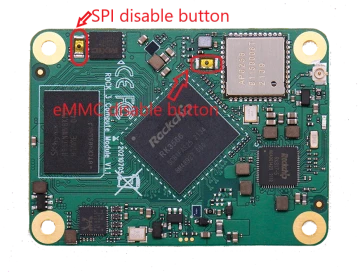
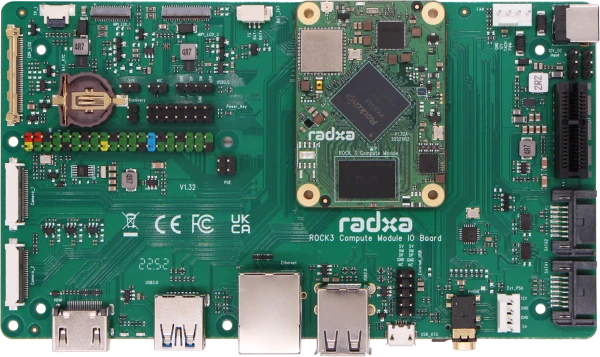
Using rkdeveloptool
Write to a file
rkdeveloptool does not automatically decompress compressed files when writing to them.
You must first extract the used files and specify the extracted files in rkdeveloptool.
rkdeveloptool does not support the selection of a Maskrom device, nor the selection of a storage medium to be written to. Normally, when using rkdeveloptool, only one device and one storage medium are connected in hardware. This step cannot be controlled by software.
If you need to write to multiple devices at the same time, use upgrade_tool.
1. Extract the image file (Download the image file from "File Download" part above, here radxa-cm3-io_debian_bullseye-test_xfce_27.img.xz is used as an example)
   xz -d radxa-cm3-io_debian_bullseye-test_xfce_27.img.xz
2. Flash Loader (Download the loader file from "File Download" part above )
   sudo rkdeveloptool db rk356x_spl_loader_v1.15.113.bin
3. Flash System Image
   sudo rkdeveloptool wl 0 radxa-cm3-io_debian_bullseye-test_xfce_27.img
Reboot
sudo rkdeveloptool rd
Login
After rebooting the device, you can log in to the system via HDMI or serial port.
Account and password are both radxa.