RKNN Installation
This document demonstrates how to install the RKNN SDK. For more detailed information, please refer to the doc directory of the RKNN Toolkit2 repository.
RKNN Overview
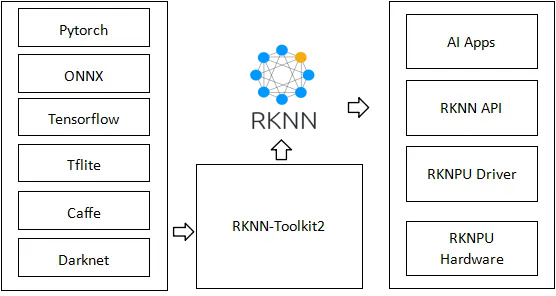
Rockchip RK3566/RK3568 series, RK3588 series, RK3562 series, and RV1103/RV1106 series chips are equipped with an NPU (Neural Processing Unit). Using RKNN helps you quickly deploy AI models to Rockchip chips and run inference accelerated by the NPU hardware. To use RKNPU, you first need to use the RKNN-Toolkit2 tools on an x86 PC to convert trained models into RKNN-format models, and then run inference on the target board using the RKNN C API or Python API.
The toolchain consists of:
- RKNN-Toolkit2: a software development toolkit for performing model conversion, inference, and performance evaluation on both PC and Rockchip NPU platforms.
- RKNN-Toolkit-Lite2: provides Python APIs on Rockchip NPU platforms to deploy RKNN models and accelerate AI applications.
- RKNN Runtime: provides C/C++ APIs on Rockchip NPU platforms to deploy RKNN models and accelerate AI applications.
- RKNPU kernel driver: responsible for interacting with the NPU hardware.
The overall framework is as follows:
Download the SDK
Clone the RKNN-Toolkit2 repository.
It is recommended to create a dedicated directory to store the related SDKs.
mkdir RKSDK && cd RKSDK
git clone -b v2.3.2 https://github.com/airockchip/rknn-toolkit2.git
Version Information
RKNN-Toolkit2 uses a Python environment for model conversion, quantization, and other operations. On the target board, the Python environment is also used to interact with the NPU driver via Python APIs. Different CPU architectures and OS versions require different Python versions and environments. Please refer to the following tables to choose the appropriate setup. It is recommended to use a Python environment manager. We recommend Miniforge.
The version mapping is as follows:
- When using RKNN-Toolkit2, the following runtime environments are required:
| OS Version | Ubuntu18.04 (x64) | Ubuntu20.04 (x64) | Ubuntu22.04 (x64) | Ubuntu24.04 (x64) |
|---|---|---|---|---|
| Python | 3.6 / 3.7 | 3.8 / 3.9 | 3.10 / 3.11 | 3.12 |
- ARM64 runtime requirements:
| OS Version | Debian10 (arm64) | Debian11 (arm64) | Debian12 (arm64) |
|---|---|---|---|
| Python | 3.6 / 3.7 | 3.8 / 3.9 | 3.10 / 3.11 / 3.12 |
Based on the version information above, configure the virtual environment on your host by following the steps below. If you plan to use the Python API on the target board, you must configure a matching virtual environment on the board as well.
Install Miniforge
wget https://github.com/conda-forge/miniforge/releases/download/25.11.0-0/Miniforge3-25.11.0-0-Linux-x86_64.sh
chmod +x Miniforge3-25.11.0-0-Linux-x86_64.sh
bash Miniforge3-25.11.0-0-Linux-x86_64.sh
Create a Virtual Environment
conda create -n rknn python=3.8
Activate the Virtual Environment
conda activate rknn
Install rknn-toolkit2
cd rknn-toolkit2/rknn-toolkit2/packages/x86_64
pip install rknn_toolkit2-2.3.2-cp38-cp38-manylinux_2_17_x86_64.manylinux2014_x86_64.whl
For arm64 architecture (i.e., on the target board):
cd rknn-toolkit2/rknn-toolkit2/packages/arm64
pip install rknn_toolkit2-2.3.2-cp38-cp38-manylinux_2_17_aarch64.manylinux2014_aarch64.whl
Verify the Installation
Run the following commands. If no error is reported, the RKNN-Toolkit2 environment has been installed successfully.
$ python3
>>> from rknn.api import RKNN
Install rknn-toolkit-lite2
Compared with rknn_toolkit2, rknn-toolkit-lite2 removes the model-conversion functionality and only provides the Python APIs for NPU inference.
It has a much smaller footprint and is suitable for users who only need to run inference on the target board. Choose the appropriate rknn-toolkit-lite2 package according to the Python version on your board.
cd rknn-toolkit2/rknn-toolkit-lite2/packages
pip3 install rknn_toolkit2-2.3.2-cp3X-cp3X-manylinux_2_17_aarch64.manylinux2014_aarch64.whl
Run the following commands. If no error is reported, the rknn_toolkit-lite2 environment has been installed successfully.
$ python3
>>> from rknnlite.api import RKNNLite as RKNN
Toolchain for Cross Compilation
To compile programs that run on the target board, you need a cross-compilation toolchain.
Download: Cross-compilation toolchain.
After the download is complete, extract the archive.
Before compiling, export the compiler path to an environment variable so that scripts can locate the downloaded cross-compiler.
export GCC_COMPILER=/path/to/your/gcc/bin/aarch64-linux-gnu
NPU Driver Configuration on the Board
For RK356X products, you must enable the NPU with rsetup before using it:
sudo rsetup -> Overlays -> Manage overlays -> Enable NPU, then reboot the system.
If there is no Enable NPU option in Overlays, please run: sudo rsetup -> System -> System Update to upgrade the system, then reboot and repeat the steps above to enable the NPU.
Troubleshooting
If the Enable NPU option does not appear even after a system update, try the following steps:
-
Confirm the system update succeeded:
- Verify that
System Updatecompleted without errors - Ensure the system was fully rebooted (not just suspended or hibernated)
- Verify that
-
Check NPU driver status:
# Check if the NPU driver is loaded
lsmod | grep rknpu
# Or check the boot logs with dmesg
sudo dmesg | grep -i npu -
Verify image version:
- Make sure you are using the latest Radxa official image
- Some earlier images may not include full NPU support
-
Manually install the NPU driver:
# For RK356X series
sudo apt update
sudo apt install rknpu2-rk356x
sudo reboot -
Check hardware compatibility:
- Confirm that your device model supports NPU functionality
- Some entry-level or specific configurations may not have NPU hardware
If the problem persists after trying these steps, please submit an issue on the Radxa forum or GitHub repository, and include:
- Device model and image version
- Output of
sudo dmesg | grep -i npu - Output of
lsmod | grep rknpu - Screenshot of the
sudo rsetupinterface (if possible)
Radxa official images come with RKNPU2 and its required dependencies preinstalled. If you encounter issues running NPU workloads, you can try uncommenting and executing the following commands.
# sudo apt update
# sudo apt install rknpu2-rk3588 # For RK3588-series SoCs
# sudo apt install rknpu2-rk356x # For RK356X-series SoCs
Check the rknpu2 driver version. In the example below, the rknpu2 driver version is 0.9.6. It is recommended to use an RKNPU driver version >= 0.9.2.
On RK356X product systems, the rknpu2 driver version may be 0.8.8.
sudo dmesg | grep "Initialized rknpu"
[ 15.522298] [drm] Initialized rknpu 0.9.6 20240322 for fdab0000.npu on minor 1